Drop your image here or click to upload
Works best with sharp, clear photos
4× — Great balance of quality and speed
AI Denoise
Remove grain and compression artifacts
Edge Sharpening
Restore fine details and edge clarity
Face Restore
Enhance facial features and skin texture
Colour Correction
Auto-correct exposure, saturation and white balance
Free · No watermark · Original quality preserved
Enhanced Image Appears Here
Upload an image and select your upscale settings to get started
Resolution Preview
How Image Upscaler Works
Our advanced image enhancer utilizes super-resolution generative adversarial networks (SRGAN) alongside custom-trained latent diffusion models to reconstruct lost details, delivering premium, crisp outputs.
Extract Features: The neural model analyzes low-resolution pictures to map pixel-level blueprints, identifying geometric structures, color transitions, and texture boundaries.
Remove Noise and Denoising: Before scaling the file, advanced denoising algorithms scrub compression artifacts and grain, ensuring flaws are not scaled up.
Synthesizing Pixels (Super-resolution): Generative layers insert synthetic high-frequency pixels, recreating skin textures, leaf veins, and fabric weaves with extreme precision.
Adversarial Refinement: A secondary discriminator network validates the reconstructed features against high-resolution reference datasets to guarantee photorealism.
AI Upscaling Features
Texture Synthesis
The AI reconstructs missing textures by predicting surface details like skin pores and fabric weaves lost in low-res files.
8K Output Support
Scale images up to 8x their original size. Turn standard web photos into massive, print-ready assets without pixelation.
Artifact Removal
Automatically scrub away JPEG compression blocks and digital noise while sharpening the actual subject details.
Practical Applications
Real Estate Marketing — Transform low-resolution listing photos into sharp, wide-angle shots suitable for 4K property portals and luxury print brochures.
Social Media Branding — Upscale cropped images for platforms like Instagram and LinkedIn. Ensure your profile photos and banners stay crisp on high-DPI mobile screens without pixelation.
Archive Preservation — Digitize and enhance small, low-res vintage scans. The AI adds authentic texture to weathered photos, making family heritage shots clear enough for modern digital frames.
Design Prototyping — Designers can use low-res stock placeholders for rapid prototyping and later upscale them to production quality, saving significant bandwidth and storage.
Technical Specifications
Popular Use Cases for Image Upscaler
Discover how photographers, designers, and brands use our AI-driven upscaling technology to breathe new life into low-resolution images with stunning 4K clarity.
Photo Restoration
Transform old, grainy, or low-quality photographs into high-definition masterpieces. Our AI restores lost details and sharpens textures while maintaining natural looks.
E-commerce Assets
Boost your sales by upscaling product images for high-resolution displays. Clear, sharp visuals build customer trust and professionalize your online storefront.
AI Art Enhancement
Take your AI-generated art to the next level. Upscale your creations to print-ready quality, adding fine details and removing pixelation for a truly professional finish.
Print & Marketing
Prepare small web images for large-scale printing. Our tool ensures that your logos and campaign assets stay crisp and clear on posters, banners, and billboards.
How to Use in 3 Simple Steps
Generate professional-grade outputs with zero technical complexity in under 60 seconds.
Upload Image
Drag and drop any low-res photo, digital art, or compressed render.
Select Resolution
Choose 2x or 4K ultra-high definition neural reconstruction.
Download 4K Lossless
Get pixel-perfect, crisp 4K output without blur or compression artifacts.
Privacy & Zero-Retention
Your uploaded media and prompts are processed securely in ephemeral volatile memory and immediately purged post-generation. We never store personal biometrics, and your data is never used to train public AI models.
100% Commercial Rights
You retain full, unrestricted commercial ownership of all assets generated. Cleared and royalty-free for YouTube monetization, client projects, advertising campaigns, and streaming broadcasts without copyright strikes.
AI Model Transparency
Powered by Real-ESRGAN & Deep Residual Denseness. Generative hallucination neural network restoring sub-pixel fidelity without edge blur. Open neural architecture with unwatermarked lossless outputs.
Master AI Image Upscaler: Related Tutorials
In-depth workflows and expert tutorials written by our production team.
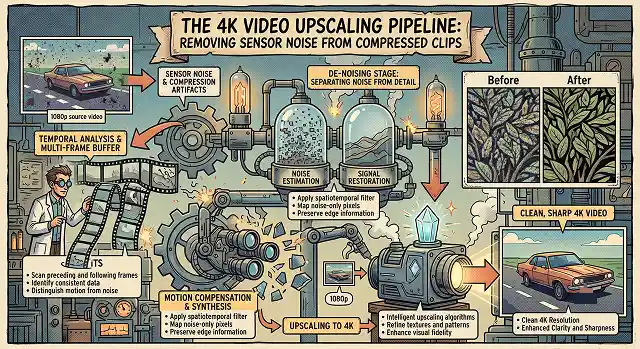
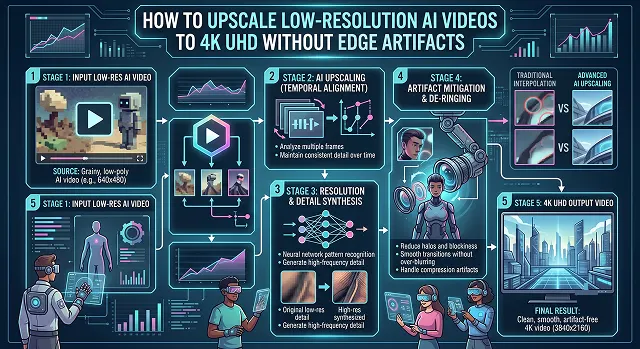
Image Upscaler FAQ
Learn how neural networks enhance and restore your visual media.
Traditional resizing simply stretches existing pixels, making the image look blurry. AI upscaling uses neural networks to "hallucinate" and synthesize new pixels, adding realistic detail and sharpness that wasn't there before.
While it can significantly improve clarity and reduce noise, it cannot completely "fix" severe motion blur. It works best on low-resolution images that are otherwise relatively sharp but lacking in pixel density.
Yes. Because the AI is adding millions of new pixels to increase resolution (e.g., from 1080p to 4K), the resulting file contains significantly more data, making the file size larger than the original input.
Yes. Our upscaler includes a "Face Refinement" sub-model that detects human facial features and applies specialized reconstruction to eyes, skin, and hair to prevent any artificial artifacts.