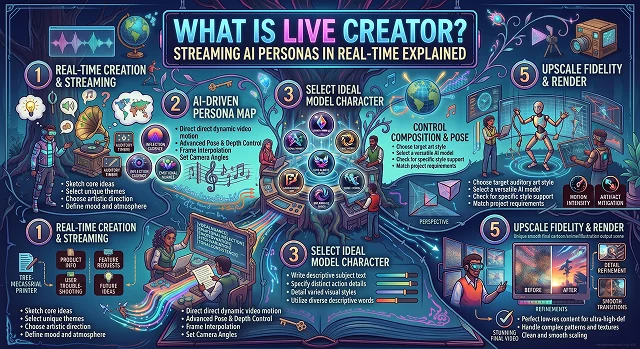
Live Creator technology refers to real-time generative neural engines that synthesize, animate, and stream interactive AI personas (digital humans or virtual VTubers) into live video feeds with sub-second latency.
Unlike pre-rendered text-to-video generators (like Runway Gen-4 or Sora) that process clips in batch queues, Live Creator pipelines operate directly on live input streams—reading chat comments, listening to microphone audio, and generating synchronized visual frames, expressions, and speech on the fly.
Above-the-Fold Breakdown: Traditional Live Streaming vs. Real-Time AI Streaming Personas
Live Broadcasting Architecture · Human Livestreams vs. Looped Video vs. Autonomous AI Personas
| Dimension | Traditional Human Livestream | Pre-Recorded Video Loop ("Fake Live") | Real-Time AI Streaming Persona (Live Creator) |
|---|---|---|---|
| Interactivity | Immediate (Real-time live voice & video) | Zero (Static linear video loop) | Full Real-Time Interactivity (Answers chat prompts & events) |
| Operational Hours | 2 to 6 hours max (Limited by human fatigue) | 24/7 (Prone to audience drop-off & platform bans) | True 24/7 Autonomous Broadcasts |
| Physical Overhead | Studio cameras, key lights, microphones, sets | Video editing software & loop streaming servers | Single reference image, browser/cloud GPU, & microphone |
| Multilingual Reach | Restricted to the host's spoken languages | Pre-rendered dubbing tracks | Dynamic real-time translation across 30+ languages |
| Visual Latency | Direct sensor capture (~0 ms) | N/A (Pre-rendered video file) | Ultra-Low Latency (~200–500 ms frame generation) |
1. How Real-Time AI Streaming Personas Work
A live-streaming AI persona is powered by an interconnected loop of four real-time neural models running with under 300ms–800ms of glass-to-glass latency:
[Live Chat / Audio Input] ➔ [1. Conversational Brain (LLM)] ➔ [2. Real-Time TTS Voice Engine]
                                                                      │
                                                                      ▼
[RTMP Stream ➔ Twitch / YouTube] ◄─── [4. OBS / WebRTC Output] ◄─── [3. Viseme & Latent Video Engine]
- Ingestion & Chat Parser: Incoming viewer chat messages (via Twitch IRC, YouTube Live Chat API, or TikTok WebSockets) are filtered and queued by priority.
- Contextual LLM (The "Persona Brain"): An LLM conditioned with a strict system prompt (defining the streamer's backstory, humor, tone, and guardrails) generates an instant conversational response.
- Low-Latency Neural Speech (TTS): Streaming text-to-speech models (such as ElevenLabs Flash or Cartesia Sonic) generate 24kHz voice audio in chunked byte streams within ~80–120ms.
- Viseme & Frame Synthesis (Live Avatar Renderer): Fast diffusion or GAN-based models (such as LTX-Video Turbo, Live Avatar, or AnimateDiff LCM) deform the source image's facial landmarks and mouth mesh to match audio phonemes at 30 to 60 FPS, pushing the final render to OBS via a virtual camera or RTMP output.
2. Top Use Cases for Streaming AI Personas
- Unlimited E-Commerce Streaming: In Asia and Western markets, businesses use AI persona hosts on platforms like TikTok Live and Shopee to present their goods, resolve shipping queries via chat, and generate sales at all times.
- Engaging Co-Hosts: Individual streamers take advantage of AI personas to act like co-host with responsibilities such as announcing chats, suppressing trolls, chatting with streamers, and playing trivia quizzes together with viewers.
- Customer Support Services: Corporate websites use WebRTC internet representatives to deliver upgraded customer support with the help of video interaction.
3. Setup Sequence: Going Live with an AI Persona
1. Define the Persona System Prompt & Voice
- Configure your persona's knowledge base and boundaries. Connect an ultra-low-latency voice model (e.g., ElevenLabs Flash or Cartesia) to establish the character's vocal timbre and speaking cadence.
2. Ingest High-Fidelity Character Keyframes
- Upload a front-facing, well-lit reference image (1080×1080 minimum) into your real-time streaming engine (such as Mixio, VisionStory, or a local Live Avatar node) to establish the facial anchor.
3. Configure Real-Time Audio-to-Viseme Routing
- Link your LLM audio output stream to the live avatar driver. Calibrate the viseme sensitivity slider between 0.4 and 0.6 to prevent excessive mouth widening or robotic chin snapping.
4. Connect to OBS via Virtual Camera or RTMP
- Route the synthesized video canvas into OBS Studio as a Browser Source (via WebRTC) or Spout2/NDI feed. Layer your gameplay, background, and alert overlays beneath the persona canvas.
Live Creator Engine Comparison
Live Persona Architecture · Static Pre-Rendered vs. Real-Time Autonomous Avatars vs. Mo-Cap VTubers
| Feature Vector | Static Pre-Rendered AI (HeyGen, Synthesia) | Real-Time Live Creator (Mixio, Live Avatar, VisionStory) | Motion-Capture VTuber (VTube Studio) |
|---|---|---|---|
| Output Speed | Batch rendering (1× – 3× real-time). | Real-Time Streaming (30–60 FPS). | Real-Time (60 FPS). |
| Viewer Interactivity | None (Static pre-recorded files). | Fully Autonomous / Live Q&A. | Dependent on human streamer. |
| Human Operator | Required to edit scripts and render. | Zero-Operator (24/7 Autonomous) or Co-host. | Full-time human actor required. |
| Input Driver | Text script / CSV upload. | Chat comments, microphone, or webhooks. | Webcam face tracking & gloves. |
| Primary Platforms | LMS, YouTube Video, Corporate Web. | Twitch, TikTok Live, YouTube Live, Kick. | Twitch, YouTube Gaming. |
Request A Custom AI Video
Tell us what you're trying to create and we'll point you to the right tool — or help you set it up.
4. Glass-to-Glass Latency Budget (End-to-End Less Than 500ms)
In the case of broadcast streams, "glass-to-glass" latency refers to the time from the moment a person enters a sentence in the chat to the moment the first audio-visual frame produced by the AI persona is shown on the screen.
Whenever the total latency exceeds 800ms, the communication loses its pace; when kept below 400ms, the artificial partner appears to be a human interlocutor.
Viewer Input (Chat / Mic)
  │   (~20ms – 40ms) WebSockets / IRC
  ▼
[1. Speech Recognition (ASR) / Chat Queue Ingestion]       (~50ms – 80ms)
  │
  ▼
[2. Streaming LLM First-Token Time (TTFT)]                 (~80ms – 150ms)
  │
  ▼
[3. Chunked Neural TTS Stream (Byte Chunks)]               (~50ms – 90ms)
  │
  ▼
[4. Neural Viseme & Dynamic Frame Deformation]             (~30ms – 60ms)
  │
  ▼
[5. WebRTC / OBS Spout2 Direct Frame Push]                 (~15ms – 30ms)
  │
  ▼
Live Stream Output (YouTube / Twitch / TikTok)             Total P50 Latency: ~245ms – 450ms
Key Latency Improvements:
- Token-Level Pipeline Chaining: LLM does not hesitate to generate the full sentence. The moment a punctuation mark (comma, period) shows up in the generated token stream (which usually contains 4 to 6 words), the generated tokens are sent to the streaming TTS engine.
- Audio-First Viseme Mapping: The TTS engine produces raw audio bytes directly sent to a local viseme inference model. The lip shape is formed together with audio which enables synchronization of lip movements with the audio without the necessity of separate rendering.
5. The TensorRT Compilation Pipeline
Live portrait architectures separate animation into distinct neural stages: Appearance Feature Extraction, Motion/Keypoint Detection, Stitching & Warping, and SPADE Image Synthesis. Compiling the entire pipeline requires exporting each sub-network to ONNX before building serialized TensorRT .engine binaries.
[PyTorch Model Checkpoints (.pth)]
                │
                ▼ (torch.onnx.export with fixed dynamic axes)
       [Intermediate ONNX Files]
                │
                ▼ (trtexec with FP16 precision & layer fusion)
[Serialized TensorRT Engines (.engine)] ➔ Loaded directly into CUDA Execution Context
Sub-Module Latency Targets (RTX 4090 @ 1080p canvas):
- Appearance Feature Extractor (F_s): One-time cold execution per static portrait ($\approx 8\text{ms}$). Runs once during session setup.
- Motion Extractor / Keypoint Network (M_d): Calculates driving 2D/3D keypoints from incoming audio-driven blendshapes (≈1.8ms).
- Warping & SPADE Decoder Generator (G): Synthesizes final deformed facial pixels (≈7.2ms).
- Total Frame Inference Time: ≈9.0ms−11.5ms (enabling 85−110 FPS raw compute headroom, comfortably locking to a broadcast-standard 60 FPS budget).
Live Creator & Real-Time AI Streamers
Master sub-second latency pipelines, conversational LLMs, real-time lip-sync, and 24/7 interactive virtual hosts.
A Live Creator is an autonomous or operator-assisted virtual persona that streams interactive video continuously. Unlike standard offline AI video generators that take minutes to render static video files, a Live Creator system uses ultra-low-latency neural rendering to generate video frames, clone voice output, animate facial expressions, and process real-time viewer chat inputs concurrently in under 500 milliseconds.
Real-time AI streamers rely on a tightly integrated 4-Node Feedback Loop: First, an ingestion node captures incoming stream chat messages. Second, an LLM generates context-aware conversational replies. Third, a low-latency text-to-speech engine synthesizes the vocal audio buffer. Finally, a real-time neural inpainting or 3D Gaussian splatting engine generates matching lip synchronization and facial gestures, outputting a continuous video stream via RTMP or WebRTC.
The platform connects directly to platform APIs (like Twitch IRC or YouTube Live Chat WebSockets). A sentiment-filtering middleware filters out spam and harmful comments, then prioritizes questions or high-value donor interactions (Super Chats/Bits). Selected comments are fed into the avatar's core personality prompt, enabling the persona to verbally acknowledge the user's handle and answer questions seamlessly during the broadcast.
A traditional VTuber requires a real human sitting in front of a webcam wearing facial-tracking sensors to voice and puppeteer a 2D or 3D digital model. In contrast, an autonomous AI Live Creator requires no human behind the microphone—the artificial brain reads chat, forms jokes, speaks via neural voice synthesis, and controls bodily motion autonomously around the clock.
Production systems implement Real-Time Guardrail Pipelines. Chat questions pass through an initial toxicity classifier before reaching the core model. Before generated replies reach the voice synthesis stage, a secondary safety validator scans the proposed text to prevent terms of service violations, hate speech, or brand damage, instantly dropping unverified outputs in milliseconds.
Live Creators monetize primarily through 24/7 E-Commerce Live Selling and Audience Tips. On TikTok Shop and Amazon Live, AI shopping hosts display products, demonstrate use cases, and answer pricing inquiries non-stop. On entertainment channels, AI streamers collect automated viewer donations, subscriptions, and affiliate commissions while broadcasting uninterrupted.
Running the complete stack locally requires a high-end workstation equipped with an NVIDIA RTX 4090 or dual GPU setup (32GB+ combined VRAM) to run LLM inferences, neural voice models, and video frame rendering simultaneously. Alternatively, cloud orchestration platforms run the heavy compute on rented enterprise GPU clusters, streaming the encoded video feed directly to OBS or streaming platforms via a stable 15–20 Mbps upload connection.
Uncanny stiffness occurs when an avatar freezes during pauses in speech. Modern engines implement Autonomous Idle State Simulators. Even when silent, the avatar continues breathing naturally, blinking, making subtle micro-nodding gestures, and looking around the virtual set, keeping the presentation fluid and lifelike between conversational interactions.
Streaming networks (including YouTube, TikTok, and Twitch) mandate explicit Synthetic Media Disclosures. Broadcasters must toggle the synthetic media label in stream settings and display an on-screen visual disclaimer (e.g., "AI Hosted Stream") so viewers are aware they are interacting with an autonomous virtual avatar rather than a live human presenter.
Follow this proven 3-Step Deployment Sequence: First, configure your character persona prompt, knowledge base, and cloned voice profile inside a live avatar platform (like Hedra, LiveKit, or HeyGen Interactive). Second, route the virtual camera and audio output feed into OBS Studio, overlaying your branded stream graphics and live chat box. Third, enter your stream RTMP key, toggle the synthetic media disclosure badge, and initiate your interactive 24/7 broadcast.
Ready to try AI Videos?
Transform your ideas into cinematic video in seconds.