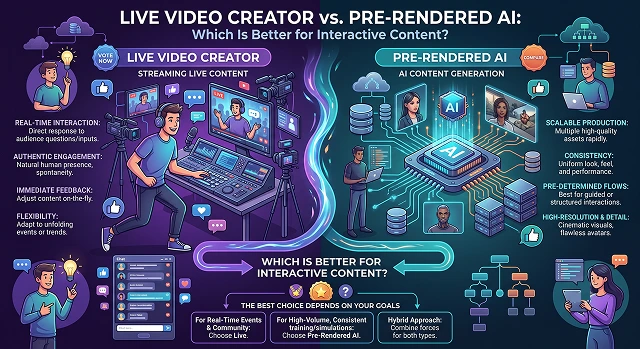
When building interactive content—like AI-powered customer service agents, personalized video marketing, immersive training simulators, or branched storytelling—one massive technical crossroad trips up creators: Should you go with Live Video Generation (Real-Time) or Pre-Rendered AI?
The decision isn't just about rendering speed; it changes the entire architecture of how your audience interacts with your brand.
The Technical Showdown: What's the Difference?
To understand which is better, we have to look under the hood at how these two synthetic video technologies process information.
1. Pre-Rendered AI Video (Batch Processing)
- Pre-rendered AI works by generating all frames of a clip all at once in a single pass based on static data or an pre-written script. Think of tools like HeyGen, Synthesia, or batch diffusion models like Runway Gen-3. The text/prompt is input into the model, and then processing can take anywhere from 30 seconds to several minutes depending on the size of the video file generated. Once this is done, it produces a finished, non-editable MP4 file.
2. Live Video Generator (Streaming)
- Live video generation involves the use of autoregressive stream-based architecture (for example, Krea Realtime 14B or digital human API streams in real time). It streams the video output in reaction to human input rather than downloading the video file.
- The Feeling: A dynamic exchange that reacts instantaneously to unexpected human actions.
When to Choose Pre-Rendered AI Video
Pre-rendered AI reigns supreme when visual perfection outranks immediate responsiveness. If your interactive content uses simple "choose your own adventure" branching buttons, pre-rendering every possible path in advance is the superior route.
Best Use Cases:
- Email Marketing: Production of 5,000 personalized videos featuring avatars saying the name of the client aloud.
- Product Scripting: Creation of top-notch, photo-realistic digital doubles explaining features of a software program.
- E-learning modules: Multi-module training programs, whereby the training program content remains static, but users navigate quiz questions at their own convenience.
- Why it works best here: Get full Hollywood photorealism with ultra-clear 4K definition. The video will never freeze, pixelate, or lose its facial structure in the middle.
When to Choose Live Video Creators (Real-Time)
Live video generation is mandatory when true conversational agility is required. If a user needs to speak unscripted sentences into their microphone and see a face reply immediately without a loading wheel, you have to build on a real-time streaming architecture.
Best Use Cases:
- AI Customer Support Chatbots: Electronic human butlers who answer live retail banking or e-commerce queries.
- Serious Gaming Simulators: Corporate training for emergency room workers, de-escalation techniques, or confrontational sales calls, wherein the AI must respond either aggressively or warmly depending on the tone.
- Live Streaming: Interactive AI personalities responding in real time to text chats and donations from users through platforms like Twitch or YouTube.
- Why it works best here: It closes the psychological distance between text messaging and conversing with another human being. The sub-second feedback loop keeps human minds engaged much longer than a simple video feed does.
Feature Comparison Matrix
Video Architecture · Generation Pipeline Benchmarks
| Metric / Capability | Pre-Rendered AI Video | Live Video Creator (Real-Time) |
|---|---|---|
| Latency / Response Time | High (30 seconds to several minutes) | Ultra-Low (Sub-150 milliseconds streaming) |
| Visual Fidelity & Quality | Ultra-Realistic. High-res 4K, perfect lighting | Hardware Dependent. Often capped at 720p or lower |
| Interactivity Level | Static. Fixed branching paths only | Dynamic. Infinite conversational paths |
| Computing Cost | Lower long-term cost per view | High GPU demand per live concurrent user |
| Temporal Consistency | Flawless throughout the clip | Can drift or degrade over long live sessions |
Request A Custom AI Video
Tell us what you're trying to create and we'll point you to the right tool — or help you set it up.
The 2026 Production Tool Stack
If you are building one of these platforms today, these are the software development kits (SDKs) and web platforms leading the market:
1. The Pre-Rendered Stack
- VEED Fabric 1.0 & fal.ai: A developers' favorite for automated pipelines. It allows you to take any static image (mascot, photo, or vector artwork) and render high-fidelity talking videos via a Python or JS client library at a highly competitive $0.08 per second.
- Synthesia & Colossyan: The undisputed kings of enterprise internal training and Learning Management Systems (LMS). They provide SOC 2 Type II compliant, security SSO, and huge preset actor libraries.
- Leadde.ai: Your ultimate solution for automating your B2B content marketing campaigns. They have a very innovative feature called "Chat with Video," which allows for text chat around pre-rendered content pieces.
2. The Live Streaming Stack
- Voice-to-Voice Inworld AI: Designed for conversational applications that require real-time response. It offers native integration of sub-200ms Time-to-First-Audio (TTFA), turn-taking functionality, and auto-model switching through 200+ individual language models on one bill.
- D-ID Streaming API: Industry standard for digital human chatbot technology. D-ID specializes in photo-to-video real-time animation with native WebRTC support for low-bandwidth environments.
- OpenAI Realtime API: A native multimodal speech-to-speech engine. By processing raw audio tokens without breaking them down into an intermediate text step, it strips out pipeline latency completely, though it currently locks you into OpenAI's visual/vocal ecosystem.
The Final Verdict
- Go with Pre-Rendered AI if you want your video to look completely flawless, professional, and branded, and your interactive elements are limited to simple clicks or predefined paths.
- Go with a Live Video Creator if you are building an operational piece of digital infrastructure—like a fully autonomous assistant—where immediate, unscripted user dialogue takes priority over movie-quality pixels.
Real-Time vs. Pre-Rendered AI
Analyze the trade-offs between instant dynamic responsiveness and high-fidelity cinematic video quality.
It comes down to runtime calculation vs. static storage. Live Video Creators animate the pixels or avatar shapes in real-time, responding instantly to variable customer chat queries or live microphone audio inputs. Pre-Rendered AI tools require you to fully render out the complete MP4 video file in advance. The user can interact with the timeline, but they can only click between pre-existing, pre-cut branching pathways.
Pre-Rendered AI wins on visual fidelity every single time. Because pre-rendering gives data servers minutes or hours to process each single frame layer, it can handle heavy volumetric lighting textures, micro-expressions, and hyper-realistic physics without dropped frames. Live streams must compress the image matrix heavily to hit low latency, often resulting in slightly blurred skin textures or minor mouth alignment artifacts.
Latency is the silent delay between a user asking a question and the AI double actually speaking back. In a live framework, when a user drops text, the server has to parse the sentence, route it to an LLM, create the matching audio tone, synthesize the mouth animations, and stream the video stream back down. If this loop takes longer than 2 seconds, it entirely breaks the conversational immersion.
They use a smart layout trick called Asset Pre-buffering. Because the interface boundaries are entirely locked down, the background video player can quietly load the opening frames of all potential choices while the user is watching the current scene. When the user clicks an alternative decision button, the browser instantly switches tracks without a single frame of black space or visible buffer delay.
If your budget is tight, pre-rendered pipelines scale incredibly cheap. Once your success path videos are rendered, thousands of shoppers can query them at the exact same moment with close to zero server data usage. Live streaming channels charge you per minute of continuous computing power. If your page hits a sudden traffic spike, running hundreds of concurrent live rendering loops can lead to expensive hosting invoices fast.
Yes, this is known as a Hybrid Media System Architecture, and it’s the elite choice for high-end web tools. You deploy crisp, pre-rendered video files to handle complex cinematic introduction sequences and ambient idle states. The exact millisecond the customer triggers a deeply personal text prompt, the app engine swaps seamlessly to a live streaming endpoint to provide custom voice and answers, giving you the best of both worlds.
Base your choice entirely on the depth of user choice required. If your application targets complex open-ended conversations—like a personalized online AI coach or live software training hub—lock down a live video creator framework. But if your goal is structured onboarding, e-commerce product showrooms, or landing page micro-courses, choose a pre-rendered layout framework to guarantee a polished, buffer-free visual experience.
Ready to try AI Videos?
Transform your ideas into cinematic video in seconds.