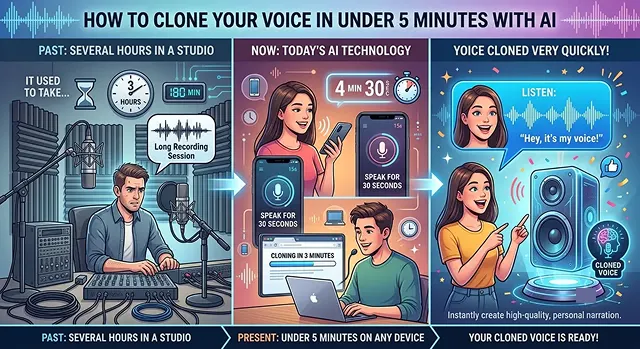
It used to take a long time to get your voice cloned - several hours in a professional studio - but now with today’s AI technology you can have your voice cloned on your phone or computer very quickly (in less than 5 minutes). This technology uses a process called Instant Voice Cloning where the AI takes a very short recording of your voice and analyzes it to determine your tone, pace and accent instantly.
ElevenLabs is the company that has established itself as the industry leader in voice cloning technology. The following is a very simple and easy-to-follow step-by-step guide for creating a digital voice twin.
What You Need to Gather First
- A free account: Sign up at ElevenLabs.io.
- Quiet room: Ensure that you are in a location with no other sound (i.e. Turn off your fans and/or A/C).
- Audio samples: You’ll need to have about 1 to 2 minutes of your voice clear. You can also do these directly from the browser or do them in advance and load it into your browser with audio recordings from your phone.
The 5-Minute Setup Guide
Head to the Voice Lab
- First, log into your dashboard and navigate to theVoicesmenu on the left sidebar. At the very end of that submenu is a button either titled“Add Voice”or“Create/Clone a Voice.”
Select 'Instant Voice Clone'
- You will see a few options. Pick Instant Voice Clone. (Do not pick "Professional"—that one takes days to train and requires hours of audio).
Upload Your Audio
- To upload audio files, drag and drop them into the upload box or, alternatively, use your microphone icon to record yourself reading an article or book excerpt.
- Here is an important tip: when you speak, please do so at your normal speaking volume and pace. If you are excessively slow in creating a recording because of your attempts to be helpful to the AI and you sound robotic, the AI will result in creating a robot-like clone with those patterns!
Name It and Confirm Legal Rights
- Give your voice a name (like "My Voice Clone"). You will have to check a legal box confirming you have the rights and consent to clone this voice. Never clone someone else without their permission!
Save and Test
- Next, click Save Voice. Allow approximately 10–30 seconds for the AI to process the voice. After processing, go to the text-to-speech tab, use any sentences you wish, tap to generate the sentence, and listen to your digital voice report the results of the recording.
Insider Tips for Creating Perfect Copies
This saying of "you get what you put in" certainly holds true. You don't have to use robotic clone as I give you some strategies on how to make that not the case:
- Multiple short clips beat one long speech: A short clip is more effective than one long recording. By providing the AI with several short 30-second recordings of you speaking naturally (3 to 4 total), the AI will have a better idea of your vocal range than it would from a lengthy recording.
- Watch your volume: Be careful with your volume; don't record too soft, but do NOT record too loud to the point that the sound is clipping.
- Turn on Noise Removal: ElevenLabs has a built-in "remove background noise" toggle when you upload your file to the site. Once you use this option, there will be fewer echoes left in the room that may confuse the AI.
Mastering the Advanced Settings
ElevenLabs Voice Settings · The "Secret Sauce" Optimization Matrix
| Slider | What it actually does | How to set it |
|---|---|---|
| Stability | Controls how predictable the voice is. Higher = flat and consistent. Lower = more emotional and expressive. | Set to 40%–50%. If you go too low, the voice might randomly whisper or shout. If you go too high, it sounds like a boring robot. |
| Clarity + Similarity | Controls how hard the AI tries to match your exact sample. | Set to 70%–85%. If your microphone had a tiny bit of background fuzz, keeping this around 75% stops the AI from cloning the fuzz into the final audio. |
| Style Exaggeration | Boosts the dramatic energy of the speaker. | Set to 0%–10% by default. Only turn this up if your original recording was super energetic and you want the AI to really lean into that vibe. |
Request A Custom AI Video
Tell us what you're trying to create and we'll point you to the right tool — or help you set it up.
The Ultimate 2-Minute Recording Script
Do not simply look up a random article on Wikipedia. You must provide an AI with a script that will make you emphasize words, use varied emotions, and ask various questions to paint a full picture of your entire vocal range.
If you feel ready to get a flawlessly recorded two-minute sample right this minute, grab yourvoice recorder and read what is found below. Do this conversationally; say it as you speak to someone that you know.
- How is it going? I’m just recording all of this, hoping to capture a digital form of my voice. It’s actually a bit weird but amazing at the same time how far the technology is going. Let me try different things.
- Maybe what if I ask it something? For example, how do you think technology, the AI will change in the next five years? Will I even recognise it? but then in other times you want to say something that’s really complicated, or you want to say it so clearly, you know take a breathe, and just go at that pace, slower, clear, you got that?
- The quick brown fox jumps over the lazy dog - you probably already have it in the audio, or in the text but it kind of represents a general sounds for everyone. Okay, it should probably capture enough.
How to Clean Up Your Audio (No Software Needed)
The AI copies everything—including room echo, lip-smacking, and heavy breathing. You don't need a professional studio, but you do need to use a few "couch hacks" to trick the AI:
- The Closet Studio: The absolute best place to record a voice clone in a normal house is a walk-in closet. The clothes absorb all the sound waves, completely eliminating that cheap "echoey bathroom" sound.
- Distance to Microphone: When using the phone, place it approximately 6-8 inches (about) away from your mouth, with the mic slightly off-centre (closer to your cheekbone). If you are less than 2 inches away from the mic and you exhale into the mic while recording, this can create a "pop" sound, ruining the quality.
Safety & Compliance
To help ensure the safe and secure use of this powerful technology, platforms like ElevenLabs have put in place several guardrails. For example:
- Voice Captcha: Cloning a celebrity’s or politician’s voice requires you to read a randomized prompt from a microphone during verification.
- Digital watermarks: Each audio file produced from either of these platforms contains an embedded, inaudible digital watermark. This allows authorities to easily determine from which account a specific audio file was created, even if someone attempts to use a cloned voice in order to defraud someone.
Instant Voice Cloning Guide
Create a flawless digital vocal twin using nothing but a quick smartphone recording.
Yes, it really is. While older technology required hours of recording inside an insulated studio, modern engines use Zero-Shot Voice Inference. The neural network only needs a clean 30-to-60 second sample of your voice to accurately map your structural pitch, timbre, and accent footprint instantly.
The absolute rule of thumb is zero background noise. Record a casual sample on your phone inside a quiet room—closets full of clothes are excellent for dampening environmental echo. Speak naturally without forced whispering, and ensure there is no background audio, as the model will mistakenly attempt to clone the ambient noise.
ElevenLabs (v3) and HeyGen IV are the definitive benchmarks. ElevenLabs allows you to create an "Instant Voice Clone" starting on their entry plan in a matter of seconds. It delivers a superior balance of deployment speed and acoustic stability compared to anything else on the market.
Leverage the Expressiveness and Stability sliders. If your clone feels flat, lowering the stability slightly forces the algorithm to inject micro-variations, breathing gaps, and organic voice inflections. Structuring your script text with dashes (—) or exclamation marks (!) will also change the pacing parameters procedurally.
Yes, this is an advanced trend known as Cross-Lingual Prosody Transfer. Models supporting multilingual generation take your unique English vocal markers and map them cleanly to Spanish, Hindi, German, or Japanese. The engine retains your core conversational style, making it sound like you're speaking the target language natively.
Security is incredibly strict to comply with safety frameworks. Top-tier tools implement mandatory Live Verbal Verification. The portal displays a dynamic script that you must record reading live. This biometric check ensures that third parties cannot maliciously upload historical clips or scraped audio without your explicit consent.
Build targeted vocal profiles by intent. Avoid using a single generalized voice model for all formatting. Instead, generate a "High-Pacing" clone for punchy advertising hooks, and a separate "Steady, Calm" clone for deep informational courses and tutorials. Segregating your profiles optimizes script delivery and maximizes natural retention.
Ready to try AI Videos?
Transform your ideas into cinematic video in seconds.