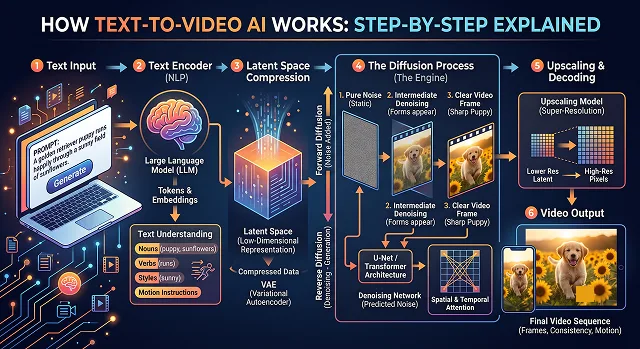
Initially, Text-to-Video AI appears as real magic. You put in a phrase such as "a golden retriever in an astronaut suit walking on Mars with cinematic lighting" hit enter, and within seconds you have yourself a moving photorealistic video clip.
The AI does not search for any videos in its library or stitch together stock footage to create something unique. In order to understand how it really works, we have to lift the hood to take a look at the two major components of its engine – Language Understanding and Removing Television Noise.
Phase 1: Mapping the Words to “AI Math” (The Brain)
Prior to painting the image, AI needs to comprehend what you want. This happens with the help of Text Encoder.
- The Problem: AI doesn’t know what a “dog” or “space” is.
- The Solution: AI transforms your text into vectors (long chains of numbers). In such mathematical universe, words with similar meanings are close to each other. In this mathematical universe, "astronaut" will be placed nearby “space”, “rocket,” and “helmet.”
This way, the AI gets the solid structural map of your request, making sure it will not forget about the “astronaut suit” once it starts painting “the golden retriever.”
Phase 2: From Chaos to a Masterpiece (The Canvas)
Most top-of-the-line video AI systems like OpenAI’s Sora, Runway Gen-3, or Luma Dream Machine all employ something called a Diffusion model.
To understand diffusion, you have to think backward. During training, the AI is shown millions of videos. It systematically destroys them by layering digital "noise" (like old television static) over the footage until the video is nothing but random pixels. The AI’s entire job is to learn how to reverse this destruction.
When you give it a prompt, the process looks like this:
- The Blank Slate: The AI starts with a canvas of completely random, chaotic noise.
- The First Pass: Guided by your text blueprint, it looks at the static and asks: "If I remove a little bit of this fuzz, will it look slightly more like a golden retriever on Mars?"
- The Iteration: It removes the noise step-by-step. In the first few passes, you just see blurry blobs of orange and red. By pass 30, you see a dog and a horizon. By pass 50, you see the reflection on the astronaut helmet.
Phase 3: Solving the "Video" Problem (The Flipbook)
Creating one image through diffusion is difficult, but creating a video is much more difficult due to time. A 10-second video made up of 30 frames per second will be made up of 300 images. If the AI simply created 300 images of the dog without doing any kind of editing, everything about the dog will constantly change.
To solve this, modern models use Transformers (the exact same architecture used for text, but adapted for pixels).
1. Spacetime Patches (Cutting up the video)
- Rather than seeing a video as large-sized files, the AI decomposes the video into small cubical blocks named spacetime patches, which include some space in form of pixels and some time in form of the change in the pixels over several frames.
2. Temporal Consistency (Remembering the Past)
- The AI uses "attention mechanism" to consider all the patches simultaneously. As it filters out the noise to compose frame #2, it keeps track of frame #1 to ensure that the dog's leash has the same color, lighting is correct and background does not suddenly change into a beach.
3. Simulating Physics
- The AI has watched enough video data to understand rudimentary physics. It knows that if a dog steps forward, its weight should shift, its suit should wrinkle, and dust on Mars should kick upward rather than float sideways. It isn't calculating actual physics math; it’s predicting what looks mathematically logical based on everything it has ever seen.
Text-to-Video AI: The Snapshot
Architecture Brief · Core Component Pipeline
| Step | Component | What it does in 5 words or less | The Human Equivalent |
|---|---|---|---|
| 1 | Text Encoder | Translates words into math. | Reading a movie script. |
| 2 | Compression Network | Makes video files tiny. | Packing clothes into a vacuum bag. |
| 3 | Spacetime Patches | Chops video into 3D cubes. | Cutting a cake into bite-sized squares. |
| 4 | Diffusion Process | Carves video out of static. | Sculpting a shape out of marble. |
| 5 | Transformer | Keeps motion smooth and logical. | A director maintaining continuity. |
| 6 | VAE Decoder | Outputs the final HD video. | Printing out the completed blueprint. |
Request A Custom AI Video
Tell us what you're trying to create and we'll point you to the right tool — or help you set it up.
1. The Video Compression Network (The Shrink Ray)
One second of video with resolution 1080p and 30 fps would contain around 62 million pixels of data. To handle such amount of information instantaneously would be impossible even for a supercomputer.
The way the AI handles this problem is through use of a Video Compression Network, which combines a Spatial-Temporal Autoencoder with a Variational Autoencoder (VAE).
- Here is how it works: The video is being converted into a highly mathematical and invisible language of Latent Space.
- Here is the catch: It does not compress frame-by-frame. It compresses over time. In case of a three-second long period of blue sky, the compression algorithm gets rid of the redundant data and substitutes it with a math note: "This part of the image will remain blue for 90 frames".
- The result: The effect is the reduction of file size by up to 90%, while preserving all the essential visual content of the video. Generation process takes place completely within this highly efficient mathematical universe.
2. Spacetime Patches (Turning Pixels into Visual "Words")
This is the breakthrough that enabled video AI to scale up dramatically. In Large Language Models (such as this one), sentences are divided into small pieces of words called tokens. Video AI does the exact same thing, using Spacetime Patches.
Imagine a cartoon on a block of Jell-O and cut it into nice little cubes. Each cube contains:
- Space: An extremely small 16x16 block of pixels.
- Time: An infinitesimal moment of time (for example, just two or three frames of action).
Since these patches are uniform, the AI can work with any video file, whether that be a vertical video on TikTok, widescreen 4K movies, or a 5-second GIF. The AI takes all the video and divides it up into blocks and puts these blocks into one long sequence of images.
3. The Diffusion Transformer (The Core Engine)
Older video AIs used a system called a U-Net, which looked at images as whole shapes. Modern models combine two distinct architectures: Diffusion and Transformers.
The Diffusion Part (Creating Quality)
- the model is trained by intentionally adding digital noise (static) to a video until it becomes unrecognizable, and then teaching the AI to guess how to remove that noise. At inference time (when you generate a video), the AI starts with a blank canvas of pure television static. Guided by your text prompt, it mathematically subtracts a layer of static, slowly carving shapes out of the fog over 30 to 50 iterations.
The Transformer Part (Creating Consistency)
- This is where the magic happens. The Transformer uses something called “Self-Attention” to bridge those spacetime patches together. When the AI’s “denoiser” is busy working on patch #245 (a human’s hand, perhaps), it pulls in related pieces of information from patch #12 (the human’s face) or patch #800 (the reflection in the mirror hanging opposite the room).
This solves the three greatest hurdles of video generation:
- Object Permanence: If a truck drives behind a tree, a standard AI will "forget" what the truck looked like, causing it to change color or turn into a bus when it emerges. The Transformer remembers the original truck patches and recreates them exactly.
- 3D Consistency: If you pan the camera across an object and it start to flatten like paper then the AI would still keep track of angles so it looks like a real object.
- Aspect Ratio: As the model can view patches like blocks then it can map it perfectly to native 16:9 horizontal or 9:16 vertical grids and it will never have to crop and square off the video for a smooth, glitch-free transition.
Silent AI Video Creation
Master the art of visual-first storytelling where the footage speaks for itself.
Silent videos are a powerful Global Scaling Strategy. Stripping away the voiceover completely removes the language barrier, opening your media to global distribution instantly. It also taps perfectly into the "Aesthetic" and "ASMR" lifestyle niches, where audiences actively prefer ambient audio and visual consistency over standard narrators.
Kling 3.0 and Runway Gen-3 Pro dominate this format. Because these neural pipelines prioritize fluid structural rendering and flawless lighting simulation, they don't require speech to give context. They communicate entirely through depth, environmental textures, and atmospheric composition.
Master Visual Show-Don't-Tell mechanics. If you're breaking down a concept, use text-to-image conditioning to prompt structural diagrams or use contextual object transitions. Let the camera pan across real physical interactions, or use minimalist on-screen lower-thirds to anchor technical points while keeping the visual layout completely clean.
The secret lies in Native Environmental Soundscapes. Models like Google Veo 3.1 allow you to generate high-fidelity, contextual ambient audio automatically. Adding the realistic crunch of gravel, the hiss of steam, or deep cinematic drones replaces the human narrative track with visceral, high-impact sensory feedback.
Rely on Dynamic Camera Motion. To compensate for the absent auditory hook, use text commands like "continuous tracking push," "slow-motion physical focus shift," or "high-contrast cinematic grading." Keeping the camera frame active and dynamic creates a hypnotic visual cadence that locks viewer retention.
Yes, using First-and-Last Frame interpolation. By uploading an ending frame from your current clip and a starting frame for your next layout, the AI calculates the spatial data between them. This approach builds physics-compliant, continuous scene blends that replace standard edits with natural continuity.
Lock Down Your Aesthetic Signature. Because there is no verbal narrative, your visual identity is your sole hook. Build out strict style sheets in Midjourney for your base plates—using concrete rules like "muted cinematic tones, anamorphic bokeh, soft chiaroscuro values"—to keep your automated vertical clips instantly recognizable across platforms.
Ready to try AI Videos?
Transform your ideas into cinematic video in seconds.