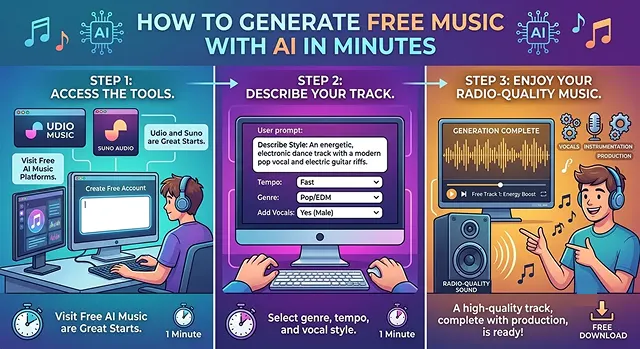
AI-generated music is now ridiculously easy; a couple of minutes and a bunch of tunes at Udio and Suno are now a free radio-station quality track ready with vocals, instrumentation and production.
Now here’s a step by step guide to doing that yourself.
The Best Free Platforms
You don't need any technical skills or musical training to use these. They both offer solid free tiers:
- Suno: Greatest song structure, catchy hooks: Basic users will receive 50 credits every day which translate to about ten full song creations with the free plan.
- Udio: Highest audio clarity and most professional-sounding vocals: Users of the Udio plan can expect up to 100 song generations per month on the free level, limited to 10 songs created a day.
Advanced Prompting (Thinking Like a Sound Engineer)
Most beginners just type rock song with a heavy beat and wonder why it sounds generic. The AI model reacts to specific technical music production terminology.
Use this four-part structure when writing your next prompt, instead of generic language use the following format:
[Sub Genre]+[Instrumentation]+[Production Style]+[Vibe/BPM]
- ❌ Weak Prompt: A Happy rap song that Sounds good and has lots of Bass in it.
- │ The result will likely be robotic and dated.
- ✓ Pro Prompt: 2000s dirty south trap, heavy 808 sub-bass, crisp hi-hat rolls, minor key, aggressive delivery, clean studio mix, 140 BPM.
- │ This gives the AI exact constraints on the instruments and the era.
The "Anti-Prompt" Strategy
Both platforms now allow you to steer the AI away from things you hate. Use the style exclusion or prompt box to filter out cliches:
- To avoid cheesy synthetic instruments, type: lo-fi, live instruments, analog warmth.
- To avoid autotuned vocals, type: raw vocals, un-quantized rhythm, acoustic room reverb.
The Pro Workflow: Mastering the "Extend" & "Inpaint" Features
The biggest secret to AI music is that nobody generates a perfect 3-minute song on the first click. Professional creators build them piece by piece.
Step-by-Step Song Building
1. Lock in the Hook
- Create a 30-60 sec segment first. This isn’t an attempt to create an entire song yet. Continue to generate until you get an exceptionally ear-worm-y chorus/hook.
2. The Extension Chain
- Select “Extend” from your favourite snippet and tell the AI, at precisely which second marker you want them to start building from (e.g. 0:45) then, in the new prompt field, switch out the lyric tag from[Chorus] to[Verse 2]or[Bridge]. The new material will slot seamlessly behind your favorite segment.
3. Audio Inpainting (The Audio Eraser)
- If you decide you LOVE your entire song but dislike how the AI rendered at 1:12, highlight the 3 second segment around it, use the Inpaint feature to retype your desired word, and the AI will re-sing only that one section (keeping all instrumentation unchanged!).
4. Vocal Personas
- If you love the specific voice the AI gave you, click "Save Persona". You can now carry that exact same virtual singer over to entirely new tracks, allowing you to create an entire consistent album.
The Advanced "Studio Mode" & Post-Production
If you want to take your tracks to a professional level, you can now use Suno Studio (their built-in Digital Audio Workstation).
- Stem Separation: Paid features allow you to split your track into separate files: Vocals, Drums, Bass, and Melodies.
- Human Touch: You can download just the instrumental stem, drop it into free software like Audacity or GarageBand, and record your own real voice over it. This completely removes the "AI vocal sheen" and makes the track sound 100% human.
Cheat Sheet: Vibe-Specific Prompts to Copy
Audio Engineering · Copy-and-Paste Style Prompt Guide
| Genre | Copy-and-Paste Style Prompt |
|---|---|
| Chill Lofi |
Lofi hip hop beat, dust crackle, vintage fender rhodes electric piano, jazzy chords, laid-back groove, no vocals, late night study vibe
|
| Cyberpunk / Synthwave |
1980s darksynth, driving retro arpeggiator, cinematic punchy analog synths, cyberpunk atmosphere, heavy compression, 110 BPM
|
| Cinematic Rock |
Modern orchestral rock, sweeping strings, heavy distorted electric guitar riffs, dramatic crescendos, thunderous cinematic drums, epic
|
| Modern Pop |
Radio-ready dance pop, driving four-on-the-floor kick, bright vocal chops, catchy synth hook, clean polished commercial mix, high energy
|
Request A Custom AI Video
Tell us what you're trying to create and we'll point you to the right tool — or help you set it up.
Mastering the AI Arrangement (Advanced Text Tags)
If you want the AI to follow a complex song structure, you have to guide it like a human band director. The models respond to specific operational tags. Beyond basic verse/chorus tags, you can use specialized brackets to control the track’s flow.
Structural Break Tags
- [Drop] or [Explosive Drop]: Forces electronic, pop, or hip-hop tracks to immediately hit maximum energy with heavy bass and percussion.
- [Build-Up]: Tells the AI to start rising in pitch, speed up the drum rolls, and create tension right before a chorus.
- [Breakdown]: Strips away the heavy drums and bass, leaving just a solo instrument or a soft vocal. This creates massive contrast before a final chorus.
- [Stripped Verse]: Removes the main beats, forcing the AI singer into an intimate, acoustic delivery.
Instrument Control Tags
- [Guitar Solo] or [Synth Solo]: Gives the AI a designated space to shred. If it sings over your solo, add [Instrumental Break] right above it.
- [Bassline Groove]: Causes the beat to transition where the drums become temporarily absent and the bass line is the leading instrument.
- [Drum Roll] or [Beat Switch]: The AI can be told to switch the drum beat dramatically or adjust the tempo for the rest of the song.
Vocal Directing Tricks
Getting an AI to sing with the exact texture, gender, or harmony you want requires a bit of clever wording. The style box handles structural tags, but the Lyrics Box handles the performance style.
Prompting for Background Harmonies
To get rich layers of backing vocals, include these phrases in your style prompt:- 3-part harmonies, gospel choir backing vocals
- call-and-response vocals, layered vocal chops
- male lead with airy female counter-melody
Audio-to-Music (Sampling & Vibe Matching)
Suno and Udio have Style Uploads/Audio Input. This revolutionises the whole workflow. You can now input an existing piece of audio and the AI will use that as a template instead of text input.
- The Hum to Song Trick: Hum a tune into your phone’s voice recorder. Upload that into the AI, pick a genre e.g. “Symphonic Metal”, and the AI will construct a giant symphony of guitars on top of your hum.
- Sampling: If you have recorded your own clean, 10 second loop of a drum beat or a set of piano chords. Tell the AI to extend this clip and it will create a massive track of different instruments building round that loop.
License Agreements and Copyright: How to Make Money
If you intend to distribute your AI Music on the internet, you need to know the laws regarding distribution in order to avoid issues with copyright infringement.
- Copyright in Reality: At this time, current law does not allow anyone to copyright a sound created entirely by AI and therefore it is available for download by anyone who wants to. However, when you create original lyrics for your song, you own the copyright to that text and if you then use those lyrics in combination with the AI created sound you now have created a new work (Derivative Work instead of Original Work) which allows you to protect it with copyright.
Platform Breakdown
- Free Plan Rules: You hold zero commercial rights. You must credit the platform (e.g., "Music generated by Suno"). If you upload a free-tier track to YouTube and monetize the video, your channel risks copyright flags.
- Paid Plan ($10–$30/mo) Rules: You own the commercial rights to the specific audio files generated while your subscription is active. You can distribute them via DistroKid to Spotify, Apple Music, or use them in commercial advertisements without owing the AI platforms any royalties.
Free AI Music Generation
Create production-ready, royalty-free tracks in any genre in just a few clicks.
Suno AI (v4.5) and Udio are the industry favorites. Suno's free tier provides 50 daily credits (roughly 10 song clips), while Udio offers a rolling baseline with structured monthly pools. For cinematic, non-vocal background scores, Beatoven.ai is the ideal specialist tool.
For personal streams or non-monetized clips, yes, it is safe because the tracks are synthesized from mathematical math patterns rather than direct splicing. However, check tier terms: free plans universally mandate strict platform attribution and forbid monetization. Commercial safety and ad rights require upgrading to a paid tier.
Be formulaic rather than abstract. Avoid emotional descriptors like "sad track" and structure using technical parameters: [Genre/Era] + [BPM Tempo] + [Core Instrumentation] + [Production Texture]. A perfect prompt looks like: "1980s dark synthwave, 110 BPM, analog retro synthesizers, heavy driving bassline, clean mix."
Yes. Both Suno and Udio offer full vocal tracking. You can input raw text, insert structural metatags (like [Verse] or [Chorus]), or use their text co-writers. The synthesis engine automatically tracks phonetic counts and syllabic rhythms to map the singing path onto your arrangement.
The initial generation renders in under 60 seconds. The models generate a short structural block first to let you test the hook. If the progression works, use the Extend Track feature to append downstream sections sequentially until your arrangement is complete.
Yes, through Audio Conditioning. Even on the free tier, you can upload up to an 8-minute voice note or audio clip. The neural net extracts key rhythmic cadences, chord progressions, and timbre values, then structures a completely distinct, native arrangement matching those core elements.
Isolate loop structures. If your goal is background media for an explainer clip, do not generate complex lyrical choruses—they will clash with your narrator's vocal frequencies. Explicitly prompt for ambient lo-fi textures or minimal pads, and cut them into clean looping blocks inside your video timeline.
Ready to try AI Videos?
Transform your ideas into cinematic video in seconds.