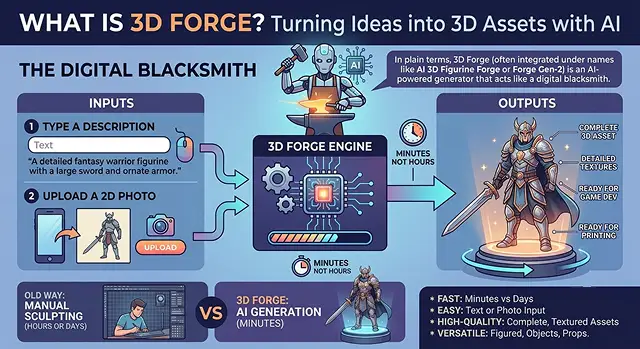
In plain terms, 3D Forge (often integrated under names like AI 3D Figurine Forge or Forge Gen-2) is an AI-powered generator that acts like a digital blacksmith. Instead of spending hours or days manually sculpting a digital 3D object using complex software, you simply type a description or upload a 2D photo, and the AI "forges" a complete, three-dimensional asset in minutes.
It bridges the gap between raw imagination and professional 3D design, allowing game developers, hobbyists, 3D printing enthusiasts, and digital artists to create assets instantly.
How It Works (The "Human Tech" Breakdown)
Traditional 3D modeling is reliant on an expertise in geometry, textures, and lighting which has a very steep learning curve in terms of creating your 3D assets. 3D Forge is able to provide the ability to create 3D items without this learning curve because it is based on how the human mind understands depth with Spatial Intelligence.
This process begins behind the scenes, when you enter your prompt:
- Multi-view Synthesis: When you upload your character or object as a 2D image, the AI synthesizes all of the possible views from your image by using the information it gained from training.
- Volumetric Reconstruction: Using each of these views, the AI uses them to create a digital skeleton or "mesh", which is comprised of thousands of tiny triangles.
- Texture & Material Mapping: The AI doesn't simply paint (add color) on to your model, but also "maps" out how the object should react to the lights. For example, it understands that a "rusted iron sword" would react very "roughly" to light than a "polished chrome sword".
- Automatic Retopology (The Clean-up): Raw AI models can sometimes look messy or be too heavy for a computer to load. 3D Forge automatically cleans up the underlying geometry so the final file runs smoothly in games or loads easily into a 3D printer.
Key Features & Capabilities
- Text-to-3D: The Text-to-3D function allows you to enter a text prompt (e.g.; “A polished brass steampunk robot spider”) and see the physical manifestation of this text.
- Image-to-3D: The Image-to-3D feature lets you take photos of approximate concepts (e.g. sketches/images of objects) and then upload the images to create a digital 3D version of those things.
- Extensive Art Styles: When you create 3D content, there are a ton of different styles to pick from. For example, you can instruct what kind of style you want (e.g.; low-poly style (the style of old video games), hyper realism, anime, chibis, or cartoons).
- Production-Ready Formats: You will have the availability to export your created 3D objects into standard file types (.OBJ, .GLB, .STL for 3D printing, and .USDZ for augmented reality) which correspond with the design industry.
The "Secret Sauce" to Getting Great Results
Your input directly impacts the quality of your asset because the AI runs completely on your input. Therefore, you can relate it back to telling an artist who is fast at making things how to proceed.
The equation for creating a 3D prompt is as follows, [the item you want] + [Texture and/or material you want your item to have] + [What artistic style and/or shape do you want] + [The way your item will stand or be oriented, such as standing, sitting, kneeling, etc].
- Bad Prompt: "A robot." (The AI will make something generic).
- Great prompt: "A broken and rusty sci-fi mech warrior with matte green and exposed silver wire, high fidelity simulation, crouched defensively".
This level of detail tells the AI exactly how to construct the geometry, handle the lighting reflections, and position the final asset.
Where It Shines Most
Use Case Matrix · 3D Forge Transformations
| Industry / Hobby | How 3D Forge Transforms It |
|---|---|
| Indie Game Design | Drastically slashes the cost of "set dressing." Developers can rapidly build hundreds of background props (barrels, rocks, furniture) to fill a virtual world in an afternoon. |
| 3D Printing | Removes the steep barrier of learning complex CAD software. Users can describe an object, export it as a watertight .STL file, and drop it straight into their slicer software (like Cura or PrusaSlicer). |
| Rapid Prototyping | Industrial and product designers can transform loose concept sketches into 3D objects to judge physical volume, shadow projection, and real-world proportions before manufacturing physical samples. |
Request A Custom AI Video
Tell us what you're trying to create and we'll point you to the right tool — or help you set it up.
The Big Shift: From Polygons to Prompts
To create a 3D asset in traditional methods it is a lot of high-tech carpentry. The artist creates a wireframe mesh by placing points in 3D space and joining them together, before wrapping the object using textures. The process of creating a complex character typically takes anywhere from 15 to 40 hours of dedicated effort from the artist.
Using 3D Forge, the entire process can be reversed by automating the process from days of manual labour down to 20 seconds to 5 minutes of automated time.
- [Traditional Pipeline]: Idea ➔ 2D Sketch ➔ Manual Poly Modeling ➔ UV Unwrapping ➔ PBR Texturing ➔ Rigging (Days/Weeks)
- [3D Forge Pipeline]: Idea ➔ Text or Image Input ➔ AI Spatial Inference ➔ Export-Ready 3D Model (Minutes)
Advanced Capabilities Under the Hood
Beyond basic text-to-3D creation, modern implementations of 3D Forge-style architectures feature a deeper ecosystem designed for true production environments:
1. Multi-View Synchronization
- If you feed the AI a 2D drawing of a character from a straight-on perspective, standard AI models might create a flat "cardboard cutout." Advanced 3D Forge systems use a dual-pass method: first, they generate matching front, side, and back 2D angles of the concept, and then they fuse those views into a balanced, geometrically accurate 3D model.
2. Materials Based on Physical Phenomena (PBR)
To create a great model, it must look appropriate for a variety of lighting conditions. AI automatically produces all the texture maps of PBR to separate and define the surface of PBR as separate layers.
- Albedo/Diffuse: The base color map.
- Roughness: Dictates where the object is dull (like cloth) versus shiny (like wet glass).
- Metallic: Tells game engines exactly which parts are raw metal.
- Normal Maps: Fake the look of tiny fine details, scratches, and crevices without adding heavy, laggy geometry.
3. Smart Retopology & Quad-Remeshing
AI outputs in raw format can be viewed as a large, messy, chaotic, triangular "soup" of different-sized shaped pieces; in fact, there may be millions of pieces of messy geometry that do not render correctly in real time. Built-in cleaning systems convert the triangle soup to an organized grid of quads (four-sided shapes), greatly reducing the number of polygons while still maintaining a high level of visual fidelity, allowing the assets to be immediately usable within Unity, Unreal Engine, and mobile AR platforms.
Tips for Creating Production-Ready Assets
Adjusting Your Inputs to Achieve Professional Grade Results on First Attempt:
- Subject Isolation: When using Image-to-3D, use images with high-contrast and one-color clean backgrounds. A busy background will confuse the AI on how to determine depth.
- Control Your Style: Dictate the geometry in your prompt. Use keywords like "Low-poly" for retro gaming performance, "Voxel" for a blocky Minecraft aesthetic, or "High-fidelity cinematic sculpt" for maximum geometric density.
- Watch the Pose: For characters, specify an A-pose or T-pose (arms out or slightly down). This makes it incredibly easy to automatically rig and animate the character later on.
Who is this for?
- Indie Game Developers: indie game devs will use rapid prototyping to create characters/weapons/envir props without high art expenses!
- 3D Printing Hobbyists: 3d printing hobbyists will have a way to create custom tabletop miniatures, figurines or decor without having to learn complicated cad programs.
- Concept Artists: concept artists can instantly take a fast 2d character sketch and turn it into a 3d object so they can examine its perspective and illumination by viewing it from different ways.
What Is 3D Forge?
Turn text descriptions and 2D images into production-ready 3D assets instantly.
A 3D Forge leverages Generative 3D Spatial Intelligence to completely bypass traditional polygonal modeling pipelines. Instead of manually parsing vertices or extruding edges inside software like Blender for hours, you input a text string or a flat 2D image. The neural transformer evaluates depth map coordinates and builds a fully structured 3D mesh model in under a minute.
The platform compiles assets directly into industry-standard formats. You can cleanly export your finalized meshes as GLB, OBJ, FBX, or STL files. This ensures your synthetic assets drag-and-drop perfectly into Unity, Unreal Engine 5, Blender, or route seamlessly to slicing engines for additive manufacturing (3D printing).
Yes, it extracts unbaked, resolution-independent PBR (Physically Based Rendering) Material Kits. Rather than wrapping flat colors onto a shell, the generator provides separate map layers for Albedo (diffuse color), Roughness, Metallic values, and Normal vectors. This lets your asset react realistically to real-time raytracing and global lighting rigs.
Raw generative 3D meshes can often result in dense, unorganized triangle fields. The embedded Quad Remeshing Transformer runs an auto-topology filter on the asset. It transforms chaotic shells into clean quad wireframes and compresses vertex footprints down to custom low-poly or high-poly budgets, rendering them game-ready instantly.
Absolutely. If text prompting yields too much variance, uploading a single ortho plate or perspective snapshot pins the structural geometry. The engine calculates the occluded, unseen surfaces on the opposite side based on training priors, allowing you to feed in a concept sketch and receive a complete spatial model.
Yes. The generation modal includes a Metric Rescale and Axis Alignment panel. Prior to downloading your STL file, you can define specific real-world bounds in millimeters, centimeters, or inches. The compiler handles volumetric boundary recalculation and centers world pivot locations automatically.
Omit flowery adjectives and prompt like a texture artist. Follow the formula: [Subject Token] + [Topology Style/Constraint] + [Material/PBR Parameter Detail]. A perfect prompt structure reads: "Medieval iron longsword, low-poly game asset configuration, weathered carbon steel blade material, worn leather grip hilt, clean hard surface uv optimization."
Ready to try AI Videos?
Transform your ideas into cinematic video in seconds.