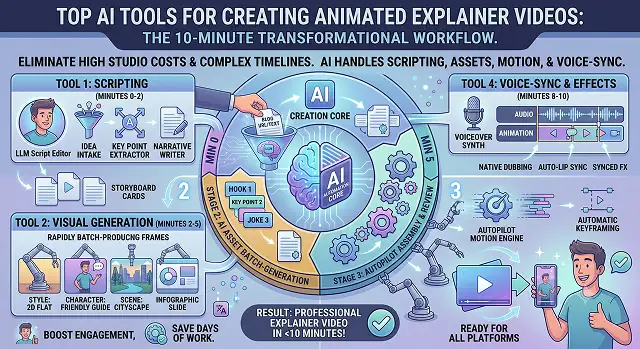
Producing an animated explainer video would take you a lot of money for studio production or a lot of time fumbling with keyframe timelines in traditional software packages. With AI software packages, all this is taken care of from scripting to generating animations and synchronizing the voiceover.
Since explainer videos range from cartoon stories to hand drawings on a whiteboard or even talking AI humans, each type is classified based on its functions.
The Short Version
For the best in-depth character animation and total scene control, Vyond remains unsurpassed. Are you looking for an easier option with a good template collection for your debut project? Then Powtoon is your choice. On a shoestring budget but with a desire for maximum design diversity without spending like a corporation? You will definitely love Animaker. Looking for fast template-based animation for your social media campaign? Try Renderforest. And if you need the “hand drawing on a whiteboard” technique, then there is no substitute for Doodly.
1. Vyond — Best for Real Character Animation
Vyond's been the name people reach for in this space for years, and using it again after a while away, I noticed how much the AI-assisted scene building has closed the gap for beginners. Describe a scene — "a frustrated project manager buried in emails" — and it'll actually generate characters and props that roughly match, instead of leaving you to hunt through a library yourself.
Where it really separates itself: the character customization goes deep. Age, build, clothing, expression — all adjustable, which matters more than it sounds like it should when you're trying to make an explainer feel like it's about your actual customers, not a generic stock cast. Three animation styles are available too — a clean modern look, a more corporate "business friendly" style, and true whiteboard-style drawing.
The catch is time. This isn't a five-minute prompt-and-done tool. Building a scene with intent takes longer than the others on this list, and I'd be lying if I said the learning curve is nothing. Worth it for anything going on your homepage. Overkill for a quick internal Slack update.
Cost-wise — it's priced like proper business software, monthly or annual, and it's rarely the cheapest option in the room.
2. Powtoon — Best for Getting Started Quickly
Powtoon has always leaned toward approachable, and its newer AI features — document-to-video conversion, generated voiceovers, avatar options bolted onto the animation side — haven't changed that core feel. You're not fighting the interface to find where anything is, which, after fighting a couple of clunkier tools this month, I appreciated more than I expected to.
The template library does a lot of the heavy lifting here. Pick one that roughly matches your story, swap in your brand colors and logo, and you're most of the way to a finished video before you've had to make a single creative decision from scratch. That's exactly what makes it a good starting point — and also why it can feel a little "seen this before" if you're producing videos at real volume.
Cost-wise — there's a free plan to get a feel for the workflow, with paid tiers unlocking longer videos, more exports, and brand controls as you scale up.
3. Animaker — Best Value for Style Variety
It is sold to be much better than its competitors, which is exactly the type of message that prompts one to look for flaws in it. I have to admit that I did not find it amazing in any respect, however, in terms of features, its coverage of different types of animations at a relatively low price point makes it a very good value for the money.
The templates have a rather modern and bright appearance, rather than something professional and business-like, thus, if you want to use Animaker to create content for a specific brand, make sure it fits your brand image well enough.
Cost-wise — this is genuinely one of the cheaper full-featured options here, which is probably its biggest selling point over Vyond or Powtoon if budget is the deciding factor.
Side-by-Side At a Glance
Tool · Best For · Style
| Tool | Best For / Style |
|---|---|
| Vyond | Deep character customization and AI-assisted scene generation. Best for flagship explainers where the story and character detail need to feel intentional. |
| Powtoon | Approachable interface with a large, brandable template library. Best for beginners who want a finished video without a steep learning curve. |
| Animaker | Wide range of animation styles at a lower price point. Best for small teams that need variety without an enterprise budget. |
| Renderforest | Fast, template-first output with community-rated templates. Best for quick social content and lower-stakes internal videos. |
| Doodly | Purpose-built hand-drawn whiteboard animation. Best for educational or process-driven explainers that specifically want that sketched-out look. |
Request A Custom AI Video
Tell us what you're trying to create and we'll point you to the right tool — or help you set it up.
4. Renderforest — Best for Fast, Template-Driven Output
Renderforest leans hard into templates, and once you accept that's the deal, it's a genuinely fast way to get something out the door. You're not really building a custom animated story from a blank canvas here — you're picking a template that's close enough and adjusting text, colors, and a few scene choices around it.
That trade-off makes it a solid fit for quick social content and lower-stakes internal videos, less so for a flagship product explainer you want to feel distinctly "yours." The community rating system on templates is a nice touch, at least — you can see which ones other users actually rated well before committing time to one.
Cost-wise — plans are priced around monthly export limits, and it's positioned as one of the more accessible options for smaller teams or solo creators.
5. Doodly — Best for Whiteboard-Style Animation
This one does exactly one thing, and does it well: hand-drawn, whiteboard-style animation, the kind where it looks like someone's sketching your story out live as a hand moves across the screen. It's a specific aesthetic, not a general-purpose animation tool, and if you don't want that exact style, skip it entirely — there's no reason to force it.
But if a whiteboard explainer is genuinely what you're after — and for certain topics, especially anything educational or process-heavy, it still performs really well — nothing else on this list replicates that look convincingly. Vyond can technically do a whiteboard style too, but Doodly's version feels more purpose-built and less like an afterthought bolted onto a bigger platform.
Cost-wise — it's priced as a straightforward one-time or annual license rather than the ongoing subscription model most of the others use, which some creators actually prefer.
One Thing Worth Clearing Up
A lot of "best AI video tool" lists blur avatar-based presenter tools together with genuine character animation makers, and it's worth being clear about the difference before you pick one. A tool like Synthesia gives you a realistic person reading a script — great for corporate, talking-to-camera content, but it can't build you an animated scene with a cartoon character reacting to a problem. The five tools above do the opposite: they're built around illustrated characters and scenes, not photorealistic faces.
If your explainer needs both — say, a realistic intro from a "presenter," followed by an animated breakdown of how the product works — most teams end up using two tools rather than expecting one to do everything well. That's a perfectly normal workflow, not a sign you picked the wrong tool.
Animation doesn't need to be photorealistic to be persuasive. Sometimes a cartoon character having your customer's exact bad day lands harder than a real person ever could.
Animated Explainer Toolkit
Discover the top platforms built to translate complex concepts into clear animated stories.
The top tools vary by style: Vyond is the enterprise standard for character-driven business explainers. Golpo AI is the go-to for automated whiteboard animation. Steve.AI excel at converting scripts to multi-character animations, while Renderforest and Simpleshow are perfect for text-to-animation workflows with ready-made 2D/3D visual scenes.
Match the format to your objective. Use Whiteboard AI tools (like Golpo AI) for technical tutorials, product pricing, or educational courses where the user needs to focus on concepts being drawn sequentially. Choose Character Animation tools (like Vyond or Steve.AI) for HR onboarding, compliance training, or marketing pitches where human-like scenarios and expressions drive the story better.
Yes, this is known as a Document-to-Video Workflow. Advanced platforms allow you to upload a PDF manual, paste a customer support help article, or input a website URL. The AI analyzes the raw data, strips out non-essential text boundaries, and restructures the narrative into a traditional problem-solution-proof sequence optimized for video engagement.
When you generate or upload an audio track, tools like Vyond use voice-waveform analysis to sync the character's mouth movements automatically. The AI calculates matching visual syllables (visemes) in real time. This ensures characters look natural while speaking, saving you from manually animating frame-by-frame jaw shifts.
This is a massive time-saver. AI animation platforms use Modular Timelines. If your interface features drop a new layout, you don't need to rebuild the project. You simply open the specific scene module, swap out the old background image asset, and the animation path adjusts itself instantly without breaking the timing.
Yes, and it’s a critical feature for global expansion. Tools translate your core script text into over 80+ languages with a single click. The AI models match your localized text structure to matching vocal cadences, ensuring the visual pacing doesn't break when a Spanish translation runs longer than the original English clip.
The golden rule is to keep it between 60 to 90 seconds. Audience retention drops significantly after the 90-second mark. Focus your AI script generator on a singular core concept, state the problem clearly in the first 7 seconds, present the animated solution, and wrap up with a punchy call-to-action.
Ready to Build Your Animated Explainer?
Turn a script into a finished animated video without touching a timeline.