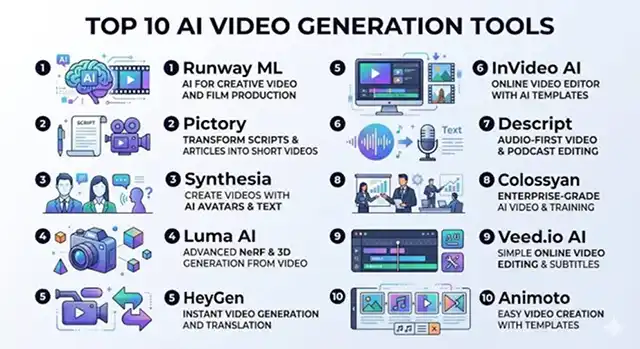
Using to be very expensive, in the past an explainer video would cost thousands of dollars for the script writer, voice actor and animator. Typically, the time to get a final draft was many weeks. Now with the advent of AI video tools, you can create a complete and professional looking explainer video in a fraction of the time.
The term "explainer video" can refer to many types of videos that use cartoon animations as well as realistic live presenters. Choosing which tool to use to create your explainer video will depend completely on your goals for the explainer video. Below are the 5 best AI video tools for creating explainer videos sorted by what they do best.
If You Just Want The Short Version
Fine, here it is up front: want a real-looking presenter talking to camera? Go with Synthesia. Need to churn out a lot of videos fast and don't care if the first draft is a little rough? InVideo AI. Already have a blog or a script sitting around and just want it turned into a video with minimal effort? Pictory. Want something animated with actual characters instead of a talking head? Vyond. Building training content that needs to plug into an LMS? Colossyan, no contest. Now let me actually explain why.
1. Synthesia — Best for Presenter-Led Explainers
Everyone's already heard of this one, and yeah, the hype is mostly earned. It gives you a realistic person on screen reading your script, in a pile of different languages, and the lip-sync stopped bothering me somewhere around my third attempt — I genuinely forgot I was watching a generated face and started just... listening to the content, which is kind of the whole point.
Here's my one gripe: it only really does one thing. A calm professional talking to camera. Corporate explainer? Onboarding video? Product walkthrough? Great. Want anything remotely cartoonish or stylized? Don't bother, it's not built for that and it shows if you try to force it.
Cost-wise — there's a free plan that's fine for poking around, and the paid tiers climb from "a solo creator could justify this" up to "this is clearly priced for a marketing team" once you need more render minutes or custom avatars.
2. InVideo AI — Best for Speed and Volume
This is the one that I really had open the entire two weeks in a tab. All you do is enter a prompt, and it finds stock footage, throws in a voiceover, captions, and music, and produces an end product in less time than it takes me to explain my project to a colleague.
Is the first draft always great? No. Sometimes the pacing feels off, or it picks a clip that's technically related but weirdly literal. But regenerating takes seconds, so "good enough, fast, and I can fix it in another 30 seconds" beats "technically perfect, eventually" for most of what I actually need videos for. I wouldn't put this one behind a big paid ad campaign without a careful once-over, though — save it for social clips and quick teasers.
Cost-wise — the free tier gets you a handful of minutes a week with a watermark slapped on. Paid plans strip that out and hand you more generation credits, which you will use faster than you'd expect once you start iterating.
3. Pictory — Best for Turning Existing Content Into Video
I'll be upfront — Pictory isn't trying to be a "start from a blank page" tool, and comparing it that way isn't fair to it. What it's actually good at is taking something you already wrote, a blog post, an old script, whatever, and pulling the key points out into a video with matched footage without you doing the thinking part twice.
If your team already writes long-form content and just wants a cheap way to squeeze a video out of it without hiring someone new, this is the tool. Don't try to build your main product explainer here from nothing though — it'll feel like using a hammer as a screwdriver.
Cost-wise — pricing runs monthly with caps on video length and export minutes. Out of everything on this list, it's usually the one that costs the least to get started with.
Side-by-Side At a Glance
Tool · Best For · Format
| Tool | Best For / Format |
|---|---|
| Synthesia | Realistic AI presenter reading your script, wide language support. Best for corporate and product explainers where a professional on-screen voice matters most. |
| InVideo AI | Prompt-to-video with stock footage, captions, and music assembled automatically. Best for fast, high-volume social and marketing clips. |
| Pictory | Converts existing articles or scripts into video with matched footage. Best for repurposing blog and long-form content. |
| Vyond | Animated, character-driven scenes with fuller manual control. Best for storytelling-style explainers and HR/training content. |
| Colossyan | Avatars plus quizzes and LMS-ready exports. Best for compliance training and structured corporate learning. |
Request A Custom AI Video
Tell us what you're trying to create and we'll point you to the right tool — or help you set it up.
4. Vyond — Best for Animated, Character-Driven Explainers
Vyond's been around for years, and honestly, the maturity shows the second you open it. Instead of a face reading a script at you, you get little animated characters — a frustrated customer, a confused new hire, whatever your scenario needs — that can actually act something out. Turns out watching a "story" land better than watching someone narrate at you, at least for problem-and-solution style content.
It does take longer to set up than the type-a-prompt-and-walk-away tools. You're placing characters and building scenes, not just pressing generate. For HR training or internal comms where a little storytelling actually helps the message stick, I think that extra 20 minutes of setup is worth it. For a quick social clip, it's overkill.
Cost-wise — this one's priced more like proper business software than a casual content app, billed monthly or annually. Don't expect a $5 starter tier here.
5. Colossyan — Best for Training and Compliance Videos
This one's a bit of a specialist, and I mean that as a compliment. Colossyan clearly built its whole product around corporate learning rather than trying to be everything to everyone. On top of the usual avatar-and-narration combo, it lets you drop in quizzes and export in formats that plug straight into a company's LMS — which, if you've ever had to manually track "did the team actually watch this," you'll know is a genuinely annoying problem to solve otherwise.
It won't win any awards for flashy marketing content — that's just not what it's for. But for compliance training, onboarding, or anything where you need proof someone finished and understood the material, the analytics alone make it worth a look.
Cost-wise — it's priced by seats and minutes and clearly built for teams rather than solo creators. There's a trial, so test the actual workflow before committing a whole department's budget to it.
How I'd Actually Pick One
Stop asking "which tool is best" — that's the wrong question, and it's why these listicles usually end with everyone still confused. Ask what your video actually needs to do first. A quick internal Slack update doesn't need the same polish as the hero video on your homepage that a thousand strangers will judge your entire company by in the first ten seconds. Different jobs, different tools.
- Publishing daily or weekly and drowning a little? Grab InVideo AI or Pictory. Speed wins here, full stop.
- Need it to actually feel like a person talking, not a slideshow with a voiceover? Synthesia, no real competition for that specific job right now.
- Got a problem-and-solution story to tell, something a little more human? Vyond's characters land that better than any static presenter I tried.
- Rolling out training that someone in HR needs to prove people actually finished? Colossyan. Don't fight it, just use the tool built for that exact headache.
One thing I'll say plainly, because too many "best AI tools" posts pretend otherwise: none of these fully replace a genuinely skilled human editor for the one video that really matters most — your funding pitch, your Super Bowl-style launch moment, whatever your company's equivalent is. For the other 95% of video content most businesses actually put out, though? Any of these five will get you there faster, and a lot cheaper, than booking an agency ever would.
Explainer Video Toolkit
Discover the top platforms built to translate complex information into clear visual stories.
The top 5 tools are categorized by their specific strengths: ngram (best all-in-one script and storyboard builder), Synthesia (the leader for avatar presenter-led corporate training), Golpo AI (the gold standard for automated whiteboard educational explainers), Vyond (best for traditional 2D business character animations), and InVideo AI (perfect for rapid prompt-to-stock-footage marketing clips).
Match the layout to your objective. Use avatar presenter tools (like Synthesia or HeyGen) for internal corporate training, compliance updates, or human resources onboarding where a "face" adds authority. Choose whiteboard or text-focused tools (like Golpo AI or ngram) for landing page product pitches, technical tutorials, or educational courses where the user needs to focus on screenshots and text charts rather than a host.
Yes, this is known as a Document-to-Video Workflow. Advanced platforms allow you to upload a PDF manual, paste a customer support help article, or input a website URL. The AI analyzes the raw data, strips out non-essential text boundaries, and restructures the narrative into a traditional problem-solution-proof sequence optimized for video engagement.
Direct text-to-video tools often guess blindly, creating random clip edits that fight with your script context. Engines like ngram generate a static text storyboard plan *before* rendering any video. This lets you inspect the structure, adjust pacing, or change specific image directions beforehand, saving hours of unnecessary processing time.
This is the hidden nightmare of traditional editing—changing a single logo means re-recording the whole video. AI platforms solve this through Modular Editing timelines. You don't have to rebuild the project. You just locate the single outdated frame box, upload the new dashboard screenshot asset, and the AI regenerates only that specific module seamlessly.
Yes, and it’s a critical feature for global expansion. Tools like Synthesia or Vyond translate your core script text into over 150 languages with a single click. The AI models match your localized text structure to matching vocal cadences, ensuring the visual pacing doesn't break when a Spanish translation runs longer than the original English clip.
Keep the hook under 7 seconds. Never lead an explainer with a slow 15-second animated brand logo spin—viewers will bounce immediately. Start the video directly inside the problem zone: "Managing customer support links by hand drops your conversion rates by 40%." Hook their attention instantly, then use the AI engine to outline your solution smoothly.
Ready to Make Your First Explainer Video?
Turn a script into a finished video without touching a timeline.