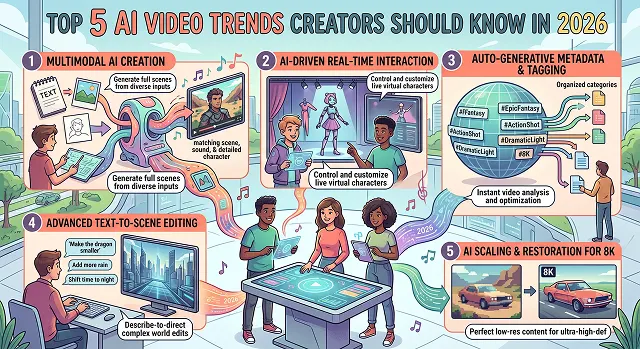
The digital media terrain has radically changed. The dialogue has officially moved beyond the initial debate about whether artificial intelligence is capable of producing pixels and is now centered around how the video production process creates pipelines for scalable, automated, and ultra-realistic assets.
For today’s creator, agencies, and web developers, being ahead of the game means understanding the principles of structural composition, multimodal synchronization, and layout programming.
1. Character & Brand Consistency as Core Infrastructure
- In early generations of AI video tools, keeping the exact same character face, clothing configuration, or product design identical across multiple independent cuts was an exhausting chore. Creators had to struggle with constant facial morphing and layout drifting.
- In 2026, Character and Asset Consistency has evolved from an advertised feature into a strict production baseline. Modern multi-model creation platforms operate built-in database modules (such as the Elements system).
- Instead of generating isolated clips individually and hoping for structural continuity, a creator defines an identity asset once using a reference photograph or text prompt vector. The platform saves that asset permanently to a local cast database, allowing the creator to deploy the exact same persona, branded asset, or custom typography layer seamlessly across 50 different scene variants with absolute visual locked continuity.
- [Master Reference Asset Locked] ➔ [Saved to Elements Database] ➔ [Deployed Seamlessly Across 50+ Multi-Angle Shots]
2. Audio-Native Generation (Synchronized Multimodal Passes)
- The classic post-production process of producing silent clips from AI, importing them into a video editing software, and then spending hours cutting audio waveforms to fit movement of lips and surroundings is extinct.
- Architecture of Frontier 2026 videos (Google Veo 3.1 and other diffusion transformers) includes unified multimodal token alignment. The AI calculates spatial movement, environmental lighting, and sound waves simultaneously during the initial generation pass.
- When you generate a clip, the model constructs frame-accurate 48kHz spatial audio loops, synchronized foley layers (like footsteps crunching on gravel or mechanical engines humming), and dialogue tracks natively alongside the pixels. The sound informs the movement from frame one, cutting video assembly down from days to minutes.
3. Directable Cinematic Camera Field Logic
- Vague prompt buzzwords like "ultra-realistic, 4k resolution, movie look" have been deprecated by modern text encoders. Content teams now interact with video networks using formal, structured cinematography shorthand.
- Instead of hiding motion inside a single long prompt paragraph, creation interfaces provide explicit, directable input fields for Shot Type, Angle, Lens Focal Length, and Axis Motion Paths. Prompting smooth, widescreen cinematic movement means declaring vector parameters programmatically:
- Cinematic Vector = Anamorphic Lens + Negative Z-Axis Dolly + 3D Parallax Calibration
- This exact terminology anchors the diffusion transformer's temporal attention maps, allowing creators to produce long, unbroken 20-second cinematic takes with zero background geometry warping or edge distortion.
AI Video Trends Master Comparison
Market Evolution Architecture · Creative Operational Pipelines
| Trend Name | Core Technical Infrastructure | Primary Creator Benefit | Operational Pipeline Step |
|---|---|---|---|
| 1. Character & Brand Consistency |
Persistent asset vector databases; cross-attention identity locks (e.g., Elements matrices). | Zero Facial Morphing. Keeps characters, clothes, and product designs 100% identical across independent cuts. | Step 1: Upload reference photos/concepts into the project library before rendering. |
| 2. Audio-Native Generation |
Unified multimodal token alignment; concurrent physical pixel and sound wave computation. | Eliminates Manual Audio Slicing. Generates frame-accurate 48kHz spatial audio, voices, and foley alongside video. | Step 3: Trigger rendering engine with the audio toggle enabled to generate sound and video together. |
| 3. Directable Camera Logic |
Axis-aligned vector prompting maps; structured field inputs for focal length and camera paths. | Artifact-Free Movement. Prevents background geometry warping or edge deconstructions during long takes. | Step 2: Explicitly declare your camera moves (e.g., negative Z-axis dolly zoom) using dedicated fields. |
| 4. The Unified Workspace |
Consolidated text-to-image, video, voice, and upscaling tool architectures within a single UI. | Context-Switching Reduction. Allows localized editing brush adjustments without re-rendering whole scenes. | Step 4: Execute localized texture modifications and timeline edits directly inside the main dashboard view. |
| 5. Vertical Dominance & Personalization |
Task-specific AI orchestration agents; automated variable data loops mapped to localized viewer metrics. | Mass Hyper-Targeting. Instantly reframes horizontal frames to vertical (9:16) while personalizing scenery dynamically. | Step 5: Programmatically map up customized visual variations adjusting voiceover language and text overlays on the fly. |
Request A Custom AI Video
Tell us what you're trying to create and we'll point you to the right tool — or help you set it up.
4. The Unified Workspace (Consolidated Workflow Tool Stacks)
- The era of jumping between five different disconnected web tools—using one engine for text-to-image concept art, a separate application for video animation, another for text-to-speech voice cloning, and a local suite for final upscaling—has completely ended.
- The leading trend of 2026 will be the emergence of fast-growing Consolidated AI Creation Suites. Creative studios operate within consolidated ecosystems (such as LTX Studio or Higgsfield), where everything is interconnected.
- This structural consolidation completely eliminates file conversion bottlenecks, minimizes browser tab context switching, and allows creators to execute localized AI Editing Actions (such as replacing or recoloring an individual object or clothing layer via text prompt mid-scene) without needing to re-render the whole sequence.
5. The Format Shift: Vertical Dominance & Personalization Scale
- Social media consumption metrics have pushed vertical formatting into the absolute majority. Over 59% of AI-generated video assets are now produced natively in a vertical (9:16) aspect ratio, heavily driven by platform expansions allowing longer multi-minute vertical short formats.
- Simultaneously, creators are leveraging task-specific AI agents to run Personalization at Scale. Instead of rendering a single, generic landscape video asset for a million viewers, automated developer workflows allow platforms to dynamically pull real-time user metrics or regional details. The pipeline adjusts the voiceover dialogue, text burned overlays, and local environmental scenery on the fly, rendering thousands of uniquely tailored variations instantly for hyper-targeted audience distribution.
Operational Workflow: Building Content Pipelines in 2026
To integrate these modern tech trends smoothly into a scalable, high-speed digital asset workflow, execute this precise sequence:
1. Define the Element Identity Blueprint
- Do not let the AI guess the look. Upload your high-resolution core product photography or character concept art directly into your workspace's asset module. Tag the image as a persistent asset identity vector to guarantee 100% visual consistency across cuts.
2. Structure the Multi-Shot Storyboard Grid
- Outline your narrative timeline using precise camera vector settings. Map out your sequence blocks deliberately: open with an anamorphic widescreen establishing shot, move into a dolly-forward medium shot, and wrap with a tight micro-lens macro detail pass.
3. Execute Unified Multimodal Generative Renders
- Trigger the generation queue using your target model framework. Ensure the native audio capability switch is toggled ON to synthesize frame-accurate environmental sound effects and dialogue cadence tracks along with the base video pixels.
4. Reframe and Re-Optimize for Vertical Delivery
- Once the master clip sequences are verified clean, use built-in viewport reframing nodes to instantly crop and recompose the layout from horizontal (16:9) to vertical (9:16). This avoids re-rendering entirely new video files for short-form social media distribution channels.
2026 AI Video Trends
Master the leading five generative breakthroughs redefining the modern digital asset pipeline.
The five absolute industry-defining developments this year are: 1. Physics-Grounded Simulation Engines (like Wan 2.2 rendering lifelike smoke, liquid, and weight interaction changes), 2. Cinematic Relighting Studios (allowing users to map 3D lighting coordinates over compiled clips in post-production), 3. Cross-Lingual Vocal Synthesis loops (cloning voices instantly into alternate foreign languages while retaining accent textures), 4. Automated Multi-Output Re-framing engines (instantly parsing widescreen clips into localized vertical layouts), and 5. Zero-Shot 4K AI UHD Up-scaling pipelines (reconstructing pristine spatial details without waxy artifacts).
Early generative systems purely guessed pixel placements, causing limbs to melt, backgrounds to shift, and objects to morph randomly. The massive trend shift in 2026 relies on Physics-Grounded Spatial Architectures. Models like Wan 2.2 are trained on real-world vector dynamics, gravity weights, and fluid forces. This ensures complex elements like volumetric smoke, glass shattering, and multi-character movements render with absolute spatial consistency.
Historically, once a video scene was exported or filmed, its exposure parameters were permanently locked down. The modern wave of AI Relighting tools (such as Magnific Relight or Higgsfield Studio) reads the flat pixels of an uploaded file and instantly builds a hidden 3D depth geometry grid. This lets creators position virtual studio lamps, inject glowing backlights, and cast realistic shadows across completed media loops without having to re-render the underlying asset.
Ditch simple, poorly timed voiceover tracks or unreadable text blocks. The current industry trend leans heavily into Cross-Lingual Voice Synthesis running through neural frameworks (like ElevenLabs Multilingual layouts and Coqui XTTS v2). Creators can feed the engine a brief 15-second sound sample, and the platform will translate and speak out target scripts in 40+ global languages while maintaining their exact human tone, natural pitch accents, and vocal texture.
Manually editing widescreen 16:9 YouTube videos into vertical 9:16 reels consumes hours of tedious timeline cropping. Modern workflows employ AI Intelligent Auto-Framing pipelines (like OpusClip and Munch). These engines track human faces and object boundaries across horizontal layouts, slicing them vertically while keeping the central action focused. They even split the screen dynamically during dialogue sequences, allowing creators to run multi-channel distribution completely hands-free.
Because generative models output digital textures like pixel swimming or waxy artifacts rather than camera grain, standard sharpness adjustments fail. The standard trend utilizes Spatial-Temporal AI Super-Resolution models (like Topaz Video AI's Iris engine or Pixop Cloud). These tools smooth out compression blocks and analyze neighboring frames chronologically before executing a pristine, artifact-free 4K expansion.
Adopt this strict 3-Step Production Blueprint: First, run your structured scene prompt strings through a high-precision simulator like Wan 2.2 to establish a stable visual base. Second, drop the rendered file into an AI Relighter to customize studio illumination grid properties and contrast balances. Finally, run the clip through an auto-framing clipping tool to package the asset into multiple widescreen and vertical outputs for multi-platform distribution.
Ready to try AI Videos?
Transform your ideas into cinematic video in seconds.