Having attempted to create a YouTube channel without faces, corporate training video or social media advertisement, one understands how time-consuming it could be. Adjusting the cameras, fine-tuning the three-point lighting, and reciting lines while messing them up is enough to make a 2-minute long video take the whole day to shoot.
The industry has officially moved past the era of stiff, robotic "uncanny valley" digital presenters. The latest generation of AI avatar engines combines generative video with advanced facial mapping to construct digital twins that capture micro-expressions, human head bobs, and flawless lip-syncing.
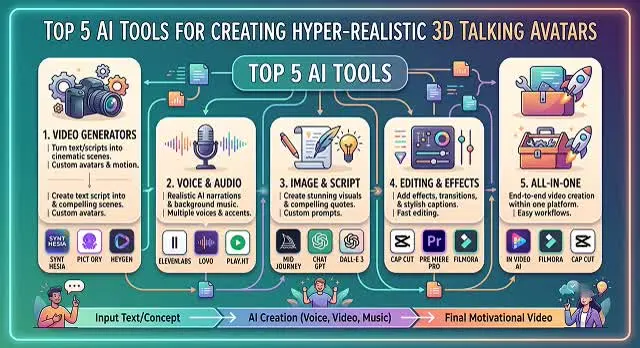
Whether you want to clone yourself as an infinite content machine or generate a entirely custom 3D presenter from thin air, here is our tested review of the top 5 best AI tools for hyper-realistic talking avatars.
1. HeyGen – The Reigning Monarch of Realism
HeyGen is undoubtedly recognized as the ultimate benchmark for marketing through customer engagement as well as quality social content. Driven by its Avatar V engine technology, it excels at understanding the nuances of how a human brain perceives a realistic avatar through subtle eye blinks, jaw movements, and body weight transfer.
- How it works: You can choose to utilize their professionally created presenters, create an avatar using a static prompt, or even create an Instant Avatar from a 2-minute video upload of you on their webcam.
- Pros: Best-in-class photorealism; native outfit generation to customize avatar clothing; amazing multilingual translations that ensure perfect lip-sync in more than 175 languages.
- Cons: Premium features use a credit structure that can get expensive for long, continuous videos.
- Best Suited For: Influencers, brand marketers, and YouTube automation channels that demand a lifestyle, non-corporate feel.
2. Synthesia – The Corporate Training Standard
If your goal is to turn massive, dry training manuals or human resources documents into engaging video guides, Synthesia is the enterprise heavyweight. It trades a tiny bit of HeyGen's casual fluid movement for robust workspace management, security compliance, and clean presentation formats.
- How it works: Simply insert your script, pick your avatar from a huge database of 230+ characters, pick a cloned voice, and create a multi-scene video presentation.
- Pros: Seamless script to video process that includes full slides; SOC 2 compliance for maximum security; perfect SCORM outputs for learning management systems (LMS).
- Cons: The stock avatars look like news anchor and can sound overly formal when used on informal social media channels.
- Best Suited For: L&D (Learning & Development) professionals, compliance professionals, and international onboarding teams.
3. Deepbrain AI – The High-Speed Volume Engine
Deepbrain AI’s core application, AI Studios, is engineered for speed and mass production. If you need to generate hundreds of localized product overviews or fast-paced news briefs daily, Deepbrain cuts down the rendering lag significantly.
- How it works: Drop a link, script, or PowerPoint deck into the canvas. Deepbrain parses the textual intent, segments the topics into scenes, maps a matching avatar, and processes a complete video draft in roughly 5 minutes.
- Pros: Extremely optimized text-to-video rendering loop; excellent multi-camera angles (cut between wide shots and close-ups dynamically).
- Cons: Editing interface focuses strictly on template compliance over open-ended creative control.
- Best Suited For: High-volume digital publishers, content factories, and automated local news networks.
The 2026 AI Game Dev Leaderboard: At a Glance
37 Synthesis Matrix · Asset Topology & Modeling Performance
| Platform | Best For | Primary Output | Mesh & Topology Quality |
|---|---|---|---|
| Meshy | All-in-One Asset Creation | GLB, OBJ, FBX |
★★★★☆
(Excellent PBR Material Texturing mechanics)
|
| Rodin (Hyper3D) | Hero Characters & Rigging | Clean Quad Meshes |
★★★★☆
(Industry-Best Quad Mesh Topology)
|
| anitya | No-Code Prototyping | Lightweight WebGL |
★★★★☆
Highly Efficient Files for rapid engine loading.
|
| Tripo3D | Blazing Fast Iteration | GLB, FBX |
★★★★☆
Perfect for Split-Second Concept production drafts.
|
| Ludo.ai | Multi-Material Prop Staging | Textured GLB |
★★★★☆
(Polycount-Controlled Optimized Mesh setups)
|
Request A Custom AI Video
Tell us what you're trying to create and we'll point you to the right tool — or help you set it up.
4. D-ID – The Live Agent & Budget Entry Pick
D-ID approaches the avatar space from a highly technical angle. While it handles standard text-to-video workflows beautifully, its massive competitive advantage is its real-time streaming V4 Interactive Agents.
- How it works: The D-ID solution is capable of converting one static 2D image to a talking head. Through direct integration of its backend API to LLMs, such as GPT-4, it becomes possible to create an avatar capable of holding live and unscripted conversations with customers.
- Pros: The most affordable premium starting tier on the market; powerful real-time API integrations for live web assistants.
- Cons: Free and entry-level packages include visible watermarks and restrict commercial distribution rights.
- Best Suited For: Web developers building interactive virtual agents, chat interfaces, and creators on a strict budget.
5. TalkingAvatar AI – The Video Redubbing Specialist
TalkingAvatar AI is designed specifically for modifying and localizing pre-existing video clips. If you don't want a generic stock anchor and instead want to manipulate real footage cleanly, this utility tool is incredibly powerful.
- How it works: Import an existing video with multiple speakers. Speaker diarization (the separation of different speakers) happens automatically. You can then re-script the entire thing, and get the real people from your video to lip-sync to it flawlessly through one-sentence voice cloning.
- Pros: Perfect one-click audio-to-video mapping for multiple speakers; highly accurate one-sentence voice cloning; ability to replace yourself with an AI doppelganger in apps such as Zoom or Twitch.
- Cons: Interface looks more like a utility processing panel than a fancy creative design application.
- Best Suited For: Podcasters updating old show recordings, multi-lingual translators, and live streamers.
The Pro Workflow: Prompting an Avatar from Thin Air
If you want to generate a completely unique presenter without using a real person's photo, do not leave the face design to chance. Follow this Two-Step Production Blueprint:
1. Create a Studio-Lit Base Concept Image
- Do not let the video generator invent the face, as this causes pixel distortion. Build a high-resolution static frame in Midjourney or Flux first. Use highly technical lighting prefixes to ensure clarity: "Symmetrical studio portrait, frontal view, neutral expression, crisp photorealistic skin textures, diffused softbox lighting, solid grey studio background".
2. Animate via Image-to-Video Audio Mapping
- Take your flawless base image and upload it into the talking-photo panel of HeyGen, D-ID, or TalkingAvatar AI. Paste your script and select a high-fidelity neural voiceover track. The engine will lock the facial architecture and animate only the speech physics.
3. Mask Minor Quirks in Post-Production
- Export your finished avatar clip. Drop it into an editor and layer ambient room tone or subtle low-volume background instrumentation. Adding soft sound design distracts the human eye from noticing minor AI processing artifacts around the jaw boundaries, cementing the realism.
3D Game Asset AI Tools
Master the pipelines for generating style-consistent, engine-ready 3D models using pure text strings.
The top specialized tools for game development include Meshy (highly popular for rapid text-to-3D generation), Tripo3D (excellent for fast drafts and neural surface reconstruction), CSM (Common Sense Machines) (perfect for turning flat 2D concept sketches into full 3D models), and Sloyd.AI (optimized for crisp, clean low-poly models that load fast in game engines).
To maintain an exact visual style, you need an Image-to-3D workflow. Instead of typing text directly into a 3D generator, first create your item designs using a 2D generator like Midjourney with a locked style reference parameter (--sref). Once you have a collection of matching item sheets, drop those uniform images into CSM or Meshy to extract consistent 3D meshes.
Yes, they are built to integrate seamlessly with game pipelines. Most modern generative 3D tools export standard industry formats such as .FBX, .OBJ, and .GLTF/.GLB. These files import directly into Unreal Engine, Unity, Blender, or Godot, and they come complete with embedded coordinate layouts and PBR material setups.
A polycount budget is the maximum number of geometric triangles allowed in an asset before it causes game lag. Raw AI meshes can often be messy and unoptimized. To fix this, platforms like Meshy and Tripo offer built-in Decimation and Retopology tools. You can explicitly set a target limit—like restricting a prop model to exactly 2,000 triangles—and the AI will re-flow the geometric wireframe cleanly.
Yes, but you need to append technical material language to your text strings. Instead of just describing colors, include explicit shader definitions at the end of your prompt layout. For example, use: "Sci-fi treasure chest, PBR stylized texture pack, high metallic value on iron trim, rough matte finish on leather body, 4K texture resolution map, glow map on glowing runic cracks."
Most standard tools produce static "T-pose" meshes, but automated rigging is catching up fast. Tools like Tripo3D have built-in skeletal auto-rigging for basic humanoid and animal characters. For meshes that don't include bones, you can drop the exported .FBX file into Adobe’s free Mixamo tool to map an skeletal rig and choose from thousands of pre-made game animations in one click.
Use the secure 3-Step Optimization Routine: First, run your structured prompt layout inside an engine like Meshy to generate the raw model. Second, hit the platform’s "Bake PBR Maps" and "Retopology" buttons to clean up unnecessary triangles and structure the textures. Finally, export as an .FBX file, run a quick automated scaling check inside Blender, and drop it straight into your game project folder.
Ready to try AI Videos?
Transform your ideas into cinematic video in seconds.