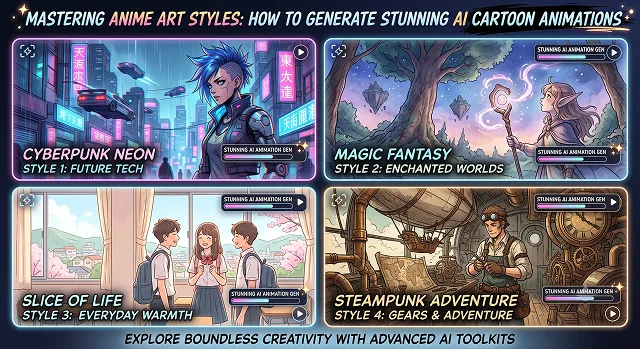
Anime animation is arguably the most challenging digital media. Moving a piece of art out of its still 2D origins and into fluid animated sequences takes more than simple prompts. It demands a deep understanding of line art preservation, cel-shading physics, prosodic camera movement, and character identity locking.
Whether you are producing a 90s retro-cyberpunk sequence, a Studio Ghibli-inspired fantasy landscape, or a modern action sequence, generating high-end AI anime requires mastering both the image generation tier and the temporal video animation tier.
Here is your complete guide to mastering AI anime art styles and bringing them to life with motion.
1. The 4 Distinct Aesthetic Tiers of AI Anime
To prompt anime effectively, you must speak the vocabulary of specific animation eras and production houses. The underlying text encoders translate these historical terms into precise linework, color palettes, and lighting physics.
[Era & Style Anchor] ➔ [Line Art Weight] ➔ [Color Palette] ➔ [Shading Model] ➔ [Final Render]
Anime Style Era / House Prompt Matrix
Aesthetic Trait Breakdown · Target Syntax Anchors
| Anime Style Era / House | Key Aesthetic Traits | Target Prompt Syntax Anchors |
|---|---|---|
| 80s–90s Retro Cyberpunk (Satoshi Kon / Katsuhiro Otomo) | Hand-drawn cel-animation, heavy grain, dramatic shadows, neon reflections, high-contrast linework. | "1990s anime aesthetic, hand-drawn cel animation, retro cel shading, film grain, muted chromatic aberration, VHS texture." |
| Masterwork Fantasy (Studio Ghibli / Hayao Miyazaki) | Soft gouache painterly backgrounds, organic lighting, lush nature, expressive character design. | "Ghibli inspired, painterly gouache background, soft pastel colors, hand-painted anime landscape, serene atmosphere." |
| Modern High-Budget Action (ufotable / MAPPA) | Dynamic digital compositing, heavy rim lighting, particle effects, razor-sharp vector line art. | "ufotable style, dynamic composition, dramatic rim lighting, intense camera angle, glowing particle effects, crisp linework." |
| Clean Slice-of-Life (Kyoto Animation / Makoto Shinkai) | Hyper-realistic lens flares, volumetric sky textures, detailed eyes, soft focus depth-of-field. | "Makoto Shinkai aesthetic, dramatic volumetric clouds, sunburst lens flare, hyper-detailed eyes, vibrant color grading." |
2. Generating the Master Frame (The Image Phase)
Trying to generate an anime video straight from text often leads to floating limbs, inconsistent line weights, and facial distortion. The professional workflow always begins with a locked static 2D master image.
The Best Engines for Anime Image Generation
- NijiJourney (V6 / V7): Midjourney’s specialized anime engine. It features unmatched understanding of anime terminology, clean line art, and advanced style reference parameters (--sref) to maintain character consistency across multiple shots.
- FLUX.1 [dev] / Anime LoRAs: Open-source models paired with fine-tuned LoRA weights (such as LineArt, RetroAnime, or Chibi) running locally in ComfyUI or automatic web UIs.
The Master Prompt Recipe
To make sure the engine does not produce and render photorealistic human skins or overly CG textures, use this detailed prompt formulation:
- Anime Master = Style Anchor + Character Details + Linework Directive + Lighting/Color
- Example Prompt: “A retro anime style shot from the 1990s featuring a female mechanic with grease on her cheek and messy dark blue hair wearing a big bomber jacket in a dimly lit garage.”
AI Anime Generation Leaderboard
Anime Model Benchmarks · Aesthetic & Access Matrix
| AI Video Engine / Tool | Best Anime Aesthetic | Standout Feature | Price & Access |
|---|---|---|---|
| Hedra (hedra.me) | Character-Driven & Audio Sync | Perfect lip-syncing with zero face-melting | Free (No Watermark) |
| Midjourney Niji + Luma | Cinematic "Makoto Shinkai" Style | Photorealistic lighting and lens flares | Paid Subscription |
| Runway Gen-3 Alpha | Fluid Action & Sakuga Animation | Handles fast camera panning and motion vectors | Credit System |
| Kling AI 3.0 | 90s Retro Cel-Shaded | Long generation times (up to 10-second clips) | Freemium (Watermarked) |
| Haiper AI | Dark Fantasy / MAPPA Style | High line-art detail and dynamic shadows | Free Tier Available |
Request A Custom AI Video
Tell us what you're trying to create and we'll point you to the right tool — or help you set it up.
3. Animating the Static Frame (The Image-to-Video Phase)
Once your static master image is locked, you feed it into a temporal video diffusion model. Classic 2D Anime relies on “animating on twos or threes.” (holding frames 2-3 ticks in a row to make action have an extremely crisp snap to it.) This is opposed to, for example, “60 Fps ultra smooth motion.”
Top Video Engines for Anime Motion
- Kling AI (Video 3.0 Omni): Excels at locking facial identity and maintaining consistent line art during complex head turns and camera tracks. Use the Element Reference or Motion Control feature to prevent the anime character from morphing into a photorealistic 3D person.
- Wan 2.1 / 2.2 I2V: An open-source powerhouse. Running Wan 2.1 Image-to-Video allows you to animate anime frames with strong motion diversity while preserving the underlying drawing style.
Controlling the Motion Vector
When prompting motion for 2D art, less is more. If you ask for too much movement, the neural network will default to 3D video logic, stretching and warping the 2D lines.
- Good Anime Motion Directives: "Slow wind blowing hair and clothes, subtle eye blink, camera executing a slow cinematic dolly forward along the negative Z-axis, static background."
- Avoid: "Character turns around, runs fast, jumps, flips, complex fighting combo" (This causes geometry melting).
4. Step-by-Step Animation Pipeline
2D anime animation Follow this pipeline to get the raw idea to a nice final animation:
1. Generate the Static 2D Keyframe
- Use NijiJourney or FLUX to generate your initial keyframe. Ensure the lighting, eyes, and line art are completely clean. Upscale the static image to $2048 \times 1152$ before animating.
2. Inpaint & Line Cleanup
- Bring the keyframe into a photo editor (like Photoshop or Photopea). Fix any typical AI generation errors—such as extra fingers, merged hair locks, or broken pupils. The video engine will amplify any flaw present in the starting image.
3. Temporal Motion Ingestion (I2V)
- Upload your clean keyframe into Kling AI or Wan 2.1 I2V. Set the motion vector parameter to low/medium (Motion Scale: 3 to 4). Keep the prompt focused on environmental factors (wind, floating particles) and micro-expressions (eye blinks, hair sway).
4. Anime-Specific Upscaling Pass
- Do not use standard photorealistic AI upscalers on anime footage! Pass your final video export through a specialized anime upscaler (such as Real-CUGAN or Anime4K). These models preserve sharp vector line art and flat cel colors without injecting artificial real-world skin textures.
Anime AI Animation Masterclass
Learn how to prompt, render, and animate authentic Japanese art styles without visual distortion.
The top platforms for generating anime animations are Kling AI and Vidu AI, both of which excel at understanding 2D illustration dynamics and maintaining character line integrity. For maximum stylistic control, pairing open-source models like Wan 2.1 or CogVideoX with anime-focused LoRAs (Low-Rank Adaptations) inside ComfyUI yields unparalleled consistency for traditional cel shading and studio-level aesthetics.
To capture 90s retro cel animation, include descriptors like: "1990s retro anime aesthetic, hand-drawn cel shading, subtle chromatic aberration, soft grain, VHS bloom, saturated primary colors." For a modern digital anime look, shift your prompt tokens to: "ultra-crisp digital line art, vibrant subsurface scattering, cinematic compositing, Makoto Shinkai lighting, volumetric dust particles."
Style drift usually happens when generators mix 3D render datasets with 2D art. To lock down the 2D aesthetic, use negative prompts such as: "3D, photo, realistic, claymation, render, depth map texture, photorealistic skin." Additionally, starting with a clean 2D reference image (Image-to-Video) rather than pure text ensures the model retains flat line art geometry across the entire frame sequence.
Anime animation relies heavily on intentional camera direction rather than chaotic frame shifts. Keep your motion strength sliders low (between 3 and 5) and specify classic anime camera techniques in your text prompt, such as "slow tracking pan," "dramatic zoom-in on character eyes," or "parallax background whip pan." Controlling movement speed prevents lines from breaking down or warping during movement.
Maintain consistency by generating a multi-angle character turn-around sheet first. Use this base image as an Image Reference (or IP-Adapter target) across all subsequent video prompts. Keep character design traits identical in every prompt—such as hair color, outfit details, and distinctive accessories—so the diffusion model maps movement onto a fixed visual foundation.
Standard AI video outputs often look slightly soft or blurry around thin ink lines. Run your finished video through an anime-optimized AI upscaler like Topaz Video AI (using the Anime/CG model) or Real-ESRGAN Anime. These specialised models specifically target vector lines and flat color fills, sharpening outlines while removing compression noise without creating waxy textures.
Follow this proven 3-Step Production Pipeline: First, design clean, high-resolution keyframe illustrations of your characters and backgrounds using 2D image generators. Second, feed those keyframes into an Image-to-Video generator (like Kling or Luma) with targeted camera motion prompts to create short, 4-second animation clips. Finally, assemble the shots in an editor, add sound effects and voiceover tracks, and run the edit through an anime upscaler for a polished 4K finish.
Ready to try AI Videos?
Transform your ideas into cinematic video in seconds.