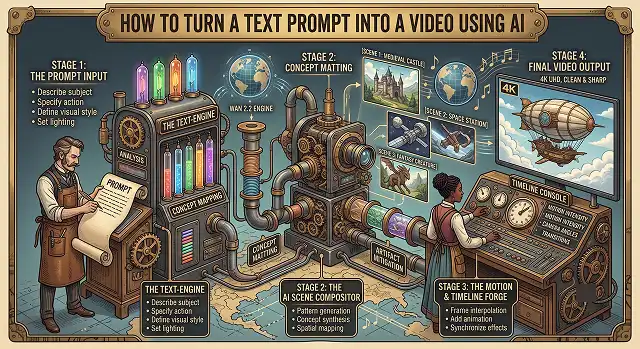
Generating high-fidelity video directly from a plain string of text has shifted from a futuristic tech demo into the engine room of modern digital production. Thanks to massive breakthroughs in Diffusion Transformer (DiT) model architectures, creators can now bypass expensive camera gear and complex editing software to render broadcast-quality, fluid cinematic sequences in seconds.
Step 1: Master the 5-Element Prompt Recipe
The most common mistake beginners make is writing vague, hyper-short text entries like: "A cool futuristic cyberpunk city landscape movie style." This gives the text encoder too much computational room to guess, resulting in blurry background structures, sudden color shifts, and jagged pixel blocks.
To output crisp, production-ready footage on your first render, structure your input string using the industry-standard Five-Element Formula:
The Formula Elements Broken Down:
- The Subject: Define exactly who or what is inside the frame with specific texture notes. (e.g., "A grizzled astronaut wearing a scratched white modular space suit...")
- The Environment: Anchor the background details firmly to prevent texture floating. (e.g., "...standing inside a dense, bioluminescent jungle on a foreign planet...")
- The Core Action: Use pacing adverbs to dictate smooth motion. (e.g., "...slowly reaching down to touch a glowing blue alien plant leaf...")
- The Cinematography: Explicitly direct the virtual camera using formal industry terms. (e.g., "...shot on a 35mm anamorphic lens, tight macro extreme close-up tracking shot...")
- The Lighting Style: Instruct how light cuts through the space. (e.g., "...low-key dramatic chiaroscuro lighting, soft volumetric glowing dust particles scattering, cinematic film grade.")
Step 2: Calibrate Engine Workspace Parameters
Before hitting the generation queue, look below your text input block to access the technical customization panel. Properly adjusting these variables saves token budgets and cuts down rendering errors:
- Aspect ratio: Use 16:9 Widescreen if the intended channel or desktop UI has a landscape orientation. For discovery channels targeting short-form (TikTok, Reels, YouTube Shorts) choose 9:16 Vertical.
- Classifier-Free Guidance (CFG Scale): Leave this parameter setting at value ranging from 3.5 and 5.5 exclusively. Beyond that range, the model is pushed to adhere to the textual strings as it was entered too closely, resulting color burnout as well as unnatural geometric distortion.
- Temporal Pacing (FPS): Just Make your targeting to your own framerate as 24 FPS or 30 FPS To prevent unnaturally smooth cinema motions.
Step 3: Execute the Post-Production Mastering Pipeline
Once your engine configuration is complete, follow this production checklist to finalize your digital media asset:
1. Initiate the Cloud Generation Loop
- Click the render trigger button. The multi-modal server node will begin computing your spatial-temporal tokens. Keep the tab open; the rendering lifecycle utilizes real-time tracking webhooks.
2. Execute Temporal Quality Control Pass
- Open the generated master file in full preview mode. Scan the final 15 frames closely. Because diffusion transformer tools can experience minor mathematical drift near the end of calculation steps, use a video editor to clip the final 0.5 seconds if you notice edge warping.
3. Synchronize Audio & Foley Arrays
- If utilizing an audio-native engine like Veo, listen to the auto-generated ambient sounds. If your engine yields silent files (like raw SVD or Runway modules), overlay a royalty-free, AI-generated background score track set to a baseline volume of -18dB.
4. Temporal Resolution Upscaling Pass
- Export your clean edit master. Run the final video file sequence through a specialized, temporal-aware video AI upscaling node (such as Topaz Video AI or BasicVSR++) to bump the asset cleanly from its base resolution up to a crisp 4K Ultra HD finish.
Select Your AI Video Workspace
Workspace Architect · Engine Allocation Matrix
| AI Video Engine | Best Suited For | Top Operational Feature |
|---|---|---|
| Luma Dream Machine | Architectural Renders & Smooth Pans | Ray Reasoning Model. Resolves physics, light paths, and spatial logic before rendering. |
| Google Veo 3.1 | Cinematic Realism & Soundscapes | Multimodal Audio. Generates clean 48kHz synchronized sound grids alongside video pixels. |
| Kling AI (3.0 Pro) | Complex Human Motion | Anatomical Continuity. Flawless tracking for human joint motion, walks, and micro-expressions. |
| Wan 2.2 / 2.1 | Open-Source & Local Processing | 3D Causal VAE. Open-weight structure allowing infinite unwatermarked local generations. |
Request A Custom AI Video
Tell us what you're trying to create and we'll point you to the right tool — or help you set it up.
1. Under the Hood: The Frontier Model Architectures (2026 Stack)
The text-to-video space has separated into three distinct deployment paradigms, each offering specialized structural advantages:
Luma Dream Machine (Ray 3.14 Engine)
Luma's architecture relies on a proprietary "Ray Reasoning Model". Instead of instantly attempting to draw pixels when reading text tokens, Ray executes a pre-render calculation phase.
- The Math: The engine models spatial physics, traces light reflections, evaluates intent, and plots scene logic before initializing the denoising blocks. This eliminates the common trial-and-error approach to prompting, allowing the system to output native 16-bit High Dynamic Range (HDR) and EXR production files ready for professional VFX compositing pipelines.
Kling VIDEO 3.0 Omni
Developed with a heavily integrated Multimodal Visual Language framework, Kling 3.0 moves away from older modular architectures where audio and video were rendered separately.
- The Multi-Shot Director: It functions as a virtual automated director. An individual architectural instruction can produce a 15-second uninterrupted continuous multi-shot video sequence (2-6 shots by tradition, such as a classic shot-counter-shot conversation) while retaining full character, attire, and environment consistency in 4K quality.
Wan 2.2 / 2.1 (The Open-Source Workhorse)
Alibaba’s open-source suite utilizes a specialized 3D Causal Variational Autoencoder (Wan-VAE) wrapped around a heavy Diffusion Transformer (DiT) framework.
- The Compression Matrix: The Wan-VAE compresses spatiotemporal data arrays by hundreds of times before running them through the denoising loops. This highly optimized math allows the model to calculate fluid motion vectors using exceptionally low hardware overhead.
2. Advanced Multi-Shot Prompt Scripting Template
Because advanced 2026 models like Kling 3.0 and Luma Ray 3 understand narrative sequencing directly from a single prompt block, you must structure your text inputs like a formal Cinematic Shot List. Using continuous paragraphs confuse the attention layers. Instead, format your prompt using this strict sequence matrix:
- [Global Style Anchor]: Cinematic film texture, photorealistic, 35mm anamorphic lens, low-key volumetric lighting, teal and amber color grade.
- [Shot 1 - Establishing - 4s]: An ultra-wide angle drone pan of a neon-lit Tokyo street during a heavy downpour. Neon signs reflect sharply on the rain-slicked asphalt. Camera tracking smoothly along the negative X-axis.
- [Shot 2 - Medium Close-Up - 5s]: Cut to a close-up tracking shot of a young female detective in a damp beige trench coat walking down the alley. Raindrops run down her face as she shifts her eyes smoothly toward the camera.
- [Shot 3 - POV / Reveal - 6s]: Cut to her point-of-view shot. A mysterious glowing holographic data disk hums quietly on top of a metal crate. Soft volumetric blue light beams pierce through the dark mist, realistic smoke dissipation.
- Why this format works: By chunking the temporal instructions with explicit timestamp boundaries (4s, 5s) and technical camera directives (negative X-axis), you guide the diffusion transformer's token weights to calculate structural cuts natively. This avoids the need to stitch multiple independent video clips together manually in post-production.
Text-to-Video Engine Primer
Master advanced script formatting workflows, layout framing targets, and artifact-free rendering passes.
For creators launching their very first generation run, platforms like Kling AI and Luma Dream Machine offer a gentle learning curve combined with spectacular visual consistency. If you need a completely automated pipeline that writes the script, organizes stock layouts, and builds an entire voiced timeline from a single sentence, InVideo AI and CapCut AI provide the fastest browser workspaces. For high-end cinematic physics, Runway Gen-3 Alpha remains an exceptional choice.
If you dump a chaotic, unorganized paragraph into a video generator, the AI will scramble different concepts together, causing shapes to warp. Always deploy a clear structural recipe: [Core Subject] + [Environmental Setting] + [Camera Trajectory & Velocity] + [Lighting Profile] + [Stylization Specs]. Separating your descriptive boundaries this way allows the spatial transformer to process the background clearly before drawing character movement paths.
Match your canvas framework directly to where your audience will watch the video. If you are constructing cinematic presentations, software documentation videos, or website hero components, select a traditional 16:9 widescreen layout. If your target destination is mobile short-form networks like TikTok, YouTube Shorts, or Instagram Reels, toggle your dashboard settings over to a vertical 9:16 aspect boundary box before generating files.
The motion velocity slider controls how much physical change happens between video frames. Setting motion parameters to maximum speeds forces the generator to take massive structural risks, which frequently tears edges apart or distorts background lines. For your initial projects, keep your motion intensity slider set to a moderate level (between 4 and 6 out of 10) to maintain rock-solid visual consistency and smooth camera transitions.
Video diffusion networks parse phrases visually rather than understanding deep language rules. Avoid abstract concepts like "she feels exceptionally happy" or "an elegant corporate atmosphere," because the machine cannot translate non-physical concepts into specific pixel grids. Instead, **describe the literal, visible objects** that represent those concepts, such as: "Character smiling widely, bright ambient office lighting, clean glass partitions, soft focus background layout."
Almost all standard AI spatial transformers generate base video elements in short clips lasting exactly 4 to 5 seconds per scene run. If your target timeline script requires a longer uninterrupted window, utilize the platform's native **"Extend Video" tool**. This caches the final frame layout of your clip, treats it as a fresh reference baseline image, and renders an extra 4 seconds of logical motion pathing seamlessly.
Adhere strictly to this unshakeable 3-Step Creation Sequence: First, split your conceptual narrative script into individual, distinct scene descriptions using the locked structural formula layout. Second, run low-resolution draft previews across your scene blocks to check character stability and camera framing paths. Finally, lock your favorite clips, push them through a high-fidelity 4K upscaler block, and compile the final segments inside a timeline editor.
Ready to try AI Videos?
Transform your ideas into cinematic video in seconds.