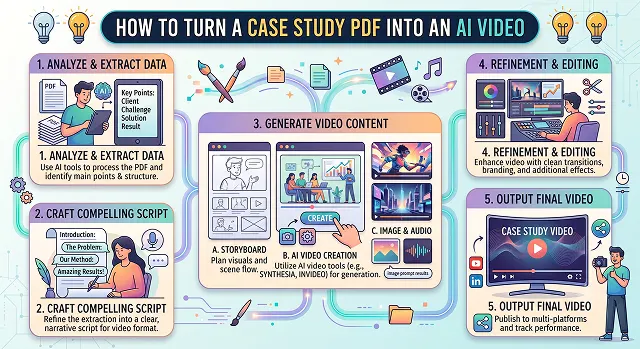
There’s no better way than turning an old, text-based case study in PDF form into a dynamic and engaging AI video. Video content generates more engagement, is easier to digest, and can increase your brand’s visibility immensely in social media networks such as LinkedIn and YouTube and online ads.
This is your step-by-step guide in creating that amazing AI video out of an old, boring PDF case study.
Step 1: Find the Actual Story Inside the Document
A case study PDF is usually structured for skimming — headers, bullet points, a methodology section nobody outside your own team cares about. A video needs a narrative arc instead: what was broken, what you did, what changed. Pull those three things out specifically, and set aside everything else for now.
Read through your PDF and highlight exactly three things: the client's specific problem in one sentence, what your product or service actually did about it, and the single most impressive result number. If you can't find all three clearly stated, that's worth noting — it might mean the written case study itself needs tightening before it becomes a video.
Step 2: Cut the Script Down Hard
A 4-page PDF has maybe 1,200 words. A 90-second video script should land closer to 200-250 words — that's genuinely how much a comfortable speaking pace covers in 90 seconds. It's a harsh step at first, but it’s the only one that will make sure your final video gets seen in the end.
The structure should be along the lines of one sentence describing the situation, two or three sentences about what you did, one or two sentences about the actual outcome, and then finally a closing sentence about the next steps. Everything else from the original PDF — background context, secondary metrics, methodology — gets cut, not because it's unimportant, but because it belongs in the full written case study, not the video summary of it.
Step 3: Pick a Format That Matches How the Video Will Get Used
There isn't one correct style — it depends on where this video is going to live.
- Embedding the presentation on your landing page or homepage: an AI presenter reading the condensed script with accompanying slides including your key stat is appropriate and appears credible without the need for your team to be featured.
- Sales Enablement (1:1 in sales cycles): data-driven video including the client name, client logo (with their consent), and your key result up front typically performs better in such direct circumstances.
- Social or LinkedIn Post: A quick 30 second version that focuses only on one really great statistic.
Use Case to Format Matcher
Where It's Going · Best Style
| Where It's Going | Recommended Style |
|---|---|
| Landing Page / Homepage | Presenter-led narration with slides highlighting the key stat. Calm, credible pacing over flashy visuals. |
| Sales Enablement (1-on-1 Deals) | Data-forward, client name and logo visible (with permission), result front and center. |
| Social / LinkedIn | Short 20-30 second cut, bold on-screen text, single standout number as the whole focus. |
| Email / Newsletter Embed | Short teaser clip with a static, clickable thumbnail linking to the full video hosted elsewhere. |
Request A Custom AI Video
Tell us what you're trying to create and we'll point you to the right tool — or help you set it up.
Step 4: Create the First Draft
Now that your streamlined script is complete, a text to video generator can create your first draft within a few minutes — creating visuals and a voiceover based on your script without any involvement from your end. Copy and paste your script, select the right visuals, and check out the results!
If you want a presenter specifically reading the script rather than a slide-and-voiceover format, an AI avatar tool works well here too — the polished, consistent delivery suits case study content, which benefits from feeling credible and calm rather than flashy.
Step 5: Make the One Key Number Impossible to Miss
Whatever your single best result is — a percentage, a dollar figure, a time saved — it should appear as large on-screen text at the exact moment it's spoken, not just mentioned in narration and left to float past. Viewers remember what they read on screen far more reliably than what they only heard once.
Step 6: Add Captions and Publish in the Right Place
Auto-captions take a couple of minutes and matter more than they seem to for this format — a good share of case study videos get watched muted, especially on a landing page someone's browsing at work. Once captioned, embed rather than upload the raw file directly, both for load speed and because a hosted player usually gives you basic view analytics for free.
Before You Publish: Get Permission and Stay Accurate
- Confirm the client is okay with a video, not just the written PDF. Many client agreements only cover use of their name and results in specific formats — check before assuming video use is automatically included.
- Don’t distort the true meaning through rounding. “Almost 40%” where the actual figure is 34% may seem like a minor distortion but it does have the ability to destroy credibility should your prospect ask you to provide the details.
- Keep the video dated, even subtly. Results and pricing can shift — a video that quietly ages out of accuracy is worse for credibility than an older one that's clearly timestamped.
A case study video doesn't need to cover everything in the PDF — it needs to make someone curious enough to ask for the details the PDF already has.
PDF-to-Video Engine
Transform dense business case studies and data reports into highly engaging B2B video presentations.
The top specialized engines include Mootion and X-Pilot (the best for accurate document parsing and data visualization), Synthesia (the gold standard for avatar-led executive presentations), and Vidocu (perfect for simultaneous multi-output workflows that create both videos and translated web manuals). For presentation-style customer decks, Powtoon AI and Canva Video offer rapid timeline layouts.
Rather than lazily stitching raw screenshots together, advanced engines utilize an LLM Document Understanding engine. The system breaks the PDF layout down contextually: it maps core headers into separate video chapters, isolates customer quotes into prominent visual text overlays, and retains structural data metrics to act as the primary blueprint for the automated script generator.
Yes, tools like X-Pilot and Scholarly apply a specialized Visual Knowledge Parser. Instead of treating a data table like unreadable text blocks, the software reads the raw chart coordinates and vectors. It handles the layout as a dynamic teaching beat, generating slick, clean graph animations that build up line-by-line while the voiceover reads out the corresponding percentage growth values.
Avoid passing pure, unfiltered academic text directly to the speaker block. Head into your editing workspace dashboard and utilize the Script Customization / Tone mapping slider. Choose conversational corporate voice profiles (like ElevenLabs-backed models) and select explicit audience targets like "explain to a senior executive team". This adds professional, human-like pauses and contextual metric emphasis automatically.
Deploy a workflow that supports Brand Kit Injection, pioneered by platforms like Powtoon AI and Synthesia. Before processing the document pages, upload your enterprise asset style sheet containing locked hex code values, typography fonts, and PNG logo paths. The layout engine instantly skins the slides, ensuring every generated clip follows your official marketing identity.
Yes. Tools like JoggAI and Synthesia are built specifically for Avatar-Led Document Reviews. The engine positions a professional virtual actor onto a clean split quadrant layer of your workspace grid layout. As the case study moves through sections, the avatar speaks directly to the audience, pointing toward the graphs and statistics to create a personalized presentation.
Adhere strictly to a secure 3-Step Upload Routine: First, run your PDF through a dedicated optimization tool to ensure layout graphics and metrics are clean and searchable. Second, drop the file into an engine like Mootion or Powtoon to generate a structured first-draft script and scene layout. Finally, review and swap any generic stock footage placeholders with real product screenshots or customer brand assets before exporting your 1080p master presentation file.
Ready to Turn Your PDF Into a Video?
Get your best case study in front of people who won't open an attachment.