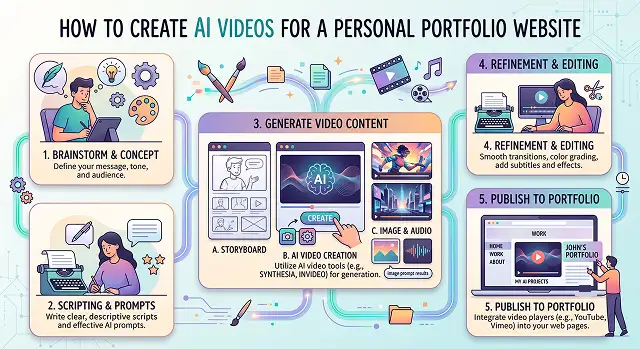
In the year 2026, having a static portfolio website using nothing but plain text and image files is simply not good enough to set yourself apart from others. The most defining trend in today's web design industry is the implementation of functional animation and film video into websites. With today's potential clients, employers, and collaborators, you have very limited time to capture their attention – only five seconds!
With the implementation of top-quality AI video into your personal portfolio website, you can showcase logo reveals, create behind-the-scenes montage videos, generate digital twins as interactive hosts of your website, and transform boring case studies into exciting video reels.
This ultimate guide covers everything about how to write scripts, generate, optimize, and embed AI videos onto your personal portfolio website in an easy-to-follow manner.
Step 1: Figure Out What Type of Video You Actually Need
"Portfolio video" is not a single item, and choosing the wrong format is by far the number one cause for never completing this assignment. In actuality, there are three formats, each requiring separate software.
- A short intro video — yourself speaking straight to the camera for 20-30 seconds about your identity and profession. Suitable when you feel good on camera or prefer that the AI does the talking for you.
- A project walkthrough — screen recording plus narration explaining a specific piece of work, most common for developers, designers, and product people.
- A visual reel — no talking at all, just your best work sequenced together with music and light text, most common for photographers, filmmakers, and visual artists.
Pick one. Trying to combine all three into a single video is exactly how these projects stall out — a five-minute video that tries to be an intro, a demo, and a reel usually ends up losing the viewer before any of the three parts land.
Step 2: Write Way Less Than You Think You Need
Considering the fact that there’s only eight seconds to work with, most people overdo the script. An intro script that is supposed to take 20 seconds ought to be done in three to four sentences, which include who you are, what you do, something that you’re proud of, and your intended outcome.
Read your draft out loud once before recording anything. If it takes longer than 25 seconds to say naturally, cut it — written scripts almost always read shorter on paper than they sound out loud, and portfolio videos punish anything that drags.
Step 3: Pick the Right Tool for Your Format
This is where AI tools genuinely save the most time, since each format has a natural tool match:
- Intro video, comfortable on camera: film it yourself on your phone, then use a tool like CapCut to add clean captions and trim the awkward pauses.
- Intro video, not comfortable on camera: an AI presenter tool like Synthesia can read your script for you — a genuinely reasonable option if the idea of recording yourself is the actual thing stopping you from finishing this.
- Project walkthrough: a screen-recording tool that adds AI narration automatically (the same category covered in our screenshots-to-tutorial-video guide) works well here, since you're narrating your own work rather than reading a formal script.
- Visual reel, no talking: a tool like InVideo AI or Pictory can sequence your existing images and clips with music and pacing without you touching a timeline.
Format to Tool Matcher
Video Type · Recommended Approach
| Video Type | Recommended Approach |
|---|---|
| Short Intro (On Camera) | Film on your phone, then CapCut for captions and trimming. Fast, personal, low setup. |
| Short Intro (AI Presenter) | Synthesia reads your script for you. Best if being on camera is the thing stopping you from finishing. |
| Project Walkthrough | Screen-recording tool with AI narration. Best for developers, designers, and product work. |
| Visual Reel (No Talking) | InVideo AI or Pictory to sequence existing work with music and pacing. |
Request A Custom AI Video
Tell us what you're trying to create and we'll point you to the right tool — or help you set it up.
Step 4: Generate a Draft, Then Actually Watch It Back
Whatever tool you use, resist publishing the first generation. Watch it back once, ideally with the sound off first — this sounds strange, but it's the fastest way to catch pacing problems, since you notice visual dead air much faster without the narration filling the silence for you.
Then watch it again with sound, specifically listening for one thing: does the opening line actually say something specific, or does it open with something generic like "hi, I'm excited to share my work with you"? That kind of opener burns your eight seconds without telling the viewer anything. Lead with the specific thing you do, not a greeting.
Step 5: Add Captions No Matter How Clear You Are
It might shock you to hear that a lot of people browse through portfolio websites without sound, particularly if they’re doing it during their working hours and have to go through numerous portfolios one after another. Automatic captions take care of this within two minutes and considerably boost your viewership.
Step 6: Get the Technical Embedding Right
This is the step people skip and then wonder why their nicely made video barely gets watched.
- Host it properly. Uploading large raw video file to your own site will crash load speed. Using YouTube (no-listed if you wish that not appear in any of search engine) or Vimeo embeded the player instead.
- Don't force autoplay with sound. The worst thing that you can do to get rid of visitors as fast as possible is to force video autoplay with sound.
- Add a poster frame that looks intentional. The thumbnail shown before someone presses play matters — a random mid-blink frame looks careless where a chosen, clean frame looks deliberate.
- Test it on mobile specifically. A meaningful share of portfolio traffic is mobile, and a video that's perfectly sized on desktop can end up cropped or oddly placed on a phone screen if you don't check.
What Actually Makes Someone Keep Watching
Beyond the technical steps, a few things separate portfolio videos that hold attention from ones that don't.
- Specificity beats polish. "I built a checkout flow that cut cart abandonment by a noticeable margin" holds attention better than a technically flawless video that only says "I'm a passionate developer."
- Show, then tell — not the other way around. Leading with 2-3 seconds of your actual work before you start talking gives the viewer a visual reason to keep watching while your intro plays.
- Keep it under a minute unless you have a specific reason not to. Longer videos have their place for a full walkthrough, but a homepage intro almost never benefits from stretching past 45 seconds.
- Update it. A portfolio video referencing a two-year-old project as your "latest work" undercuts credibility more than having no video at all — treat it as something to revisit every few months, not a one-time task.
Nobody's judging your lighting setup. They're judging whether you sound like someone who actually understands the work you're showing them.
Portfolio Video Integration
Optimize your creative assets and site components to build a high-conversion digital showcase.
Focus on three distinct core pillars to exhibit versatile skills: First, Cinematic World-Building using high-end physics engines like Runway Gen-4 or Kling 3.0 to prove pure prompting mastery. Second, Character/Likeness Consistency loops showing a single subject moving through varied environments. Finally, Before-and-After breakdowns that peel back layers from a flat reference image up to a fully upscaled, color-graded video reel.
Never upload raw, uncompressed 4K MP4 files straight onto your web hosting servers. Convert your presentation reels into the modern WebM format using an efficient H.265 or VP9 layout codec. This drops file weight levels by up to 70% while keeping pristine visual sharpness intact. For fallback support on older browsers, bundle a lightweight 1080p MP4 track right next to it.
For tiny, 3-to-5 second looping background headers or silent hover-state thumbs, local WebM hosting keeps transitions feeling fluid. But for long project walkthroughs, case study break-downs, or your master showreel, it is best to use a specialized hosting CDN like Vimeo Pro or Bunny.net. This prevents high data-transfer bills and ensures high bandwidth adaptive bitrate streaming for international clients.
Clients hire AI developers not just for the output, but for their system engineering precision. Wrap your exact text strings, seed variables, and model weights into clear, copyable code tags (pre and code blocks) placed contextually under your media players. This cleanly demonstrates your prompt architectural setup to prospective creative directors.
Ditch standard static images entirely. Set up high-performance, automated Video Hover Reveals. When an enterprise recruiter scrolls through your grid layout and hovers their cursor over a project card, a low-weight, silent video loop should instantly play. This interactive, lively layout hooks browsing attention much faster than flat static graphics.
While digital assets are always copyable, you can minimize direct scrapers significantly. Apply an elegant, low-opacity text or brand logo watermark over a corner grid quadrant during your final editing phase. Furthermore, disable the right-click download trigger via custom javascript tags on your video players, and block scraping crawlers inside your directory's root robots.txt parameters.
Structure each case study layout using an unshakeable 3-Step Storyboard Narrative: Start with the primary **Hero Reel** (the stunning, final polished 4K model render). Next, display a technical **Workflow Sequence Block** showing the reference architecture, mask arrays, and intermediate upscaler comparison steps. Finally, close with a brief **Project Objective summary** detailing how your asset automation slashed traditional rendering timelines and overhead expenses.
Ready to Build Your Portfolio Video?
Turn a short script into a polished intro your work deserves.