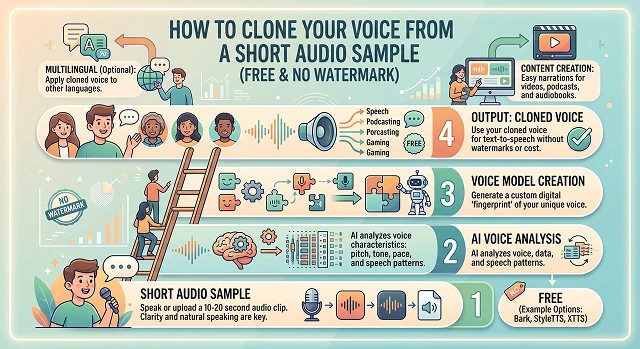
Cloning your voice used to require hours of professional studio recordings and expensive software. Today, thanks to advancements in neural audio networks, you can create a scary-accurate digital clone of your voice using just a 10-second to 1-minute audio sample—completely free and without annoying watermarks.
The Best Free, No-Watermark Voice Cloning Tools
To get a true studio-quality clone for free without watermarks eating up your screen or audio, these are the top platforms to use:
1. ElevenLabs (Free Tier)
ElevenLabs is without a doubt the best service out there in terms of natural inflection, breath sounds, and emotions.
- The Free Deal: Get 10,000 characters of audio for free each month.
- Watermark Status: Zero.
- The Catch: Their Instant Voice Cloning technology works only on their paid plan (you need a 1-minute voice sample to clone), but it’s extremely accurate!
2. F5-TTS / Fish Speech (Open Source)
If you want completely unlimited generation with zero restrictions, open-source models are the way to go.
- The Free Deal: 100% free and locally runnable if you have a decent computer, or accessible via free cloud platforms like Hugging Face spaces.
- Watermark Status: None.
- The Catch: Requires a tiny bit of technical familiarity to click "Run" on a web interface, but it can clone a voice perfectly from just a 5 to 10-second audio clip.
Step 1: Prepare Your Audio Sample (The "Golden Record")
The trick to a seamless AI voice clone doesn’t lie in the software itself – it depends on the quality of the training sample. Poor-quality source audio translates into a tin-can voice for the AI clone.
Here’s How to Record the Best 30-Second Sample:
If you want completely unlimited generation with zero restrictions, open-source models are the way to go.
- Eliminate Background Noise: Find a small, quiet room (small closet rooms work perfectly to reduce echoes). Make sure no fans, ACs, or any computer running noisy fans are turned on.
- Use a Decent Mic: Don’t spend $500 buying a fancy mic. It’s better to use a decent smart phone recording just a few inches away from your face rather than a budget headset mic pressing against your shirt-collar.
- Watch Your Script: Talk normally. Read out a single paragraph which contains different kinds of expressions and emotions along with a question mark and standard punctuation marks.
- Format Correctly: Convert your recording into a .MP3/.WAV file and make sure it’s under 10 MB.
Step 2: Cloning your voice (step-by-step)
Here is how you can do it using the simplest web-based process by utilizing an online instant cloning tool.
1. Create Your Free Account
- Head over to a platform like ElevenLabs or a public Hugging Face space hosting F5-TTS. Sign up for a free account.
2. Upload Your Sample
- Go to the “Voice Lab” or “Voice Cloning” section. (Most cloning sites have a separate section or dedicated page for cloning.) Tap “Add Instant Voice,” name your voice, then upload the “clean” 30-60 second audio clip you prepared in step 1.
3. Confirm You Own Your Voice
- Most sites ask you to check a box, or recite a short phrase verifying you’re only cloning your own voice (a good move, to deter deepfakes.)
4. “Turn Your Text Into Voice”
- Now, simply write or paste your script, and click Generate. The clean, watermarked clip will be ready to download in just a few seconds.
The Voice Cloning Comparison Matrix
Audio Architecture · Speech Synthesis Deployment Benchmarks (2026)
| Feature / Metric | ElevenLabs (Free Tier) | F5-TTS (Open Source) | Qwen3-TTS (Open Source) |
|---|---|---|---|
| Cost | 100% Free (10,000 characters/mo) | 100% Free & Unlimited | 100% Free & Unlimited |
| Watermark | None | None | None |
| Sample Needed | ~1 minute (Instant mode) | 5 to 10 seconds | 3 seconds |
| Hardware Required | Cloud-based (Runs on anything) | Mid-tier GPU (~4GB–8GB VRAM) | Low-to-mid GPU (~4GB–8GB VRAM) |
| Generation Speed | Fast (Cloud-dependent) | ~7x Real-time (Fast mode) | Sub-100ms latency |
| License Type | Proprietary Commercial | MIT License (Commercial allowed) | Apache 2.0 (Commercial allowed) |
| Vocal Expressiveness | High (Captures breathing/sighs) | Excellent stability & flow matching | High text-speech alignment precision |
| Best Used For | Quick voiceover tests and small web projects. | Free content creation, video narration, and offline privacy. | Shorter text snippets and production pipeline application builds. |
Request A Custom AI Video
Tell us what you're trying to create and we'll point you to the right tool — or help you set it up.
Step 3: Fine-Tuning and Troubleshooting
If the voice you clone is sounding somewhat artificial or strange, then try tweaking these slider controls within your software settings:
- Stability (Low-High): Stability should be reduced for a more lively performance by the cloned voice, although reducing it too much will result in an erratic performance. Higher stability levels will make the performance more stable but boring. Ideal levels are between 40% and 50%.
- Clarity / Similarity: This dictates how strictly the AI mimics your sample. Set this high (70-80%) if your original recording was pristine. If your sample had minor background hiss, lower this slightly so the AI doesn't replicate the hiss!
SEO Optimization Guide: Ranking Your Audio Content
If you are using your cloned voice to scale your content marketing, ensure you optimize it for Google and algorithm search engines:
1. Create Audio-to-Text Transcripts
- Search engine bots cannot "listen" to audio files effectively. Always include a clean text transcript alongside your audio player or video. This injects your content with relevant keywords naturally.
2. Implement Speakable Schema Markup
- In case you publish your AI-enabled articles on any site, you should use Speakable Schema. This indicates to search engines such as Google that your content has been designed to be used on voice search devices (Google Assistant, Amazon Alexa).
3. Title Architecture for YouTube/Podcasts
When uploading content powered by your voice clone, structure your titles using the Keyword + Benefit framework:
- Bad Title: "My audio article about coding."
- Good SEO Title: "How to Learn Python Fast (Full Audio Guide for Beginners)"
The Open-Source Revolution: True Unlimited Cloning
While commercial tools limit your word count on free tiers, open-source models allow you to clone a voice perfectly and generate hours of text with zero restrictions. The most dominant open-source models rely on an architecture called Flow Matching, which delivers human-like speech patterns in seconds.
The two best absolutely open-source models that you can use without paying anything currently are:
- F5-TTS: This is an amazing model that produces hyper-realistic emotion-driven voices using only a 5 to 10 second clip. It natively handles multi-style voice generation and zero-shot voice transfers.
- CosyVoice 2: An incredibly popular model trained on massive multilingual datasets. It has an ultra-low streaming latency (around 150ms), meaning it can generate natural speech almost simultaneously as text is fed into it.
Voice Cloning Toolkit
Master the zero-cost pipelines to clone your vocal profile cleanly without watermarks or subscription walls.
The top open-source and free platforms are F5-TTS and XTTS v2 (via Coqui open ecosystem), both of which can be run locally via GitHub or through free cloud instances on Hugging Face Spaces. For creators looking for polished web interfaces with generous free tier allotments and completely clean file downloads, MyVocal.ai and ElevenLabs Starter tier offer exceptional rapid testing without mixing sound tags or watermarks into your audio.
While older systems demanded hours of voice training data, modern zero-shot architectures like F5-TTS require only a 10-to-15 second raw audio snippet. The target model analyzes the key acoustic frequencies, voice print textures, and dynamic thresholds within those few seconds, allowing it to accurately project that vocal likeness onto whatever text blocks you script next.
An AI voice model will copy your environment just as much as your vocal profile. If your source sample contains heavy air conditioning hums, microphone clicks, or room echo, your output audio will sound heavily distorted and synthetic. Run your file through an automated tool like Adobe Podcast AI Enhance or use a clean mic in an isolated room to strip out background noise before loading the sample into the generator.
If your generated track sounds monotone, check your platform's tracking sliders. Keep the Stability configuration at around 40-50%. Dropping stability down forces the neural network to express wider pitch changes and add organic breath sounds. Furthermore, manually add punctuation like ellipses (...) or dashes (—) within your text script to trigger longer, natural pauses.
Yes, this is known as Cross-Lingual Voice Synthesis, and it is natively handled by tools like XTTS v2 and ElevenLabs Multilingual models. You can feed the platform an English voice sample, paste a text layout written in German, Hindi, or Japanese, and the AI will output the target language while maintaining your personal vocal tone, texture, and accent characteristics.
Vocal data security is critical. When testing on web cloud platforms, make sure your voice model settings are set to "Private" or "Personal Use Only" to keep public users from generating files with your likeness. For absolute security control, download and run local open-source weights (like F5-TTS) using a local web interface environment. This keeps your training samples completely isolated on your own hardware storage.
Stick to a secure 3-Step Generation Routine: First, record a clean 15-second WAV file of your voice reading a sample line naturally, and run a denoise filter over it. Second, load that reference block into your chosen engine, paste your target script text, and configure stability sliders to mirror your normal cadence. Finally, review the output track for pronunciation errors before exporting your clean, watermark-free WAV or MP3 audio master.
Ready to try AI Videos?
Transform your ideas into cinematic video in seconds.