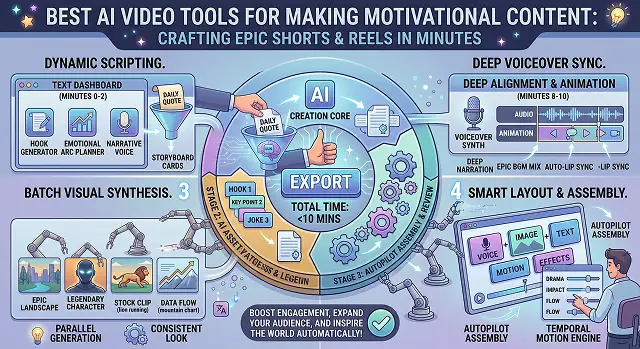
Creating motivational videos, especially "faceless" videos for TikTok, Reels, and YouTube Shorts, has taken off like never before. In order to do this, you will need the right blend of dynamic scripts, deep-voiced narration, epic music, and quick editing.
Instead of juggling five different apps, specific AI tools now automate this exact niche. Here is a breakdown of the best AI video tools for making motivational content, categorized by how you like to work.
1. The "All-in-One" Faceless Video Machines
If you want to type in a single topic like "Why discipline beats motivation" and have the AI generate the script, choose a booming voiceover, sync cinematic B-roll, and add trending captions all on its own, use these tools.
Invideo AI & Faceless.so (Best for Quick Social Content):
- The Vibe: Type a prompt, get a fully finished video.
- How it works: You provide it with an initial concept. Then, the machine makes a script, picks up relevant movie clips (such as people running in the rain or climbing mountains), incorporates a powerful voiceover, and combines it all with epic background music.
- Pros: Unbelievably quick. You can adjust your video just by providing a few typing instructions ("make the voice gritty and masculine" or "switch the scene at 15 seconds with a gym clip").
- Cons: Due to being dependent on stock footage databases, sometimes you may encounter some generic footage if the prompt you provide is too vague.
Steve AI & Pollo AI (Best for Multi-Format Optimization):
- The Vibe: Built specifically to create high-impact, viral clips.
- How it works: These platforms excel at matching the emotional peaks of your script. When the voiceover builds up to a major life lesson, the background score automatically swells, and the visuals sync perfectly to the beat.
- Pros: Outputs up to 4K quality; great for crisp mobile layouts.
- Cons: To get the best premium cinematic assets without watermarks, you will need to jump onto a paid plan.
2. The Raw Cinematic Engines (For Ultra-Realistic, Custom Visuals)
If you are tired of using the same old stock footage and want to generate completely unique, jaw-dropping, movie-like scenes from scratch, you need to look at heavy-hitting generative models.
Kling AI (Version 3.0) & Seedance 2.0 (Best for Human Movement):
- The Vibe: Hyper-realistic generation.
- How it works: If you want a specific visual—like "a cinematic, moody shot of an athlete staring into the stadium lights, 4k, anamorphic lens"—these engines generate it from scratch. Kling 3.0 is famous for rendering realistic human physics, meaning no weird glitchy hands or robotic faces.
- Pros: Complete creative freedom. Your videos will look entirely original, like a high-budget sports commercial.
- Cons: These tools only make the video clips. You still have to bring those clips into an editor to add your own music and voiceovers.
Google Veo 3 & Luma Dream Machine (Best for Scenic/Atmospheric Shots):
- The Vibe: Grand, sweeping scenery and perfect camera panning shots.
- How it works: Works well as backdrops for philosophical and stoic motivation (e.g., ocean waves, mountain tops, rain clouds). The Veo 3 generates some of the most high-definition videos out there.
- Pros: Aesthetically pleasing; almost looks like a movie scene.
- Cons: Takes a little while to generate each clip.
3. The Custom Editors (For Total Control Over the Mood)
If you already have a vision, a specific voice clip (like a famous speech by Joe Rogan or David Goggins), or a distinct aesthetic in mind, you need a platform that gives you traditional editing control powered by AI efficiency.
CapCut & Flixier:
- The Vibe: Cloud-based editing with powerful AI features.
- How it works: You can upload your background music and use their AI text-to-speech tools to generate deep, aggressive, or calm motivational voices. They also feature one-click auto-captions that apply flashy, stylized text overlays across your clips.
- Pros: Incredible flexibility. You control the exact timing, cuts, and text styles. CapCut’s mobile app is entirely free for core features.
- Cons: Requires more manual effort than the automated prompt-to-video tools.
Which Workflow is Yours?
Faceless Strategy · Production Path Matrix
| If your goal is to... | Best Tool To Use | Why it fits |
|---|---|---|
| Pure Speed: Want 5 videos a day with zero effort. | Invideo AI or Faceless.so | Generates the whole thing from a single text line. |
| Cinematic Wow-Factor: Want completely unique, stunning visuals. | Kling AI (3.0) or Google Veo 3 | Creates custom, Hollywood-level video clips from scratch. |
| Hands-On Editing: Want to mix custom audio with trendy text styles. | CapCut or Flixier | Full control over the timeline with automated AI assists. |
Request A Custom AI Video
Tell us what you're trying to create and we'll point you to the right tool — or help you set it up.
1. Automated "Faceless Channel" Operators
When it comes to handling all channels on your own (TikTok, Reels, and YouTube Shorts), those become your personal production team. They write, narrate, assemble, and style your video from scratch based on one prompt only.
Invideo AI & HeyGen (Video Agent)
- The Workflow: You give the machine a prompt such as "Produce a dark and gritty 60 seconds video based on Stoic philosophy theme."
- The AI Actions: It writes a hook-like script, chooses a deep-voice narrator, finds some high contrast backgrounds (such as stone sculptures, rain on the street, solo runners) and applies trendy and stylish text overlays on top of them.
- The Control Panel: Instead of working with an advanced editing timeline, you manipulate the video with simple text commands. You can actually write "Increase the background music level by 20% when saying the final line" or "Change the background clip at 0:15 to the boxing ring," and the AI does that immediately.
- Best For: Solos who need to scale the content creation process—helping you produce 3-5 unique and good-quality videos in less than 15 minutes.
2. The Hollywood-Grade Visual Engines
If your strategy relies on visual awe—meaning you want scenes that look completely original, hyper-cinematic, and incredibly high-budget rather than standard, overused internet stock clips—you need pure generative models.
Runway (Gen-4.5) & Kling AI (Version 3.0)
- The Workflow: These are powerhouses for generating videos from text and videos from images. You feed them creative prompts such as: "35 mm anamorphic shot, closeup of eyes of a tired marathon runner with sweat drops, golden hour lighting, film grain, 4k."
The Tech Edge:
- Kling 3.0 is world-class at rendering realistic human anatomy and complex muscle movements without the weird digital "glitches" or melting faces common in older AI tools.
- Runway features an advanced Multi-Motion Brush. You can upload a static image of a powerful landscape or a stoic statue and literally paint over specific areas (like moving clouds, smoke, or flowing water) to control exactly how those elements animate.
- Best For: Creating premium, cinematic-level motivational content or sports-brand aesthetics that stand out completely from the generic crowd.
3. The Power Audio Stack (The "Voice" of Motivation)
In motivational content, audio is 70% of the battle. If the voice sounds robotic, viewers scroll away instantly. You need deep, gravelly, commanding voices that mirror figures like David Goggins or Marcus Aurelius.
ElevenLabs
- The Workflow: You write or paste your custom motivational script into the platform and select an ultra-realistic voice model.
- The Tech Edge: ElevenLabs goes far beyond standard text-to-speech. Its models capture emotional inflection, natural breathing pauses, and dramatic gravelly undertones. It actually understands context: if your script says, "When you want to quit, keep going," the AI naturally lowers its register and increases tension for emphasis.
- Voice Cloning: You can safely upload a clean 30-second audio sample of your own voice (or a copyright-free voice) to create an absolute digital twin, giving your channel a completely exclusive, branded narrator across hundreds of videos.
Motivational AI Toolkit
Master the tools that turn simple quotes and mindset scripts into viral, high-energy clips.
The top platforms for this niche include Steve.AI and InVideo AI for prompt-to-video automation, Google Veo 3 or Runway Gen-3 for high-end cinematic visuals, and Magiclight.AI which features dedicated motivational templates. If you are repurposing long podcast speeches from figures like Joe Rogan or David Goggins into Shorts, Opus Clip is the absolute leader.
The secret lies in picking a voice profile with deep bass, low pitch, and high clarity inside tools like ElevenLabs. To make it hit harder, lower the voice "Stability" slider to around 45%—this forces the AI to speak with more aggressive emphasis, adding natural breath breaks and gravelly tones rather than a flat digital monotone.
Avoid generic stock prompts. Use atmospheric, high-contrast descriptions inside your video model. Excellent keyword formulas include: "Cinematic dark mood, heavy vignette, slow-motion tracking shot of a athlete running in thick volumetric fog, dramatic rim lighting, moody desaturated color grading, shot on 35mm film."
Use an editor featuring Kinetic Auto-Captions like CapCut or Opus Clip. Choose a bold, blocky font (like Montserrat or Impact), set the display to show only 1 to 3 words per frame, and turn on the "Word Highlight" option. The AI will instantly sync the captions to your voiceover syllables, highlighting key words in neon yellow or bright red to keep scroll attention high.
Yes, but you need to feed it a strict structural structure to avoid cliché fluff. When generating a script, tell the model: "Write a 60-second motivational speech. Avoid overused words like 'stunning' or 'journey.' Use short, sharp, fragmented sentences. Lead with a brutal truth, pivot to discipline, and end with a harsh call-to-action."
Use Audio Ducking and Peak Alignment. The ambient background audio track (like slow orchestral strings or heavy cinematic bass pads) needs to sit quietly at roughly -18dB while the voiceover is running. The pro trick is to manually match your video cuts and the most aggressive script point right when the music track hits its main structural drop.
Stick to an automated Pipeline Strategy: Paste a 2-hour podcast link of an inspiring public speaker into Opus Clip, let the AI automatically extract 10 highly engaging vertical clips ranked by virality potential, verify that the face tracking centering looks sharp, hit export to download clean 1080p clips, and push them directly onto your content scheduler.
Ready to try AI Videos?
Transform your ideas into cinematic video in seconds.