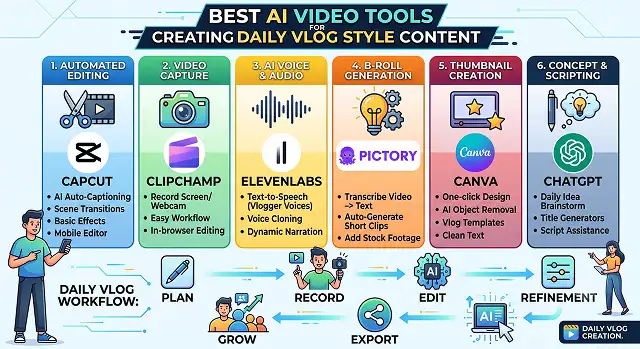
And one of the best ways to create an incredibly loyal fan base is through the daily vlog format. People are not tuning in for the excitement, but they are tuning in for the energy and personality.
Nevertheless, being a daily vlogger is one sure way to get burnt out. Recording the whole day, going through endless hours of raw footage, cleaning up all the "ums" and "ahs," synchronizing music, and making captions would make the process of making a 10-minute long video take you 8 hours every single time.
Generative AI tools have officially broken this barrier. Specialized AI editing engines can now parse a day's worth of raw footage, extract the most engaging hooks, match the soundtrack to your pacing, and animate B-roll seamlessly from simple prompts.
Whether you are building a lifestyle brand on YouTube, scaling an aesthetic "Day in the Life" series on TikTok, or automating high-conversion daily shorts, here is our hands-on review of the best AI video tools for creating daily vlog style content.
The Short Version
When your most time-consuming task is removing unnecessary words and long periods of silence from your talking to camera vlog, then you cannot find a better tool to do so than Descript. Looking for something quick, easy, and mobile friendly? CapCut. Specifically building a YouTube channel and want auto zoom, chapters, and noise cleanup built for that platform? Gling. Need quick captions and vertical reformatting without installing anything? VEED. And if your real bottleneck is turning one long daily vlog into a week's worth of short clips across platforms? Vizard.
1. Descript — Best for Cutting Filler Words and Dead Air
This is genuinely the tool that changed how fast my test edit went. Descript transcribes the full 20 minutes, and every "um," repeated sentence, and awkward pause shows up as visible text you can just delete — the video cuts itself to match. What would've been 40 minutes of manual scrubbing turned into about 10 minutes of skimming a transcript and deleting obvious junk.
It's not flawless — it caught most filler words but missed a couple of longer rambling tangents where I technically wasn't saying "um" but was still going nowhere. Those still needed a manual pass. For the mechanical, repetitive part of daily editing, though, nothing else on this list saved more time.
Cost-wise — there's a usable free tier for shorter projects, with paid plans priced around monthly transcription hours.
2. CapCut — Best Free, Fast, Mobile-First Option
For editing on your phone between errands, rather than sitting down at a laptop every night, CapCut is genuinely hard to beat. Auto captions, quick trim tools, and a huge trending template library mean a daily vlog can realistically go from raw footage to posted in under 15 minutes if you're not chasing perfection.
The trade-off compared to Descript is precision — CapCut's filler-word detection isn't as thorough, and you're doing more manual scrubbing to find the awkward bits. For someone prioritizing speed and simplicity over frame-perfect editing, that's a completely reasonable trade, especially on a day where 15 minutes is genuinely all you have.
Cost-wise — the core editing, captions, and templates are free with no watermark, which matters a lot for daily, high-frequency use.
3. Gling — Best Built Specifically for YouTube Vloggers
Gling leans hard into the specific, repetitive tasks that eat up a YouTube vlogger's time — automated silence and filler-word removal similar to Descript's approach, plus auto zoom-ins that add a bit of visual movement to otherwise static talking-head footage, and AI-suggested titles and chapters aimed specifically at what tends to perform on YouTube.
It integrates with editors like Premiere and DaVinci Resolve rather than fully replacing them, which is worth knowing upfront — it's positioned more as a fast first-pass tool that hands off to your main editor than a complete standalone solution. For someone who already has an editing workflow and wants to speed up just the tedious first cut, that's a genuinely useful role to fill.
Cost-wise — pricing runs on monthly plans tied to processing volume, aimed specifically at creators publishing regularly rather than occasional users.
Side-by-Side At a Glance
Tool · Best For · Trade-Off
| Tool | Best For / Trade-Off |
|---|---|
| Descript | Cutting filler words and dead air via transcript editing. Trade-off: still misses some longer, rambling tangents. |
| CapCut | Fast, free, mobile-first editing anywhere. Trade-off: less precise filler-word detection than Descript. |
| Gling | YouTube-specific auto zoom, chapters, and cleanup. Trade-off: hands off to a separate editor rather than standing fully alone. |
| VEED | Fast browser captions and vertical reformatting. Trade-off: bigger structural edits still need manual review. |
| Vizard | Turns one long vlog into a week of platform-ready clips. Trade-off: highlight picks need reviewing, not a perfect final cut. |
Request A Custom AI Video
Tell us what you're trying to create and we'll point you to the right tool — or help you set it up.
4. VEED — Best Browser-Based Quick Turnaround
No install, no waiting on renders locally — VEED runs entirely in the browser, which is genuinely convenient if you're editing on whatever laptop happens to be nearby. Captions generated quickly and were mostly accurate on our test clip, needing only minor corrections, and converting the raw footage to a vertical short took just a couple of clicks.
Where it's more "assist" than "automate": it accelerates the mechanical parts (subtitles, trimming, format conversion) well, but bigger structural decisions — cutting an entire rambling section, reordering a story beat — still needed manual review. That's a fair characterization of most tools on this list, honestly, but worth setting expectations around.
Cost-wise — there's a usable free plan for shorter exports, with paid tiers unlocking longer videos and watermark-free downloads.
5. Vizard — Best for Turning One Vlog Into a Week of Clips
If the real daily grind isn't the long-form edit itself but everything that's supposed to happen after it — cutting shorts for TikTok, Reels, and YouTube Shorts from the same footage — Vizard is built specifically around that repurposing step. Upload the long vlog, and it identifies highlight moments, reframes them vertically, and captions them automatically.
It's genuinely a different job than editing the main vlog itself, and it shows — the auto-detected highlights were a reasonable starting shortlist rather than a perfect final cut, similar to other clip-detection tools in this category. For a daily vlogger trying to stretch one recording session into a full week of content across platforms, that shortcut is worth the extra step in the workflow.
Cost-wise — there's a free tier to test the workflow, with paid plans scaling based on monthly upload minutes.
A Look at Building a Sustainable Workflow That Won’t Make You Feel Tired
The importance of the tool is much lower compared to the system itself. Things that made the greatest impact on me after changing my approach to workflow from “once” to daily practice:
- Film your videos in batches when you can. It is much more convenient to film several days’ worth of video content and then process it in separate batches rather than to record and process every day.
- Pick one primary tool and stick with it. Switching tools daily to chase whichever feels "best" adds real friction. Learning one tool's shortcuts well saves more time than any individual tool's raw feature set.
- Set a hard time limit before you start editing. Daily vlogs don't need to be polished — they need to ship. A self-imposed 20-minute edit cap keeps the habit sustainable long past the point where perfectionism would otherwise kill it.
- Let AI handle the boring 80%, and spend your remaining energy on the part only you can do — picking which story beat actually mattered that day, not scrubbing for dead air.
The daily vloggers who last a year aren't the ones with the best editing software. They're the ones who found a workflow boring enough to survive doing it every single day.
Daily Vlog AI Tools
The ultimate setup for automating jumps, adding smart b-roll, and streamlining your daily publishing workflow.
For vlog style content, Descript is incredible because it allows you to edit your video timeline simply by editing a text transcript. CapCut AI dominates for rapid mobile trends, auto-captions, and smooth transitions. If you want a tool that scans your raw footage to automatically generate high-retention social shorts or daily highlight reels, OpusClip and Vrew are fantastic.
You can instantly handle this using AI Text-Based Editing or silence removal plugins. Platforms like Descript transcribe your audio into text lines immediately upon upload. You can click a single button to "Remove Filler Words," and the AI cleanly slices away every "um," "uh," and long pause from both the text sheet and your video track, delivering a sample clean, high-tempo jump-cut sequence.
Yes. Advanced tools feature AI Script-to-B-Roll Mapping. Platforms like InVideo AI or CapCut can analyze your spoken narrative words, identify key concepts, and automatically overlay fitting placeholder clips or licensed asset b-roll precisely above your timeline. This keeps viewers visually engaged without requiring you to manually browse asset sites for hours.
This feature adjusts your pupils digitally to look straight at the lens. When vlogging, it is easy to accidentally look at your phone's screen instead of the actual camera lens. Tools inside CapCut or Descript use a neural face-map to seamlessly reposition your gaze forward. Use this subtle tweak on your introductory hooks or speaking sections to maintain a personal, direct connection with your audience.
Utilize an AI Voice Isolation Engine (such as Adobe Podcast or CapCut’s Enhance Voice tool). These modules map a neural mesh over your vocal patterns, isolate your specific talking frequency, and entirely cancel out unpredictable environmental interferences like traffic noise, wind friction, or coffee shop chatter—giving you crisp, studio-sounding audio.
Yes, and it’s a brilliant way to save time on recording voiceovers. By uploading a clean 5-minute recording of your speaking voice to engines like ElevenLabs or Descript, you can generate an exact AI Vocal Clone. Whenever you need to record a daily update or transition voiceover, simply type your thoughts out, and the tool outputs the audio in your natural cadence and voice.
Deploy a systematic Batch Repurposing Pipeline: First, record your long lifestyle or daily walk-and-talk video files. Second, feed the long video link straight into a tool like OpusClip. Let the AI algorithm instantly cut the timeline, add auto-highlighted captions, apply zoom effects, and render out 5 to 10 bite-sized, ready-to-publish mobile shorts in one batch edit.
Ready to Speed Up Your Editing Routine?
Turn raw daily footage into a finished vlog in minutes, not hours.