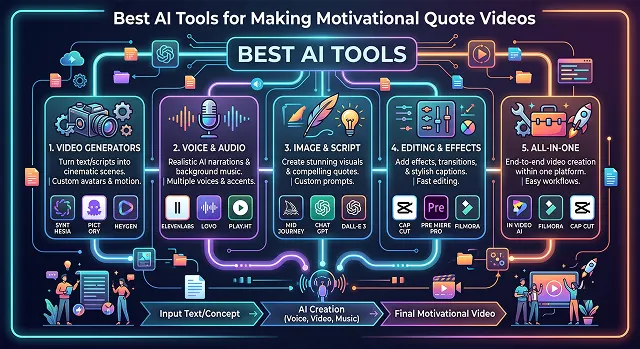
The motivational video niche is a monster across social media. You could go through almost any feed of tiktok, reels or shorts and not be in minutes before you stumble across a faceless account, garnering millions of views, on a video composed of a cinema-like voiceover, dark aesthetic video and sharp kinetic video captions.
When those viewers watch for a thrill or focus with those types of videos, the algorithm gives it huge play and viewership.
Back in the day you'd need to scour through hours of stock footage, somehow synchronise a voiceover and keyframe every single piece of text on the screen. Now, in 2026, all that effort can be done in just 5 minutes thanks to the emergence of generative AI tools. Welcome to our review of the best generative AI tools out there to create viral motivational quote videos.
The Short Version
Want the fastest route from a typed prompt to a finished, publish-ready video with commanding narration? InVideo AI handles that well. Prefer starting from a script and having the AI structure the pacing and visuals around it? Fliki. Need real editing control alongside the AI-generated first draft — trimming, color, precise timing? Filmora or Flixier both give you that, with slightly different workflows. And if you're making these casually on your phone and just want something fast and free? CapCut still gets the job done.
1. InVideo AI — Best for Fast, Prompt-to-Video Generation
Typing the quote in and choosing a "motivational" style produced a genuinely usable first draft in a couple of minutes — matched footage, a commanding-sounding voiceover, and reasonably well-timed captions, without me touching a timeline. That speed is the whole appeal here.
Where it showed its limits: the stock footage selection leaned toward exactly the clichés my coach friend was complaining about — mountain summits, sunrise runs — since it's pulling from a large but fairly predictable library. Swapping a scene or two manually afterward fixed that, but don't expect the first generation to feel original without a little post-editing.
Cost-wise — there's a free tier with limited monthly credits, and paid plans scale up based on generation volume and export quality.
2. Fliki — Best for Script-Driven Structure
Fliki's workflow leans on having an actual script rather than just a single line, so it genuinely benefits from a bit more prep — I ran the quote through a quick expansion (turning one sentence into a short 3-line monologue) before feeding it in, and the result had noticeably better pacing than tools working from the bare quote alone.
The voice selection is a real strength — a wide range of tones from warm and reflective to sharp and commanding, which matters a lot for motivational content since the voice does more emotional heavy lifting than the visuals usually do. Worth spending the extra few minutes auditioning two or three voice options before settling on one.
Cost-wise — there's a usable free tier to test voices and short scripts, with paid plans unlocking longer videos and more voice options.
3. Filmora — Best for Editing Control After the AI Draft
Filmora's AI writing and template tools get you a first draft fast, similar to the others, but the real reason to reach for it is what happens after — a genuine timeline editor sits right there if the auto-generated pacing doesn't feel right. I nudged the moment the music swelled to land exactly on the quote's key phrase, which made a bigger difference to the final feel than I expected going in.
That extra control comes with a slightly steeper learning curve than a pure one-click generator. If you're happy with "good enough" output from a prompt, this is more tool than you strictly need. If you care about that one specific beat landing just right, it's worth the extra few minutes.
Cost-wise — there's a free version with a watermark, and the paid tiers remove it while unlocking the full effects and template library.
Side-by-Side At a Glance
Tool · Best For · Trade-Off
| Tool | Best For / Trade-Off |
|---|---|
| InVideo AI | Fast prompt-to-video with strong narration. Trade-off: stock visuals can feel generic without manual swaps. |
| Fliki | Script-driven pacing with a wide, expressive voice library. Trade-off: benefits from prepping a fuller script rather than a bare quote. |
| Filmora | AI draft plus a full timeline editor for precise timing. Trade-off: steeper learning curve than a one-click generator. |
| Flixier | Browser-based, multi-model generation with editing built in. Trade-off: more style options mean more decisions upfront. |
| CapCut | Free, fast, template-driven mobile editing. Trade-off: no original AI scene generation, relies on your own or stock footage. |
Request A Custom AI Video
Tell us what you're trying to create and we'll point you to the right tool — or help you set it up.
4. Flixier — Best Browser-Based Alternative With Editing Built In
Flixier covers the same ground as Filmora — AI generated content and actual editing software — except that Flixier is entirely web-based, which is important when you’re using two different computers and do not want to install the software each time. You simply type in your quote, select your voice and visual style, and Flixier creates a rough version for you to edit.
It enables you to generate videos by using several different AI generated video models, depending on the style you need, offering a little more choice compared to some other tools I've tried out. That flexibility is genuinely nice, though it also means slightly more decisions to make before you land on a look you like.
Cost-wise — there's a free plan for shorter exports, with paid tiers scaling for longer renders and higher resolution.
5. CapCut — Best Free, Fast Mobile Option
For a quick, casual motivational post — the kind you want to get out the door in ten minutes rather than perfect over an hour — CapCut's templates and auto-captions handle the basics well. Drop in a quote, pick a template built for this exact format, add music, done.
It won't generate original AI visuals from scratch the way the other tools here do — you're working from your own footage or the built-in stock library. For a lot of casual motivational content, that's genuinely fine; the format doesn't always need a fully generated scene to land.
Cost-wise — the core templates and editing tools are free with no watermark, which is hard to beat for quick, frequent posting.
What Actually Makes a Quote Video Feel Genuine, Not Generic
- Swap at least one stock clip for something specific. Even one less-obvious visual choice breaks the "seen this a thousand times" feeling the sunrise-and-mountain combo has earned.
- Get your quotes right. I swear a huge percentage of misattributed quotes are online everywhere. There is nothing that kills credibility as badly as putting on an entire video using a completely false attribution. Three clicks will give me the answer before I hit “Upload” and it would save me huge humiliation.
- Match the voice to the message, not just to "sounding motivational." A quote about quiet perseverance lands differently read in a booming, hype-style voice than in a calmer, more reflective one — pick deliberately rather than defaulting to whichever voice sounds most dramatic.
- Leave a breath before the payoff line. A half-second pause before the most important phrase does more for emotional impact than almost any visual effect layered on top.
A motivational video doesn't need to look expensive to work. It needs the one line that actually lands to have room to breathe.
Motivational Quote AI Tools
The ultimate 2026 playbook for turning daily mindsets and historic wisdom into viral short-form clips.
The top specialized tools include Magiclight.AI (features a dedicated workflow built specifically for mindset and quote channel templates) and Steve.AI (excellent for rapid prompt-to-timeline text rendering). If you are pulling raw speech clips from long podcasts featuring speakers like David Goggins or Marcus Aurelius philosophy analyses, OpusClip and WayinVideo are the industry leaders for extracting viral snippets.
Avoid robotic voice presets. Use advanced vocal engines like ElevenLabs or the built-in voice models inside Magiclight.AI. Look for voice profiles tagged as "Deep," "Narrator," or "Gravelly." The professional layout trick is to dial down the voice stability settings to roughly 40-45%. This forces the AI to fluctuate its pitch, introducing natural respiratory breaks and aggressive vocal emphasis.
To make sure your text lines stay legible, your video backgrounds must be high-contrast and dark. Feed cinematic models (like Google Veo 3 or Kling AI) specific stylistic prompt arrays: "Moody atmospheric desaturated tones, slow-motion tracking shot of a lone wanderer climbing a peak in heavy volumetric fog, dark vignette borders, dramatic rim lighting, cinematic 35mm film grain look."
Deploy an editor containing Kinetic Captioning modules (like CapCut or OpusClip). Set your layout font parameters to a bold sans-serif choice (such as Montserrat or Archivo Black), restrict the display rules to show a maximum of 1 to 2 words per frame line, and toggle on the active word tracker. The AI instantly syncs to your audio syllables, washing the words in bright neon yellow or white.
Yes, but you have to keep the text engine away from predictable AI buzzwords. When generating text structures inside your workflow, frame your script instruction precisely: "Draft a 45-second script centered on stoic discipline. Do not use overused phrases like 'journey,' 'unlock your potential,' or 'beacon.' Write in short, fragmented, punchy declarations. Keep the delivery raw and realistic."
Use an automated Audio Ducking system. Your background soundtrack—typically intense ambient strings or heavy dark-synth bass pads—needs to be gain-staged down to roughly -18dB to -22dB the exact instant your AI voice actor starts speaking. The moment the voice pauses for dramatic timing, let the audio levels expand back up to preserve momentum.
Utilize a systematic Bulk Extraction Routine: Feed a 1-hour public speech or interview link into an AI processor like OpusClip or WayinVideo. Let the AI algorithm immediately scan the file to extract 10 to 15 vertical clips ranked by a built-in virality score. Apply your custom caption profile template across all outputs at once, export them clean, and run them directly into your posting scheduler.
Ready to Make Your First Quote Video?
Turn a single line into a video worth sharing, in minutes.