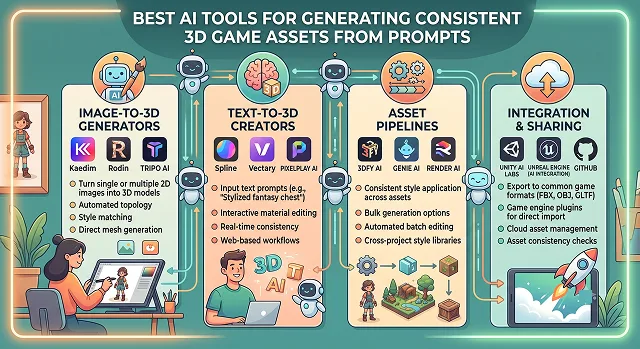
If you've ever tried to model, texture, and rig 3D assets by hand, you know the real cost isn't the modeling itself — it's getting 50 props or characters to look like they belong in the same game. Unwrapping UVs, baking PBR textures, and keeping a consistent art style across dozens of assets is the kind of work that quietly eats an indie team's entire schedule.
AI-generated 3D has gotten a lot more usable in the last year or so. Instead of the messy, unusable "triangle soup" early tools produced, current text-to-3D and image-to-3D engines can output clean, textured, engine-ready meshes in minutes rather than days.
I tested a handful of these tools specifically for consistency — can you generate 10 props, or 10 characters, that actually look like a matched set? Here's what held up, whether you're building a stylized RPG, a gritty sci-fi shooter, or a mobile-friendly low-poly game.
1. Meshy – The Best All-Round Game Pipeline
Meshy is widely considered the default starting point for modern indie developers. It handles the entire core asset pipeline in a single web browser tab, allowing you to transition seamlessly from a text prompt to a fully textured mesh with a built-in auto-rigging engine for characters.
- How it works: Simply enter a text-based description or import a 2D design sketch, and Meshy automatically converts that into a 3D model mesh, applying Physically Based Rendering (PBR) materials and exporting an engine-ready file.
- Pros: Fast creation of fully textured models, taking less than one minute; auto-rigging is automatically done, saving countless hours on skeletal animation; great native export support for Blender, Unity, and Unreal Engine.
- Cons: Highest-definition PBR texture rendering passes can consume platform credits quickly.
- Best Suited For: Solo developers needing props, environments, and basic character models without jumping between multiple design applications.
2. Rodin by Hyper3D – The Clean Topology Champion
The most common complaint about AI-generated 3D assets is messy topology—meaningless triangles that are impossible to edit manually. ByteDance’s Rodin model tackles this head-on by prioritizing clean, structured quad-based mesh geometry.
- How it works: Driven by a robust 10-billion parameter engine, Rodin takes single or multi-angle image prompts and builds mathematically clean meshes. It natively enforces strict T-poses or A-poses for characters, meaning the mesh arrives perfectly optimized for structural rigging.
- Pros: The cleanest, most editable quad layouts on the market; multi-image fusion accurately details the back of an object based on front-facing reference art.
- Cons: Processing clean quad layouts takes slightly longer than raw triangle generation tools.
- Best Suited For: Intermediate and professional game artists who need high-fidelity hero assets they can actually modify in Blender.
3. anitya – The Ultimate Fast Web Engine
Built on the lightweight, open-source Godot engine architecture, anitya is uniquely designed for creators who want to build, test, and share assets in a single sitting. It cuts down the friction of exporting files by keeping the generation layer and game canvas in the same browser tab.
- How it works: Type a prompt to generate your 3D asset, then drag and drop it directly onto a live scene canvas. You can instantly assign game mechanics and hit publish to generate a shareable, playable WebGL URL.
- Pros: Produces incredibly lightweight WebGL-optimized models that load fast on any device; absolute user data ownership with clean raw exports.
- Cons: Reduced texture fidelity for improved online performance, hence not suitable for intensive gaming consoles.
- Best Suited For: Developers building Web3 products, mobile hyper-casual game designers, and instant gameplay demonstrators.
The AI Avatar Leaderboard: At a Glance
Performance Comparison · Synthetic Human Generation Brief
| Platform | Best For | Realism Rating | Primary Workflow / Superpower |
|---|---|---|---|
| HeyGen | Elite Photorealism & UGC |
★★★★★
|
Avatar V Engine: Flawless micro-expressions and dynamic hand gestures. |
| Synthesia | Scaleable Enterprise Training |
★★★★☆
|
Built-in corporate LMS learning and multi-language workflow pipelines. |
| Deepbrain AI | High-Volume Conversational Media |
★★★★☆
|
Core engine handles script-to-video processing under 5 minutes. |
| D-ID | Tight Budgets & Live Stream Agents |
★★★★☆
|
Real-time streaming API agents powered by LLMs. |
| TalkingAvatar AI | Video Redubbing & Multi-Speaker |
★★★★☆
|
Flawless multi-speaker video diarization and voice matching. |
Request A Custom AI Video
Tell us what you're trying to create and we'll point you to the right tool — or help you set it up.
4. Tripo3D – The Fast-Iterating Speed Demon
If your creative process relies on "generate, reject, rewrite" twenty times before lunch, Tripo3D’s rapid rendering loop is built to keep up with your brain. It prioritizes blazing turnaround speeds over fine-tooth editing controls.
- How it works: Pushes out optimized text-to-3D or image-to-3D asset geometry in roughly 8 to 15 seconds. It builds automated, engine-tuned topology directly during the initial generation phase.
- Pros: Unbeatable generation speeds; built-in character rigging algorithms function smoothly; excellent for building massive background asset libraries quickly.
- Cons: Fine micro-textures can occasionally trail Meshy's highest fidelity options.
- Best Suited For: Game designers building massive worlds who need a massive pool of diverse asset variations fast.
5. Ludo.ai – The Controlled Polycount Workspace
Ludo.ai approaches asset creation with strict game-engine limits in mind. It understands that a model is useless if its polygon count lags your target engine. Ludo gives creators explicit sliders to govern the physical footprint of the mesh before the AI renders it.
- How it works: After typing your prompt or uploading a 2D reference frame, you select your desired target triangle density range (from a lightweight 1k low-poly prop to a dense 50k hero asset).
- Pros: Flawless adaptive decimation (simplifies mesh geometry without blurring structural shapes); exports directly to GLB with embedded PBR materials.
- Cons: UI layout is heavily tailored toward game design data tracking rather than standard casual art generation.
- Best Suited For: Multi-platform developers targeting both low-spec mobile hardware and high-spec PC environments simultaneously.
The Professional 3D Consistency Pipeline (The "Secret Sauce")
To ensure your generated props share an identical art style across an entire level, never generate from raw text prompts completely blindly. Use this Image-to-Video-to-Mesh pipeline:
1. Generate a 2D 'Style Anchor' Concept Art
- Do not proceed directly to 3D text prompting. First create an excellent quality 2D render of your asset on a pure grey background using a good 2D rendering engine (such as Midjourney or Flux). The prompt should clearly state the style (e.g., "Stylized World of Warcraft hand-painted RPG style, clean orthographic perspective").
2. Pass the Style Anchor to Your Mesh Engine
- Upload your 2D master style anchor image directly into the Image-to-3D engine of a tool like Meshy or Rodin. This forces the AI to extract the exact color palettes, lighting profiles, and line choices from your reference art, keeping your style cohesive.
3. Configure Polycount & Bake Ambient Occlusion
- Export your asset as a GLB file. Import it into Blender to check the geometry. Apply a swift decimation or vertex ambient occlusion modifier to bake soft, natural shadows directly into your texture maps. This steps mask any minor rendering quirks seamlessly inside your engine.
Hyper-Realistic Avatar Toolkit
The leading 2026 digital twin and 3D character engines for flawless lip-syncing and expression mapping.
The verified top 5 platforms are: HeyGen (Avatar V Engine) (the undisputed king of photorealistic human digital twins), Hedra (Omnia & Character 3) (the ultimate choice for cinematic audio-driven character expression), Synthesia (the enterprise standard for corporate presenters and onboarding), TalkingAvatar.ai (the best live-streaming camera replacement tool), and D-ID (Agents Pipeline) (ideal for rapid interactive developer API setups).
A stock avatar uses a pre-made virtual actor licensed to hundreds of companies. A Digital Twin clone is an exclusive copy of you. By filming a simple 2-minute baseline video of yourself talking naturally, platforms like HeyGen map your unique face topology, blink frequencies, shoulder movements, and vocal patterns. You can then type any text string to generate an identical video copy of yourself instantly.
Older tools merely stretched mouth shapes over images, causing an uncanny valley look. Modern platforms like Hedra use omnimodal foundation architectures that process image, text, and voice audio simultaneously. The model dynamically maps speech sounds directly to appropriate micro-movements—like natural eye shifts, subtle eyebrow lifts, chest respiration, and head tilts—making the animation feel truly alive.
Yes, using Stream Avatar integration pioneered by platforms like TalkingAvatar.ai. By routing the software through a virtual camera driver, you can link the system directly into Zoom, Microsoft Teams, Twitch, or TikTok. When you speak into your microphone, the virtual character reads your voice and lip-syncs flawlessly in real-time, letting you attend video calls professionally without turning on your real camera.
This is the standout feature of premium engines like HeyGen. You upload a master clip recorded in English, and the engine’s Video Translation pipeline re-voices the audio track into choices like Spanish, German, or Japanese while maintaining your voice tone. Simultaneously, the AI completely redraws the avatar's jaw and lip placement to match the new language's phonemes perfectly.
Never upload a messy portrait or the model will stretch pixels unnaturally. Start with a high-resolution, front-facing close-up portrait with symmetrical studio lighting and a neutral, mouth-closed resting face. Make sure no stray hair lines cover the eyebrows or lip line, giving the neural tracker clear structural boundaries to map the facial points cleanly.
Follow the professional 3-Step Pipeline: First, lock in your actor asset by training your clean digital twin or selecting a high-fidelity stock avatar. Second, paste your text layout script and integrate a premium voice model (like ElevenLabs) to guarantee human-like pitch changes. Finally, review the generation track using dynamic layout framing adjustments before rendering out your crisp 1080p presenter master file.
Ready to try AI Videos?
Transform your ideas into cinematic video in seconds.