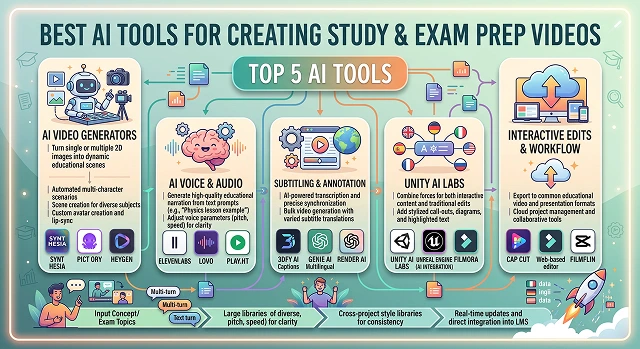
Turning a chapter of notes into a video used to mean a whole weekend of building slides and recording audio over them. Tutors and education YouTubers are increasingly skipping that step entirely, feeding a textbook chapter, a past paper, or a summary straight into an AI video tool and getting a narrated study video out the other end.
Whether you're building out a faceless YouTube channel or putting together flipped-classroom material for exam season, here are the tools that actually hold up for this.
The Short Version
Already have a written summary or study guide and just want it turned into a narrated video fast? Pictory handles that well. Want a consistent AI "tutor" character explaining concepts across a whole course? Synthesia. Building something specifically structured around exam formats — practice questions, timed sections, concept breakdowns? Mootion leans into that specific use case. Need free, simple templates for visual explainer clips or mind-map-style videos? Canva. And for polishing your own recorded lecture summary with captions and clean cuts, CapCut does the job.
1. Pictory — Best for Turning a Study Guide Into Video Fast
If you've already condensed your notes into a written study guide (which, honestly, you should do before touching any video tool — more on that below), Pictory turns that text into a narrated video with matched visuals in a few minutes. It did a reasonable job pairing relevant imagery with key physiology terms on our test material, giving the content a visual anchor beyond just narration.
It won't do the actual condensing for you — feed it your full 30-page PDF as-is and you'll get a long, unfocused video that doesn't help much. Feed it a tight, already-summarized study guide, and the output is genuinely useful. The quality of what you get out depends heavily on the quality of what you put in.
Cost-wise — there's a limited free trial, with paid plans unlocking longer videos and more monthly minutes.
2. Synthesia — Best for a Consistent AI Tutor Character
For students building out video summaries for an entire semester's worth of material, having the same presenter explain every topic creates a sense of continuity that random stock visuals don't. Synthesia's avatars deliver material clearly and at a steady, controllable pace, which matters more for study content than it does for a flashy marketing video.
It's not built specifically for exam prep — no practice questions, no quizzing feature — so you're really using it as a narration engine, not a full study system. Pair it with your own practice questions written separately if that's part of your prep routine.
Cost-wise — there's a limited free plan to test pacing and pronunciation, with paid tiers scaling for regular use across a full course.
3. Mootion — Best for Exam-Format-Specific Content
Mootion is genuinely built with exam prep as a specific use case, not just general education content — it can structure a video around question-and-answer formatting, concept breakdowns, and diagram generation aimed at how exam material actually gets tested. That focus shows in the output feeling more "structured for review" than a general explainer would.
A fair warning worth passing on: like a lot of tools in this specific niche, its own marketing leans on speed and performance claims that are hard to independently verify, so treat any "X% faster" style stat with a healthy grain of salt and judge the actual output for yourself rather than the numbers on the landing page. The underlying feature set — structured, exam-aware video generation — is a genuinely useful niche regardless of the marketing around it.
Cost-wise — there's a free tier to test the workflow, with paid plans scaling by generation volume.
Side-by-Side At a Glance
Tool · Best For · Trade-Off
| Tool | Best For / Trade-Off |
|---|---|
| Pictory | Fast video from an already-written study guide. Trade-off: output quality depends heavily on how condensed your source material already is. |
| Synthesia | Consistent AI tutor presenter across a full course. Trade-off: no built-in quizzing or practice questions. |
| Mootion | Structured, exam-format-aware video generation. Trade-off: judge output on its own merits, not the marketing claims around it. |
| Canva | Free, hands-on visual explainers and diagrams. Trade-off: more design tool than full AI generator — you're building it, not just describing it. |
| CapCut | Polishing your own recorded "teach it back" sessions. Trade-off: generates nothing on its own, purely an editing layer. |
Request A Custom AI Video
Tell us what you're trying to create and we'll point you to the right tool — or help you set it up.
4. Canva — Best Free Option for Visual Explainers
For visual subjects — anatomy, chemistry structures, historical timelines — sometimes a short animated diagram explains more than any amount of narration. Canva's free education tier covers flashcard-style animated clips, mind maps, and simple diagram videos without cost for verified students, and it's genuinely quick to put together even without design experience.
It's more of a design and template tool than a true AI generator — you're building the visual yourself with AI assistance, rather than describing a topic and getting a full video back. For students who want a bit more creative control over exactly how a concept is visualized, that hands-on quality is actually a plus.
Cost-wise — free for verified students via Canva for Education, and the standard free tier covers most casual needs regardless.
5. CapCut — Best for Polishing Your Own Recorded Summaries
At other times, what works best for your studies is simply yourself talking about something out loud because explaining a concept in your own words is one of the most consistent means of finding holes in your knowledge. CapCut is where that raw recording turns into something clean — auto captions, trimmed pauses, a title card — without needing real editing skill.
It won't generate study content on its own, but as the final step for turning a self-recorded "teach it back to yourself" session into something rewatchable, it's fast and completely free.
Cost-wise — the core editing and caption tools are free with no watermark.
The Step Most Students Skip: Condense Before You Generate
The single biggest mistake in this whole process is feeding a raw, unedited lecture PDF straight into a video tool and expecting something useful back. AI video tools are good at turning text into video — they're not good at deciding what's actually worth remembering versus what's a professor's tangent. That judgment call is still yours to make first.
- Summarize before you generate, not after. Pull out the core concepts, key terms, and anything explicitly flagged as important, and build your video from that condensed version, not the raw source.
- Every video should be centered around one topic alone. A 90-second video that addresses one concept is viewed repeatedly before an exam more than a 20-minute video which covers an entire chapter.
- Self-test after viewing, not just while viewing. It is indeed true that simply viewing a video for studying purposes is much more beneficial than simply re-reading notes, but it is not as good as self-testing after viewing.
- Rewatch on a schedule, not once. Spaced review — watching the same short video again a few days later, then again before the exam — builds retention far better than watching it once and moving on.
A study video's job isn't to look impressive. It's to survive being watched three times over two weeks without becoming boring enough to skip.
Exam Prep AI Toolkit
Animate textbooks, solve exam layouts from screenshots, and construct high-yield visual tutorials instantly.
The top specialized tools for this workflow include Golpo AI (the absolute king of turning textbook chapters, question papers, or problem screenshots into whiteboard explainer videos) and Google NotebookLM (excellent for generating grounded audio-visual summaries from your specific notes without hallucinations). For avatar-led lecture series and corporate student onboarding modules, Synthesia and HeyGen provide clean multi-language presentation controls.
Yes, using an advanced Screenshot-to-Whiteboard workflow. Platforms like Golpo AI let you upload a single snapshot image of a complex equation, physics layout, or chemical formula. The tool's parser reads the visual symbols, structures the logical step-by-step resolution script, and completely animates a digital whiteboard layout showing the problem being solved in real-time with narration.
Never trust raw text models to blindly pick curriculum information from the open web without verification. Use a Source-Grounded System like Google NotebookLM or specify strict structural boundaries in your editor. Upload your own certified lecture slides, curriculum maps, or standard textbook chapters directly as the system anchor. This forces the video engine to draw text definitions strictly from your documents, avoiding toxic hallucinations.
Ditch highly corporate or high-energy marketing voices—they cause cognitive exhaustion during long study modules. Route your audio tracks through a voice library using an Instructional / Conversational Narrator blueprint. Tweak the voice clarity parameters to roughly 80% while keeping stability moderate. This injects natural breathing points and emphasis keys, mimicking a supportive peer or private coach.
Active recall significantly outperforms passive viewing for memory preservation. Utilize a modular canvas template (like CapCut bulk creation linked with Quizlet AI data tables) to compile card layers. Structure your timeline clips precisely: show a bold concept term card for 4 seconds, introduce a silent countdown window to let students think, and then trigger a clean sliding transition revealing the step breakdown page.
Yes, specialized educational suites like Golpo AI support Multilingual Whiteboard rendering. You can load a master English study file, and the core processing system will automatically translate the script, map localized text blocks over your whiteboard layout, and generate matching native voice narration across 40+ languages instantly without shifting assets.
Stick to a clean 3-Step Sprint Routine: First, isolate your study content by extracting core problem sets or chapter blocks into individual PDF pages. Second, route those files through an engine like Golpo AI to produce raw whiteboard solution drafts with automated vocal tracks. Finally, drop automated structural chapter stamps and high-contrast word highlights across the final timeline layout to guarantee quick exam-prep navigation.
Ready to Turn Your Notes Into a Study Video?
Condense your material into something you'll actually rewatch before the exam.