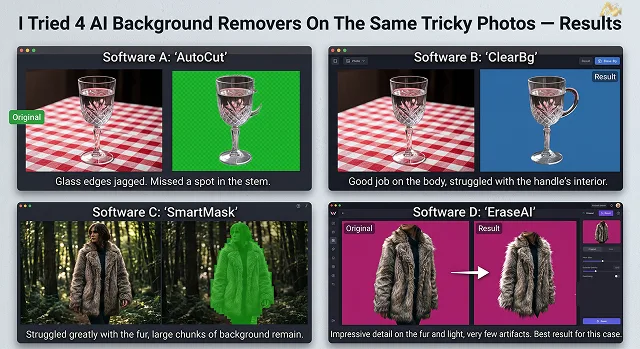
Background removal is one of those tools that looks perfect in every marketing screenshot — clean cutout, simple subject, plain background. So instead of testing on an easy photo, I picked the 3 hardest cases background removal tools usually struggle with: loose hair, animal fur, and a glass object — and ran each one through 4 different tools.
The 3 Test Photos
- Photo A: A portrait with loose, flyaway hair strands against a plain wall.
- Photo B: A photo of a fluffy dog against a grassy background.
- Photo C: A clear glass cup on a wooden table, shot against a busy kitchen background.
Results, Photo By Photo
| Tool | Photo A (Hair) | Photo B (Fur) | Photo C (Glass) |
|---|---|---|---|
| This site's Background Remover | ✅ Kept most flyaways | ✅ Good edge on fur | ⚠️ Lost some transparency |
| remove.bg | ✅ Very clean hair edge | ✅ Good | ⚠️ Cup edge slightly hard |
| Photoroom | ⚠️ Cut off some fine strands | ✅ Good | ❌ Treated glass as background |
| Canva BG Remover | ❌ Hard, clipped edge around hair | ⚠️ Some fur loss at edges | ❌ Glass mostly removed by mistake |
The Pattern That Showed Up
- Hair and fur were handled reasonably well by every tool. None were perfect, but all four kept a recognizable silhouette with only minor flyaway loss.
- Glass and transparent objects were where every tool struggled, and two of the four (Photoroom and Canva) actively mistook the glass cup itself for background and removed parts of it. This makes sense — transparent objects don't have a clear edge for any of these models to detect.
- No single tool won across all three photos. remove.bg handled hair best, but wasn't the strongest on the glass photo.
Takeaway
If your subject has hair or fur, most modern background removers will get you 90% of the way there with minor manual touch-up needed at the edges. If you're removing the background from anything transparent or reflective — glass, water, plastic wrap — expect to do manual cleanup regardless of which tool you use. That's the one category where none of the four came close to a clean automatic cutout.
Request A Custom AI Video
Tell us what you're trying to create and we'll point you to the right tool — or help you set it up.