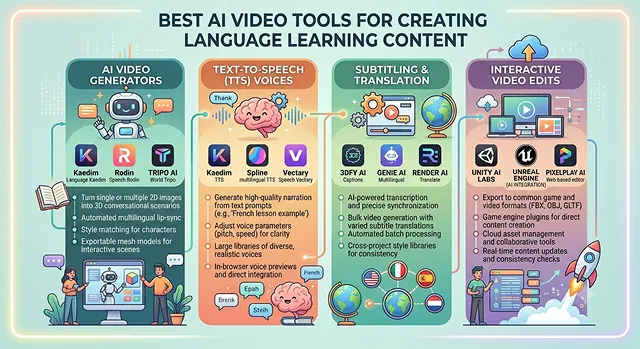
Language acquisition is, by nature, an intimidating task. Reading off vocabulary lists or hearing monotonous audio tracks are the quickest ways to kill the learner's interest. Humans need context to learn – we learn languages most effectively when we have the ability to see micro-expressions, synchronized lip sync, kinetic subtitles, and relate words to real-world visuals.
Previously, creating high quality language learning videos was a process which involved hiring voice-over artists, purchasing expensive green screen equipment, and manual subtitle synchronization for each individual translation.
In 2026, however, generative AI has eliminated this problem entirely. Specialized AI platforms are now able to perfectly replicate a teacher's voice, translate videos into 50+ languages and perfectly lip synced, and automatically create educational flashcards from a script.
Whether you are an independent educator, a corporate trainer scaling localized onboarding, or an entrepreneur building a profitable language learning channel on YouTube, here is our hands-on review of the best AI video tools for language content creation.
The Short Version
Want a consistent AI teacher presenting lessons in dozens of languages? Synthesia handles that well. Already have a video of yourself teaching and want a dubbed version in another language with matching lip movement? HeyGen's translation feature is genuinely impressive for this specific job. Starting from a written lesson script and want it turned into video fast? Pictory. Need free templates for vocabulary flashcards, quizzes, or bilingual comparison graphics? Canva. And for the final editing pass — dual-language captions, pacing, trimming — CapCut does the job well.
1. Synthesia — Best for a Consistent AI Teacher
If your format is a recurring presenter walking through lessons — think "meet your teacher" style content — Synthesia's strength is exactly that consistency. The same avatar, the same voice, lesson after lesson, in whichever language you're teaching, without you needing to re-record anything.
Pronunciation on our test phrases was clean and natural rather than robotic, which matters enormously for language content specifically — a slightly-off accent teaches a slightly-off habit to a beginner who has no way yet to know the difference. It's worth actually listening closely to a sample in your target language before committing, since quality can vary a bit by language and accent option.
Cost-wise — there's a limited free plan to test pronunciation quality in your specific language, with paid tiers scaling for regular lesson production.
2. HeyGen — Best for Dubbing Your Own Videos Into Other Languages
This is a genuinely different job than the others on this list, and it's a great fit for language teachers specifically: HeyGen's translation tool takes a video of you actually talking and generates a dubbed version in another language, with your mouth movements adjusted to roughly match the new audio.
For a language teacher, that means recording one real lesson and producing versions aimed at speakers of several different native languages, without re-filming anything. It's not flawless lip-sync on close inspection, but it's convincing enough at normal viewing speed, and it's a genuinely rare feature most general video tools don't offer at all.
Cost-wise — there's a free trial with limited translation minutes, with paid plans scaling by monthly minutes processed.
3. Pictory — Best for Script-to-Video Lessons
If you've already written out a lesson — vocabulary list, example sentences, grammar notes — Pictory turns that into a video with matched visuals and narration without much extra work. For vocabulary-heavy content specifically, it does a reasonable job pairing relevant imagery with each word, which gives beginners a visual anchor alongside the text and audio.
It's less suited to a "consistent teacher character" format since it's not built around a recurring avatar the way Synthesia is. For single lessons, explainer-style grammar breakdowns, or lecture summaries, though, it's an efficient way to turn a written lesson plan into something watchable.
Cost-wise — there's a limited free trial, with paid plans unlocking longer videos and more monthly minutes.
Side-by-Side At a Glance
Tool · Best For · Format
| Tool | Best For / Format |
|---|---|
| Synthesia | Consistent AI teacher avatar across many lessons, dozens of languages. Best for a recurring "meet your teacher" channel format. |
| HeyGen | Dubs your own real footage into other languages with matched lip movement. Best for reaching multiple native-language audiences from one recording. |
| Pictory | Turns a written lesson script into a visual, narrated video. Best for vocabulary lessons and grammar breakdowns. |
| Canva | Free flashcards, quizzes, and bilingual comparison graphics. Best for supporting visuals alongside your main lesson video. |
| CapCut | Dual-language captions and pacing for beginner comprehension. Best for the final polish on whatever tool generated the lesson. |
Request A Custom AI Video
Tell us what you're trying to create and we'll point you to the right tool — or help you set it up.
4. Canva — Best Free Option for Supporting Graphics
Not every piece of language content needs to be a talking video — vocabulary flashcards, bilingual comparison graphics, and quiz slides round out a lesson well, and Canva's free education tier handles all of that without cost if you qualify as a teacher or student. Even outside education verification, the free tier covers most of what a language content creator actually needs.
It's not a video generator in the same sense as the others here — it's closer to a design tool that happens to export short animated clips well. Pairing it with one of the presenter-based tools for the actual "lesson" portion, and Canva for the supporting visual material, is a genuinely efficient combination.
Cost-wise — free for verified teachers and students via Canva for Education, and the standard free tier is generous enough for casual use regardless.
5. CapCut — Best for Dual-Language Captions and Final Polish
Whatever tool generates your core lesson, CapCut is genuinely useful for the finishing touches that matter a lot for language content specifically — stacking captions in both the target and native language at once, timing pauses so a beginner has time to actually process a new word, and trimming dead air between phrases.
It won't generate the lesson content itself, but as a final editing layer it's fast, free, and handles the "make this genuinely usable for a beginner pausing and rewinding constantly" details that a lot of generation-first tools don't think about by default.
Cost-wise — the core editing and caption tools are free with no watermark, which makes it an easy default final step regardless of which tool generated the main video.
What Actually Matters for Language Content Specifically
- Listen to the pronunciation prior to making any commitment. Even a professional-looking video with a bit of an accent is going to teach the wrong habits. Generate a short sample in your actual target language before building a full lesson series around any presenter.
- Pace deliberately slower than feels natural. A beginner needs real time to process a new sound or word. Most default AI narration speeds are calibrated for a native listener, not someone hearing the phrase for the first time.
- Dual captions beat single captions for language learners specifically. Showing the target-language text and a translation together, rather than one or the other, is genuinely more useful for this audience than it would be for general content.
- Repetition isn't boring here — it's the whole point. Don't feel pressure to make every lesson visually novel; a consistent, recognizable format actually helps language learners feel oriented from lesson to lesson.
A language lesson video succeeds or fails on whether someone could pause it, repeat the phrase out loud, and feel like they got it right — not on how impressive the visuals are.
Language Learning AI Tools
Scale educational content, automate dual-language caption matrices, and build natural vocal dialogue sequences.
For educational language tracks, HeyGen leads the industry by providing hyper-realistic digital avatars that lip-sync perfectly to localized speech models. ElevenLabs is unmatched for generating ultra-clear, natural-sounding vocal tracks with precise regional accents. For quick text-based clip generation, vocabulary flashcard videos, or dual-language shorts, CapCut AI and InVideo AI offer the fastest timeline automation assets.
Showing the native language alongside the target language is vital for comprehension. Platforms like CapCut allow you to generate automatic multi-language subtitle tracks. The pro method is to duplicate your main text track layout block, setting the top text tier to the target language (e.g., Japanese characters) and the bottom tier to the translation (e.g., English text). Use a high-contrast color accent to make it easy for students to read along.
Yes. Modern high-tier engines use advanced phoneme-to-viseme mapping networks. When you feed a foreign language audio file into a system like HeyGen or Synthesia, the AI does not just randomly move the avatar's lips; it carefully alters the physical shape of the jaw, teeth positions, and lip tightness to mirror real human speech mechanics. This makes them highly effective for demonstrating subtle pronunciation differences.
Avoid generic, flat text-to-speech outputs that lack natural pacing. When using an engine like ElevenLabs, adjust the voice profile settings by picking regional accent filters (such as Castilian Spanish vs. Mexican Spanish). Further, tweak the Stability and Clarity sliders to about 75%. This retains natural human breathing spaces and slight vocal inflections, helping students learn authentic local cadences.
Deploy an AI Batch Production Workflow. Start by creating a structured prompt template in ChatGPT to arrange your phrases into a clear table format. Next, import that layout dataset straight into CapCut or Canva's bulk-creation engine. Connect the data slots to a simple video template, and the software will instantly render dozens of individual, structured vocabulary reels in a single export run.
Yes, but you need to give the AI engine clear context rules. Instead of asking for a generic script, instruct the large language model to behave like a native speaker and educator. Use explicit guidelines like: "Write a 1-minute conversation between two friends greeting each other in Paris, using natural modern French slang, avoiding outdated textbook phrases, and adding brief cultural notes for beginners."
Stick to the unshakeable 3-Step Lesson Blueprint: Begin with a **Vocal Hook** (a clear native avatar speaking the phrase at normal speed with bold, dual-language text cards). Follow up with a **Micro-Breakdown phase** (slowing the voice track down to 0.8x speed while zooming in on the avatar's lip positions). Finally, close with an interactive **Call-and-Response loop**, leaving a silent 3-second gap for the student to practice speaking out loud.
Ready to Build Your Next Lesson?
Turn a lesson plan into a video learners will actually finish.