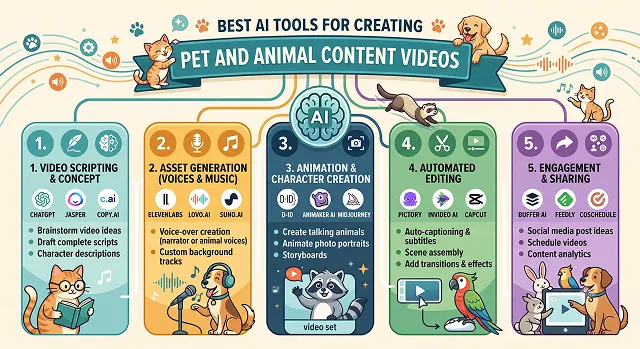
Animal content is one of the few genres that basically never stops performing — a funny dog clip or a weird-wildlife-fact video will pull views on TikTok or YouTube pretty reliably, no niche audience required.
The hard part was always production. Getting a genuinely funny pet moment on camera meant waiting around with your phone out for hours, and proper wildlife footage usually meant licensing expensive stock clips.
A few AI tools now let you skip most of that: animate a still photo of your own pet, clone something close to an animal's "voice," or generate a fully narrated wildlife video straight from a script. I tried the main ones people use for this — here's what's actually worth using.
The Short Version
Want the most convincing "talking pet" effect from a single photo? D-ID handles animal faces better than most general tools. Want a solid free option to just experiment with before committing to anything? Vidnoz AI. Building a recurring branded animal character — a mascot, not just a one-off clip? HeyGen. Have a folder of real pet photos and want them sequenced into a proper video instead of a talking-head clip? Pictory. And for the actual editing, captions, and trend-chasing hooks around whatever footage you generate or film? CapCut.
1. D-ID — Best for Convincing Talking Pet Videos
D-ID's lip-sync was originally built around human faces, but it's held up surprisingly well on animals — Gerald's mouth movements while "talking" looked close enough to natural that they didn't trigger that instant uncanny reaction pet audiences are quick to call out. It's not flawless on every animal; smaller mouths and unusual facial structures (think birds, or very fluffy faces) are still tougher than a standard cat or dog.
The workflow is genuinely simple — upload a photo, add a script or audio, and it generates the synced video in a few minutes. If your whole goal is a quick, shareable "my pet says something funny" clip, this is one of the more reliable starting points.
Cost-wise — there's a limited free trial to test the output quality, with paid credits required for ongoing use.
2. Vidnoz AI — Best Free Option to Experiment
Vidnoz's biggest advantage genuinely is the free plan — it's generous enough to actually test whether this whole "talking pet" format is something you want to build content around, before spending anything. I ran three different Gerald photos through it back to back without hitting a paywall, which isn't always true of "free" tiers in this category.
The level of quality in the results is slightly inferior compared to D-ID's results when it comes to faster mouth movements. However, for casual usage on social networks when you make people laugh no matter what your lip-sync is like, the difference is not that great. It's a really great starting point for those who just began experimenting.
Cost-wise — the free tier covers a real number of monthly generations, with paid plans available for higher volume or watermark-free exports.
3. HeyGen — Best for a Recurring Branded Character
If the goal is less "one funny clip" and more "a consistent character my audience recognizes episode after episode," HeyGen's avatar consistency tools are worth the switch from a simpler talking-pet app. It's not purpose-built for animals the way some niche tools are, but it handles a defined character — including an animal mascot — more reliably across multiple videos than most single-purpose apps.
This is really the tool for a pet brand or a creator thinking beyond a single viral clip toward an actual recurring series or mascot identity. For a one-off joke video, it's more setup than you need.
Cost-wise — it's priced closer to a business tool than a casual app, reflecting its broader feature set beyond pure pet content.
Side-by-Side At a Glance
Tool · Best For · Trade-Off
| Tool | Best For / Trade-Off |
|---|---|
| D-ID | Convincing talking-pet lip-sync from one photo. Trade-off: struggles more with unusual mouth shapes like birds or very fluffy faces. |
| Vidnoz AI | Generous free plan for experimenting risk-free. Trade-off: slightly lower lip-sync quality than premium tools on fast movements. |
| HeyGen | Consistent recurring character across many videos. Trade-off: more setup and cost than a one-off talking pet clip needs. |
| Pictory | Turns real pet footage into a polished, non-synthetic video. Trade-off: no talking-animal or AI-generated visual effects. |
| CapCut | Free editing, captions, and trending audio for the final cut. Trade-off: doesn't generate any AI animal content on its own. |
Request A Custom AI Video
Tell us what you're trying to create and we'll point you to the right tool — or help you set it up.
4. Pictory — Best for Turning Real Pet Footage Into a Video
Not every good pet video needs a talking animal gimmick — sometimes you've just got a folder of genuinely great photos and clips of your dog's actual personality, and you want them sequenced into something watchable rather than posted one at a time. Pictory handles that well, turning a batch of real photos into a stylized video with text overlays, music, and pacing, without needing any AI-generated animal faces at all.
This leans more toward the "real pet as the hero" approach that a lot of experienced pet content creators actually recommend over synthetic talking-animal gimmicks, since audiences in this niche respond strongly to authentic footage of a real, specific animal.
Cost-wise — pricing runs monthly with limits on video length and export minutes, similar to most general video-from-photos tools.
5. CapCut — Best for Editing, Captions, and Trend Hooks
Whatever footage you end up with — real, AI-generated, or a mix — CapCut is where most of it gets assembled into something actually postable. Its trending audio library, caption styles, and quick-cut templates are especially well suited to pet content's need for a strong hook in literally the first second, since that's genuinely what determines whether the algorithm pushes it further.
It won't generate a talking animal or an original AI scene on its own, but as the final editing layer on top of everything else on this list, it's hard to beat for speed and how well it matches current platform trends.
Cost-wise — the core editing and caption tools are free with no watermark, which makes it an easy default layer regardless of which generation tool you pair it with.
A Few Honest Notes Before You Post
- Audiences can tell, and they mostly don't mind — as long as you're not pretending. Labeling a clip as AI-generated or clearly stylized tends to land fine with pet content audiences. Trying to pass a synthetic clip off as a real, spontaneous moment from someone's actual pet is where trust breaks down fast if it's ever noticed.
- Never depict an animal in apparent distress for a joke, even a fake one. It reads badly regardless of whether it's real, and platforms increasingly flag this kind of content regardless of intent.
- Real footage of an actual animal still tends to outperform synthetic content as the emotional centerpiece — the strongest pet content strategy right now leans on AI for the supporting elements (captions, b-roll, translated voiceovers) while keeping a genuine animal as the hero of the shot.
- If you're commissioning talking-pet content of someone else's animal, get their okay first. It sounds obvious, but it's an easy step to skip when the tool makes it this fast to just upload any photo.
The pet content that actually builds a following almost always has a real, specific animal at its center. AI is best used to make that animal's actual personality easier to share — not to replace it.
Pet & Animal AI Toolkit
Master the tools that capture fur textures, fluid animal physics, and funny pet talking clips on autopilot.
The top platforms depend on your content style: For funny "talking pet" videos with flawless mouth matching, HeyGen and TokkingHeads are the clear favorites. For nature documentaries, cinematic wildlife visuals, or realistic animal movements, Kling AI 3.0 and Runway Gen-3 Alpha dominate. If you want to rapidly bundle animal facts into automated social shorts, InVideo AI handles scripts, voiceovers, and timeline assembly in seconds.
This is managed using AI Lip-Sync Animation mapping. You upload a clear, front-facing image of your cat or dog, then type out a script or paste an audio voiceover. Tools like HeyGen scan the animal's face, locate the mouth and jaw parameters, and seamlessly blend a human-like speaking animation across the snout, ensuring it matches vocal syllables without warping the pet's eyes or nose.
Animal textures like fur can trip up standard AI models. To prevent messy blurring, use an Image-to-Video blueprint. First, generate a hyper-clean, high-resolution portrait of the animal using Midjourney. Then feed that photo into a advanced transformer-physics model like Kling AI. Keep the motion velocity setting moderate (around level 4) to ensure paws, whiskers, and coat patterns stay locked in place.
Yes, but you need to guide the text model away from cliché patterns. When prompting a script writer, structure it like this: "Write a 50-second video script about a rare animal fact. Start with a shocking visual hook in the first 3 seconds (e.g., 'This creature doesn't have a brain, but it can memorize paths'). Use conversational, human language, short punchy sentences, and avoid words like 'majestic' or 'unbelievable.'"
To build National Geographic style depth, use explicit lighting and cinematography setups at the end of your string. A solid formula is: "[Animal type] crouching in the wild brush, slow dramatic tracking slider pan, national geographic cinematic aesthetic, warm golden hour backlighting, photorealistic texture detailing, shot on 85mm anamorphic lens."
Most pet content is consumed on phones without sound, making subtitles non-negotiable. Use an editor with Automated Kinetic Captions (like CapCut or InVideo). Choose a bold, thick typography style, configure the setup to reveal only 1 or 2 words at a time, and turn on syllable highlighting. This forces a rhythmic movement that keeps users locked into your shorts.
Set up a streamlined Bulk Prompt Pipeline. Type a conceptual theme string directly into an engine like InVideo AI (e.g., "Create a 60-second video on 3 things dogs do when they love you"). The platform automatically scripts the structure, applies a warm natural voiceover, selects relevant asset footage layers, and drops a completed edit onto your dashboard inside 5 minutes, allowing you to easily scale daily uploads.
Ready to Give Your Pet Their Own Video?
Turn a photo or a folder of clips into shareable pet content today.